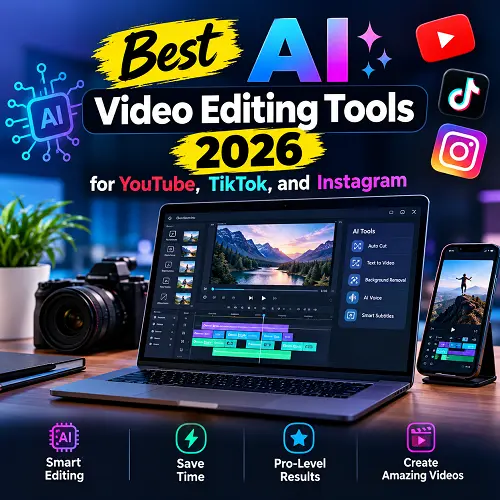
Artificial intelligence has revolutionized the process of editing videos. If you are a novice, content creator, influencer, marketer, or entrepreneur, some of the best AI video editing tools 2026 will enable you to create professional videos within a few minutes rather than hours. Here are all features, cost, advantages, disadvantages, and find out which software is best for creating videos on YouTube, TikTok, Instagram Reels, and other professional content. AI powered video editing tools will be discussed, as well as the best free AI video editing tools 2026 CapCut alternatives.
Why AI Video Editing Is Bigger Than Ever in 2026
All forms of social media have video content. Everyday, millions of people are uploading videos online. AI makes the editing process easier by automating repetitive actions.
Rather than wasting many hours in editing videos, syncing audio, adding subtitles, and fixing errors manually, today’s AI software does all that with a couple of clicks..
Some common AI features include:
- Automatic scene detection
- Smart video trimming
- AI captions
- Background noise removal
- AI voice enhancement
- Auto color correction
- Text-to-video generation
- AI thumbnails
- Motion tracking
These innovations make AI powered video editing tools essential for modern creators.
Best AI Video Editing Tools 2026 for Every Creator
Here are the top AI editors worth considering this year.
1. Adobe Premiere Pro AI
Best for professionals
Features:
- AI Extend
- Auto Reframe
- Speech Enhancement
- Generative Fill
- Color Matching
- AI Scene Editing
Advantages
- Industry standard
- Advanced editing
- Excellent AI integration
Disadvantages
- Subscription required
- Learning curve
2. DaVinci Resolve Studio
Best for filmmakers
Features
- Magic Mask
- AI Object Removal
- Face Refinement
- Neural Engine
- Smart Color Correction
Advantages
- Hollywood-level tools
- Excellent color grading
Disadvantages
- Powerful PC required
But if you need powerful pc for run this tool you need to visit the best online tech store for shoppers like Pro Tech Base.
3. Descript
Perfect for podcasts and talking-head videos.
Features
- Edit video by editing text
- AI voice cloning
- Remove filler words
- AI captions
Ideal for:
- YouTubers
- Educators
- Podcasters
4. Runway
Runway has become one of the most exciting AI powered video editing tools available today.
Features
- AI object removal
- Green screen without green screen
- Text-to-video
- AI video expansion
Best for:
- Creative professionals
- Marketing agencies
5. Filmora AI
Excellent for beginners.
Features
- AI Copilot Editing
- AI Music
- AI Thumbnail Generator
- AI Text-Based Editing
Advantages
- Affordable
- Easy interface
6. VEED.io
Cloud-based editing made simple.
Features
- AI subtitles
- AI avatars
- AI translation
- AI scripts
Great for:
- Businesses
- Social media creators
7. Pictory
Transforms blog posts into engaging videos.
Features
- AI voiceover
- Auto highlights
- Stock footage integration
8. Canva AI Video Editor
Canva now offers powerful AI features beyond graphic design.
Features
- Magic Media
- AI video generation
- One-click templates
- Brand kit integration
Ideal for beginners.
you are needed best laptop for business run these tools. So you need to visit Pro Tech Base online store.
AI Video Editing Tools for TikTok and Instagram Reels
Short-form videos rely on speed and engagement. Some of the AI video editors which include features aimed at creating attractive and engaging TikTok videos and Instagram reels include CapCut, InVideo AI, VEED.io, OpusClip, and Adobe Express. Rather than spend hours on manual clipping, adding captions, changing the video format, transitions, and much more, creators have access to some features that will make the editing process faster with AI tools.
AI Video Editor – Why It Can Be Useful for Short-Form Content?
The main requirements for TikTok videos and Instagram Reels include:
- Engagement
- Quality
- Short video length
Creators should publish videos regularly; therefore, having fast video editing process is a must.
With AI Video Editors, Creators Can:
- Edit videos faster
- Add automatic captions
- Create smooth transitions
- Sync clips with music
- Change the video format to be suitable for vertical screens
- Apply quick effects
- Improve quality
Best AI Video Editing Tools for TikTok and Instagram
These are some best ai video editing tools for tiktok and instragram reels:
CapCut
CapCut is very popular among creators of short-form content due to its fast editing workflow and numerous AI features.
- Automatic captions
- AI Effects
- Background Removal
- Templates based on trends
- Beat Synchronization
- Video Resizing
- Text Animations
- Mobile and Desktop Editors
InVideo AI
InVideo AI is a perfect choice for people looking for an option to generate and edit videos based on the text prompt.
- Text-to-video creator
- AI Scene Generation
- Automatic Voiceover Generation
- AI Scripts
- Social Media Templates
- Automatic Subtitles
- Easy Video Customization
VEED.io
This tool unites traditional video editing with AI capabilities and is good for those who are making content for social networks.
- Automatic subtitles
- Video Generation via AI
- Background Removal
- AI voiceovers
- Video Resizing
- Social Media templates
- Audio Enhancement
OpusClip
It is very useful when creators are working with long videos and transforming them into short videos.
- Finds Important Moments Automatically
- Converts Long Videos Into Short Clips
- AI Captions
- Automated Reframing
- Vertical Video Support
- Useful for PodCasts and YouTube videos
- Multiple Social Media Clips Creation
Adobe Express
It is one of the simplest AI video editors for creating and editing videos for social media.
- Pre-made templates
- AI Design Features
- Background Removal
- Video Resizing
- Text Animations
- Social Media Content Creation
AI Features for TikTok and Instagram Reels
Automatic Caption Generation
Captions can be useful to short videos since a number of viewers do not use the sound function when watching videos. CapCut, VEED.io, and OpusClip can automatically create subtitles based on the spoken audio.
- Create captions automatically
- Saves time with manual transcription
- Make videos easy to understand
- Enhance accessibility
- Provides customization of captions
- Highlights words and phrases
Ready-Made Trending Templates
With templates, one can create appealing videos without having to come up with each individual aspect of the video. Both CapCut and Adobe Express have templates that can be used to make social media videos.
- Video templates
- Common transitions
- Text animations
- Music choices
- Readymade visual effects
- Fast creation of the video
Smart AI Transitions
Transitions add some dynamism to the video. An AI video editor can easily recommend the best transitions or even apply it directly.
- Make smooth transitions between scenes
- Recommend automatic transition
- Useful visual effects
- Reduce manual editing
- Have well-edited videos
Automatic Music Beat Matching
The music plays an important role in making TikTok or Instagram Reels videos. AI editors can automatically detect the beats of the song to match video cuts.
- Automatic detection of music beats
- Making cuts based on the rhythm
- Making dynamic videos
- Timing becomes effortless
- Improve video flow
AI Vertical Video Formatting
The format used by most TikTok videos and Instagram Reels videos is vertical video formats. CapCut, OpusClip, and VEED.io can help in reframing videos to fit mobile devices.
- Converting horizontal videos to vertical format
- Keep subjects within the frame
- Automatically reframe the composition of the video
- Helps in repurposing videos
- Adapt videos to mobile screens
One-Click AI Effects
One-click effects allow even beginners to enhance videos without requiring advanced editing skills.
- Background removal
- AI Filters
- Improvement in color
- Motion effects
- Blur effects
- Object removal
- Automatic video enhancement
AI Applications That Can Accelerate Social Media Video Editing
Regular editing requires time consumption and sometimes creators have not enough free hours because they need to post multiple videos each week. There is no doubt that AI tools will help automating some steps during the process.
Using OpusClip
For instance, when uploading a lengthy video to OpusClip service, users allow using AI technology for:
- Identifying most crucial parts
- Cutting into short clips
- Generating captions
- Automatically reframing videos for TikTok or Instagram Reels
Using CapCut
It is similar when talking about CapCut, which allows:
- Creating clips
- Adding captions
- Adding effects
- Adding transitions
- Adding music
- Avoiding the need to perform all editing steps manually
Benefits for Creators
This way, creators can:
- Reduce time of video editing
- Create more short-form videos
- Reuse previous videos
- Maintain video quality
- Test different formats
- More often update content
When creating posts whether it is Reels or TikTok videos, AI tools save time and efforts.
Best Free AI Video Editing Tools 2026 CapCut Alternatives
Many creators want powerful editing software without depending on CapCut. Fortunately, several best free AI video editing tools 2026 CapCut alternatives provide impressive AI features.
DaVinci Resolve Free
Professional editing with advanced color grading.
Canva Free
Excellent for social videos and beginners.
Clipchamp
Simple browser-based editing.
VN Video Editor
Lightweight and mobile-friendly.
InVideo AI
Create videos from prompts with minimal effort.
These best free AI video editing tools 2026 CapCut alternatives offer strong performance without expensive subscriptions. For using these tools you have to need best laptop for business which are available on the store like Pro Tech Base.
Future of AI Video Editing
Artificial intelligence continues evolving rapidly.
Future updates may include:
- Real-time editing
- AI directors
- Fully automated storytelling
- Personalized video generation
- AI-generated B-roll
- One-click multilingual videos
The next generation of creators will rely even more on intelligent editing assistants.
Final Thoughts
Video production using AI video editing software has made it fast, easy, and convenient to create videos. Some popular video editing software available are CapCut, Adobe Premiere Pro, DaVinci Resolve, Runway, and OpusClip among others. Each of these software caters to various requirements on YouTube, TikTok, Instagram reels and even professionals.
In deciding on best AI video editing tools 2026, take into account your budget, level of skill in editing, kind of video, and AI features required.
With further advances in AI technology, video editing is set to become faster and more automated, saving time in routine tasks while allowing more creative input by the editors.