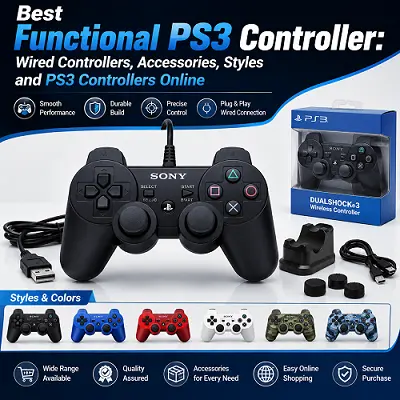
The functional PS3 controller model may play an important role when you are trying to obtain smooth game control for your favorite PlayStation 3 games. An ideal controller will perform with consistency, be comfortable to use, connect well and be able to meet all the game requirements. The Sony controllers used in PlayStation 3 include motion sensing in case of SIXAXIS and vibration in case of DUALSHOCK 3. The latter provides USB Mini-B connectivity.
What Makes a Functional PS3 Controller
A functional PS3 controller goes beyond just powering up. It should deliver reliable button presses, good analog sticks response, good triggers function, solid connectivity, and proper PS button operation. For many users, the optimal choice would be either original or high-quality compatible controller tested for these basic functions.
Motion Controls and DUALSHOCK 3 Compatibility
Motion controls were first delivered via SIXAXIS controllers and then incorporated into DUALSHOCK 3 along with vibration capabilities. That is why compatibility may play its role when choosing a particular controller besides the basic button layout for some games that make use of motion controls or rumble.
Features to Check When Assessing a PS3 Controller
When assessing the condition of a controller, the following features should be taken into account:
- Analog sticks for smooth movements and accurate centering
- D-pad for reliable directional input
- L1, L2, R1, R2 buttons for reliable operation
- PS button for navigation and console pairing
- USB port for connectivity and charging
- Wireless connection and battery condition
- Vibration and motion capabilities depending on the game
How to Choose a Functional PS3 Controller
The selection of a functional PS3 controller on the basis of these tests would be more useful than buying it because of its fancy design and low cost.
If you are required PS3 controllers or other gaming product like ps5 controller you should visit Pro Tech Base online store.
Playstation 3 Wired Controller Options
A playstation 3 wired controller could be ideal for gamers who want to use the device through a USB connection. Wired play would get rid of the need to rely on the battery of the device while connecting it physically to the console.
Documentation by Sony has shown that wired PS3 controller connectivity could vary depending on the specific device, cable, and adapter. The wired connection for PS3 is through the original DUALSHOCK 3 which uses the USB Mini-B cable.
Advantages of Wired Play
- There is no pairing requirement when using wired play
- The player does not have to rely on the battery charge while wired
- Straightforward connectivity for compatible devices
- Useful when troubleshooting wireless connectivity issues
- Ideally practical as an alternative to PS3 wired controllers
The major constraint of using wired play is the cable itself. A short and faulty cable would limit the mobility of the controller, while the faulty connector could affect the charging and operation of the controller.
PS3 Wired Controllers for Different Gaming Needs
When looking for PS3 wired controllers, one must do more than just look at how it looks like. The most important thing would be the ability of the controller to function on the PlayStation 3. When comparing PS3 wired controllers, one should also consider the connections that the product offers.
Features to Consider
Some third-party PS3 wired controllers have varying features in terms of the buttons and layout of the controller. There could be some products designed for simple control while there are others that have additional buttons and are platform-specific.
Compatibility
- Incompatibility should be taken care of through checking the manufacturer’s specifications.
- Do not just assume that all USB controllers work on all PS3 games.
Selecting a Functional PS3 Controller
The selection of a functional PS3 controller depends on what kind of games one wants to play on the device.
- For more action-based games, it is essential to go for something that works on sticks and buttons.
PS3 Controller Colors and Styles
The colors and styles of PS3 controllers will help you get your own feeling of older consoles. The first controllers that were offered by Sony had a number of color variations. It included black, silver, and the colors of Candy Blue. Sony introduced the Candy Blue DUALSHOCK 3 together with a charging station in 2011.
Replacement Shells and Third-Party Models
Currently, you might see replacement shells and third-party models. There could be many PS3 controller colors & styles if you are looking for aftermarket models. A colored shell looks good but it does not mean that its condition is good from the functional point of view.
What to Check When Comparing PS3 Controller Colors & Styles
When comparing PS3 controller colors & styles, look at the following:
- The condition of a shell and the level of its wear and tear
- The condition of buttons and analog-sticks
- The labels of the model
- If the model is the original or third party one
- If the color is the original one or it is the replacement shell
Controller Alternatives and Compatibility
The topic of controller alternatives and compatibility is relevant due to the age of the accessories for the PlayStation 3 and differences in their availability. The issue of controller alternatives and compatibility is especially valuable when selecting from the original controllers, third-party controllers, and multiplatforms.
PS3 Controller Compatibility
A game controller for the PlayStation 3 is not guaranteed to function fully on a PC, PS4, tablets, and other devices by default. According to Sony documentation, the controllers for PS3 can be connected to certain devices with a wired connection and with a suitable adapter, yet compatibility with the device is needed.
Windows Compatibility
Some configurations of controllers for PS3 may also require proper drivers on a Windows operating system.
Things to Consider Before Selecting an Alternative
Before selecting an alternative, consider:
- Supported platforms
- Connection type
- Required adapter or driver
- Motion controls
- Vibration
- Button mapping
- The need for cable or battery
Y03 Leverless Multi-Platform Controller
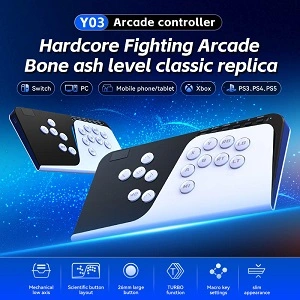
The Y03 Leverless Multi-Platform Controller provides an alternative for the gameplay experience. Rather than adopting the conventional PS3 controller configuration, the leverless controller will have buttons as its directional control. Such a setup can provide an exciting challenge for those who need a specific gaming controller.
Y03 Leverless Multi-Platform Controller Compatibility
Nevertheless, the Y03 Leverless Multi-Platform Controller cannot be considered as a universal solution to replace a normal PS3 controller. The compatibility will depend on the specific model, connection option, systems supported and needed software or adapter.
Compatibility Considerations
- It is important to consider manufacturer’s compatibility details before purchase for your particular system.
- The compatibility will depend on the specific model.
- The connection option should also be considered.
- Systems supported and needed software or adapter may affect compatibility.
Conventional PS3 Controller Configuration
It is better to stick to the conventional controller configuration for playing regular PS3 games, because the console library was created taking into consideration such control elements as analog sticks, shoulder buttons, face buttons, and PS button.
Alternative Controller Option
The Y03 Leverless Multi-Platform Controller can be a good alternative but not the direct replacement.
These are available on the best online tech store for shoppers like Pro Tech Base online store.
PS3 Controller Accessories
Accessories for the PS3 controller can be convenient, provide better protection, and aid in maintenance. Some helpful accessories could be USB Mini-B cables, battery chargers, protective cases, new thumb grips, and a storage solution.
USB Cable for PS3 Controller
According to the Sony DUALSHOCK 3 User Manual, a USB cable connects the console or charges the controller and specifies that the correct cable should be USB A to Mini-B. This is why it is crucial to have a proper cable when purchasing an older model without the original accessories.
Useful PS3 Controller Accessories
PS3 controller accessories could also be used to protect an older console controller. Here are some possibilities:
- USB Mini-B data and charger cable
- Protective controller case
- Thumb grips replacement
- Controller stand/holder for storage
- Cloth for cleaning and electronic cleaning products
Check Compatibility Before Buying
Never purchase accessories just because it is a universal accessory. Look into the connection type and platform compatibility.
Used PS3 Controllers
Used PS3 controllers may be a good option if it’s hard to get original equipment, but condition is crucial. Old controllers might have worn out sticks, dead batteries, loose USB port, sticky buttons, or even some damages on the surface.
What to Check Before Purchasing
Before purchasing used equipment, request the proof that the controller was tested by the vendor. The controller should be confirmed to have functional buttons, sticks, triggers, PS button, wireless, USB, and vibrations.
Used PS3 Controller Testing Checklist
When choosing used PS3 controllers, you should test its functionality according to the following list:
- Press all face buttons.
- Check movements of both analog sticks.
- Press all shoulder buttons and triggers.
- Press the PS button.
- USB port should work fine.
- Check the charging.
- Verify wireless connection.
- Test for unexpected inputs and stick drift.
- Check the surface for any cracks and loose shell parts.
Price and Condition
The price should be considered together with the condition. Even if the more expensive controller will cost more, it may be a better buy.
PS3 Controller Repair and Maintenance
PS3 controller repair & maintenance becomes relevant when an older controller begins to demonstrate unstable operation. Problems may include malfunctioning, wear of analog parts, USB port damage, problems with batteries or malfunctioning buttons. Discussion about PS3 controller repair & maintenance in communities also often includes topics such as stick drift, USB problems, batteries, conductive films.
Basic Checks Before Repair
Before concluding that your controller needs internal repair, it is best to check some simple things first.
- Check the controller with a cable that works well with other controllers.
- Check the USB port.
- Reset your controller if needed.
- Then test the controller with the PS3.
Also, Sony’s official instructions describe wired connections for PS3 controllers on compatible devices.
PS3 Controller Maintenance
Proper PS3 controller repair & maintenance requires preventing. For the process of maintenance of your controller:
- Prevent dust and other contamination to enter ports and buttons.
- Save your controller in dry place and in a safe environment.
- Prevent unplugging the cable from the connector.
- Prevent applying too much pressure to the analog sticks.
- Check the condition of the cable.
- Clean the outer shell of the controller carefully.
- Only replace worn parts if you have enough knowledge and skills in repairing.
How to Choose PS3 Controllers Online
When purchasing PS3 controllers from any online store, consider the product details rather than judging it based on the images provided.
Some important steps to follow are:
1. Compatibility with your console
Always make sure that it clearly states that the item is compatible with PS3. Never assume that all USB connected controllers are compatible with your PS3.
2. The Type of the Controller
Choose between a genuine DUALSHOCK 3, a compatible controller or a wired one. If you want motion sensors and vibration, make sure that the controller has them.
3. Condition
In case you buy a used controller, make sure to know whether it is tested or refurbished and untested. Inquire about its stick condition, battery capacity, buttons and its USB connectivity.
4. The Included Accessories
Some controllers do not have a cable with them which might require separate purchases. Find out whether the cable is included.
5. Price Comparison
Do not always choose the cheaper one; add up the price of cables, shipping and repairing and then compare the prices.
If you are required ps3 controllers or other gaming product like ps4 controller you should visit Pro Tech Base online store.
Key Features of PS3 Wired Controllers
Key features vary based on your usage. For daily gaming, choose precise analog sticks, sensitive buttons, solid connections, and comfort.
Features for Different Gaming Needs
Daily Gaming
- Choose precise analog sticks.
- Look for sensitive buttons.
- Consider solid connections.
- Choose comfort.
Motion Sensing Games
For motion sensing games, make sure the controller comes with 6 axis motion sensing capabilities.
Vibration in Games
If you use vibration in games, ensure that the controller is DUALSHOCK compatible. Sony defines the DUALSHOCK 3 as incorporating rumble into the 6 axis motion sensing.
Wired Gaming Considerations
For wired gaming using the playstation 3 wired controller, connector and cable quality become key.
Used Controllers
- In case of used controllers, condition becomes more important than looks.
Final Thought
The decision regarding the selection of a Functional PS3 controller involves the compromise between compatibility, condition, comfort, and usefulness of features. Original DUALSHOCK 3 controllers are still preferred due to their combination of the traditional layout of a PS3 controller along with the ability to use the six-axis sensing and vibration. Wired controllers, as well as third-party controllers, can become an option as well.
When choosing a PS3 controller either as a replacement of the old one or the second controller or even among PS3 controllers available for sale on the Internet, you should consider first its functionality and not its color and price.