
Criteria for Choosing the Best WiFi Routers goes beyond just the speed advertised by the supplier. A good option to consider will have to match the plan, internet speed, WiFi standards, and type of networking that is required, which may depend on the area, connected devices, number of users, size of the space in need of coverage, and what the network is intended for.
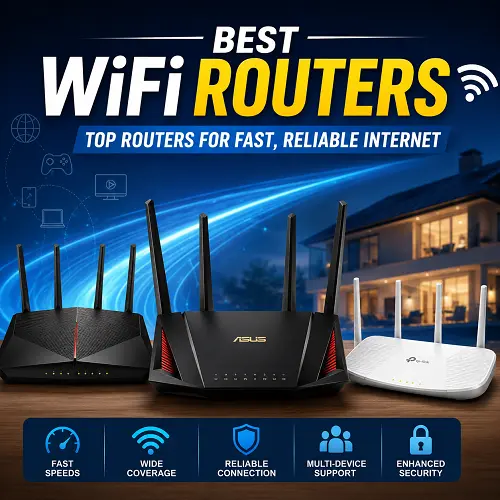
Current routers support technologies such as WiFi 6, mesh networking, QoS, firewall protection, parental control, and gigabit Ethernet. Here is some information about the types of routers, recommended options depending on the application, and criteria for choosing the router.
What Makes the Best WiFi Routers?
First and foremost, a good router needs to perform well and fit your network needs.
- Internet speed: A router with good capabilities to match the speed of your plan, especially in the case of gigabit internet.
- Coverage: One single router in the case of small spaces; mesh or access points for large spaces.
- Number of devices: WiFi 6 technology is useful in the case of multiple phones, laptops, TVs, cameras, and smart devices.
- Technologies: WiFi 6 is recommended as a powerful wireless technology currently available on routers, while WiFi 6E offers additional access to the 6 GHz spectrum.
- Ethernet ports: Useful for high-speed gigabit Internet, gaming, and workstations or servers.
- Safety: Routers with the latest firmware updates and other safety features, like firewall and protection from cyber threats.
- QoS: Quality of Service helps prioritize important tasks like gaming, making a phone call, or streaming video.
- Parental Controls: Useful for device management and scheduling.
Top Recommendation: AX3000 WiFi 6 Mesh Router
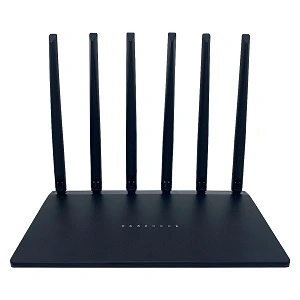
AX3000 WiFi 6 Mesh Router is an excellent choice among the offered routers.
- Supports WiFi 6 / 802.11ax.
- Supports both 2.4 GHz and 5.8 GHz frequencies.
- Has six external antennas.
- Firewall and QoS capabilities.
- Supports mesh functionality.
- Suitable for home, office, and enterprise applications.
According to the Alibaba product listing, prices start at roughly US$29.85 for 1-9 pieces and get lower for larger quantities. Since, according to the specifications, 6 GHz spectrum is not supported by the product, the AX3000 router must be considered WiFi 6.
This product is available on the best online tech store for shoppers like Pro tech base online store.
Different Types of WiFi Routers
Dual-Band WiFi Router
- Uses both 2.4 GHz and 5 GHz frequency bands.
- 4 GHz usually gives better coverage.
- The 5 GHz band may support greater speed but over short distances.
- Suitable for most homes and offices.
- Recommended: AX3000 WiFi 6 Mesh Router is ideal for those who seek a low-cost dual-band WiFi 6 router.
Tri-Band WiFi Router
- Involves an additional wireless frequency band.
- Needed where there are lots of connected devices.
- May help to better divide wireless traffic.
- Good for a heavy load of mesh devices.
- Recommended: It’s better to use a tri-band router where there will be multiple devices using high bandwidth or multiple mesh nodes at once.
WiFi 6 and WiFi 6E Routers
- Uses the 802.11ax standard.
- Allows you to improve your network performance and capacity.
- WiFi 6E adds the 6 GHz frequency band.
- WiFi 6E needs supporting devices.
- Recommended: Use the AX3000 WiFi 6 Mesh Router for standard WiFi 6 routers; for WiFi 6E, choose a model that supports the 6 GHz connection.
Mesh WiFi Router
- Involves multiple nodes extending your wireless coverage.
- Suitable for bigger houses or several stories.
- Lowers the chances of WiFi dead zones.
- Easier to extend than a single-router solution for large areas.
- Recommended: Use the AX3000 WiFi 6 Mesh Router for a budget-friendly mesh system.
Wired or Hardwired Router
- Connectivity is provided through Ethernet.
- Suitable for gaming PCs or consoles, offices, and workstations.
- Reduces dependence on the wireless connection.
- Recommended: Consider using a quality wired router with Ethernet access points.
5G Router
- Connectivity is provided via a 5G cellular connection instead of fiber or cable internet.
- Useful where a fiber or cable internet connection is not available.
- Its performance relies on local 5G coverage and network load.
- May also act as a backup for the main internet connection.
- Recommended: Select a 5G router depending on carrier compatibility, bands used, Ethernet ports, and WiFi technology.
Best Router for Gigabit Internet
Gigabit internet needs equipment able to operate with gigabit traffic. Limited Ethernet or outdated wireless technology could turn into a bottleneck.
Look for:
- Gigabit (or even faster) WAN and/or LAN.
- WiFi 6 (or even newer).
- Strong performance under multi-device workload.
- Traffic management tools (QoS).
- Good wireless coverage.
For a gigabit speed plan, you need to always make sure about the exact specifications of the WAN and LAN connections – not just the advertised WiFi speed.
Top choice: The AX3000 WiFi 6 Mesh Router is a good pick if you want WiFi 6, dual band, QoS, Firewall, and mesh capability. But you need to find out more about the Ethernet specifications of this model before combining it with gigabit plans.
Best WiFi 6E Routers
WiFi 6E builds on WiFi 6 by utilizing the 6 GHz band. This provides additional spectrum for 6 GHz-ready devices and can help in congested wireless environments.
- WiFi 6 uses 2.4 GHz and 5 GHz bands.
- WiFi 6E additionally uses the 6 GHz band.
- WiFi 6 is compatible with a broader array of legacy devices.
- WiFi 6E becomes useful when your smartphones, laptops, or other devices are 6 GHz ready.
WiFi 6E is not necessary just because it is a more recent version. For most people, WiFi 6 is more optimal in terms of balance between performance and compatibility.
Top choice: For WiFi 6, you need a simple AX3000 WiFi 6 Mesh Router among the provided models. If you actually need 6 GHz WiFi, then you need to get a WiFi 6E router.
Best WiFi Routers for Gaming
Good gaming needs a stable connection and low latency – not necessarily the fastest available download speed.
Main Characteristics:
- Low latency.
- Traffic management (QoS) and priority.
- High-performance Ethernet.
- Stable WiFi.
- Newest WiFi standards.
- Good coverage.
Ethernet is preferable for gaming PCs and consoles that stay in one place because of the lack of interference issues. WiFi is convenient for gaming laptops and other devices that cannot use Ethernet.
Top choice: The ASUS ROG Rapture GT-AX11000 is definitely the best among the listed models for gaming. This product is more suitable for gaming purposes rather than general router use.
Also, if you are looking for a more affordable WiFi 6 device, then the AX3000 WiFi 6 Mesh Router may be worth taking a look at.
If you are needed other related products like best laptop for gaming you can visit Pro Tech Base online store.
Best WiFi Routers for Large Areas and Multiple Floors
Large buildings and houses, offices, and multi-floor properties are at risk of weak signals owing to walls, floors, distance, and even signal interference.
Consider:
- WiFi 6 mesh networking systems.
- Additional mesh nodes.
- Wired access points.
- Ethernet-based backhaul connection where possible.
- Effective router positioning.
In case of a large home without Ethernet, mesh becomes more convenient to implement than wired access points. For a large office or other property with already existing Ethernet cables, wired access points can offer a more effective solution.
Top pick: The AX3000 WiFi 6 Mesh Router becomes an effective solution for people requiring a WiFi 6-based mesh system. Very large areas may need additional mesh nodes or wired access points.
Best Router and Access Point
Router and access point serve different purposes.
- Routers: Serve as local networks’ gateway to the Internet and provide additional functions like routing, NAT, DHCP, and sometimes firewall protection.
- Access point: Provides wireless connections to a wired local network.
- Router and access point: A very effective combination for offices, large homes, and multi-floor buildings.
- Several access points: Can be used for providing a scalable wireless network when Ethernet cables are available.
Access Point vs Mesh
Mesh
- Easier implementation in the absence of Ethernet cables.
- Uses several nodes.
- Effective for large houses.
- Easy to expand.
- Suitable for users who require an easy whole-house coverage solution.
Access Points
- Work efficiently in conjunction with existing Ethernet cables.
- Provide wired backhaul.
- Effective for large houses, offices, and other places.
- Allow for better control by the network administrator.
Which One to Choose?
- Without Ethernet cables:
- With Ethernet cables: Wired access points work great.
- Large office: Router and access points with wired connection.
- Coverage problems: Additional access point or mesh node.
Recommendation: Go with the AX3000 WiFi 6 Mesh Router in case of simple home mesh coverage. Businesses with Ethernet should use dedicated routers and access points.
Best Routers With Parental Controls
Parental controls make it possible to control how particular devices connect to the internet.
Search for:
- Device profiles.
- Internet usage schedules.
- Site blocking.
- Content blocking.
- Internet pause capability.
- Guest networks.
- Security options.
If you are searching for a parental control router with no subscription plan, make sure you get filtering, scheduling, and management for free, without any monthly payment required.
Our top recommendation is AX3000 WiFi 6 Mesh Router, provided that the Firewall and QoS features of it fit your needs. To make sure that all advanced features needed are supported, check out the filtering and scheduling capabilities of the exact product before making the purchase.
Fiber Optic Internet and WiFi Routers
For most cases, fiber optics use ONT (Optical Network Terminal) instead of a standard cable modem.
- ONT: Terminates the fiber line and converts its optical signals into network signals.
- Router: Distributes the signal to wired and wireless devices.
- ISP Gateway: Some companies provide devices that perform multiple networking functions.
Do I Need a Special Modem for Fiber?
- The equipment should match the ISP.
- The ISP company can provide the ONT.
- Your router should support a compatible WAN interface.
- Some ISPs have specific requirements.
For picking the proper router for fiber optics, pay attention to:
- Compliance with WAN port and its requirements.
- Ethernet speed.
- WiFi technology generation.
- Coverage area.
- Requirements from the ISP company.
The recommended router is AX3000 WiFi 6 Mesh Router if the specifications of its WAN interface are appropriate. You shouldn’t consider it as a direct replacement for the ONT provided by the ISP.
Best Hardwired Router vs Wireless Router
Wired connection can be useful when stability is more important than mobility.
For a Good Router, It Should Have:
- The necessary amount of Ethernet ports.
- Gigabit or higher speed.
- Firewall protection.
- The appropriate WAN interface speed.
- The necessary amount of other useful features for the particular network.
Wired vs Wireless
- Wired: Better for gaming PCs, consoles, servers, workstations, and offices.
- Wireless: Best for smartphones, tablets, laptops, and smart devices.
- Both options: The best variant for most modern households.
Our Recommended Usage:
- For high-performance, stable devices:
- For mobile devices:
Best WiFi Router Brands
TP-Link WiFi Routers
- Provides products at various prices.
- Large variety of WiFi 6 and mesh equipment.
- Suggested model is TP-Link Archer C6 AC1200 (basic networking).
ASUS WiFi Routers
- Strong gaming-oriented product line.
- Sufficiently powerful performance and advanced network management features.
- Suggested model is ASUS ROG Rapture GT-AX11000 (gaming-oriented).
Netgear Routers
- Luxury, gaming, and mesh routers are provided.
- These routers are appropriate for users requiring advanced networking features.
- Suggested models are those that fit your speed and coverage requirements.
D-Link WiFi Routers
- Mainstream WiFi and WiFi 6 networking devices.
- Suggested model is D-Link DIR-X6060 (high-performance D-Link).
Tenda & Huawei WiFi Routers
- Luxury and mid-class products are available.
- The purchase must be preceded by comparing features such as WiFi standard, number of Ethernet ports, coverage, and ISP compatibility.
Suggested Best WiFi Router Models
AX3000 WiFi 6 Mesh Router (Best All-Round)
- WiFi 6 / 802.11ax.
- Dual-band.
- Frequency: 2.4 GHz and 5.8 GHz.
- Six external antennas.
- Firewall, QoS.
- Mesh-oriented functionality.
- Applications: home, office, enterprise.
- Best for: affordable WiFi 6 mesh networking.
TP-Link Archer C6 AC1200 (Best Basic Networking)
- Dual-band AC1200-class router.
- Meets everyday Internet browsing and streaming requirements.
- Best for: small networks and basic home networking (no need for WiFi 6).
ASUS ROG Rapture GT-AX11000 (Best Gaming Network)
- The best high-end gaming-oriented router.
- The device is aimed at demanding networking.
- Best for: serious gamers and advanced networking users.
D-Link DIR-X6060 (Best D-Link)
- WiFi 6-class router.
- Aimed at modern high-capacity wireless networks.
- Best for: higher-performance D-Link.
Cisco RV260W-A-K9-NA (Best Business Networking Hardware)
- Business-oriented networking hardware.
- The hardware is more appropriate for business usage rather than ordinary home needs.
- Best for: small-business networking.
Netgear vs TP-Link: Which Router Is Better?
There are several products that both brands have for various budgets and requirements.
TP-Link
- Quite a versatile range of products depending on the price range.
- Has a good WiFi 6 and mesh portfolio of products.
- Worth consideration if a person needs something to work with.
Netgear
- Offers a strong portfolio of premium, gaming, and mesh products.
- Has products aimed at advanced users.
Which Should You Pick?
- TP-Link: If value and variety matter the most.
- Netgear: If a person is looking for a premium device that has all necessary features.
- It’s better to consider each individual product rather than the whole brand blindly.
ASUS vs TP-Link vs Netgear Routers Comparison
- For Gaming/advanced users:
- General home or office use: TP-Link.
- More advanced networking capabilities:
- Games: ASUS is the most focused choice out of the three.
- Overall value: TP-Link is the best choice.
- Premium networking: Netgear should be taken into account.
- The best affordable WiFi 6 mesh: AX3000 WiFi 6 Mesh Router.
How to Choose the Best WiFi Router?
Check Your Connection Speed
- It has to match the speed provided by the ISP.
- If the plan is gigabit, make sure the network will support it.
- Faster connections need more modern WiFi standards.
Check Your Coverage
- Small home – a single router.
- Larger home – mesh.
- Multi-floor apartments – mesh or access points.
- Large office – router + wired APs.
Device Counting
Think about connected devices like phones, laptops, TVs, cameras, consoles, smart-home devices, and other electronics. Networks with multiple devices may get some advantage from WiFi 6 or even newer standards.
Check Ethernet Ports
- Number of LAN ports matters.
- Make sure the ports support gigabit or higher-speed connections.
- Add an Ethernet switch when needed.
Consider Security
- Keeping firmware up-to-date.
- Using secure passwords.
- Ability to create guest networks.
- Parental controls.
Where Should You Place a WiFi Router?
Optimal positioning can increase WiFi coverage without changing the router.
- Consider central positions.
- Position the router in an elevated place.
- Don’t put it inside any cabinets.
- Keep it clear of large metallic objects.
- Minimize WiFi interference around the router.
- Implement mesh nodes/access points in locations where one router cannot cover all the premises.
WiFi connection improvement on your laptop or other device implies positioning closer to the router, choosing the right WiFi band, regularly updating drivers and firmware, and using Ethernet cables for stationary devices that demand high performance.
How to Tell If Your Router Is Bad
Indicators of some trouble include:
- Frequent disconnections.
- Sudden rebooting of the router.
- Repeated loss of WiFi.
- Poor overall performance across different devices.
- Excessive overheating.
- Lack of firmware updates.
Preliminary Actions Before Replacing:
- Unplug and plug in your router.
- Test with several devices.
- Measure WiFi performance against Ethernet.
- Update firmware.
- Check for internet problems.
- Test all the WiFi bands that the router supports.
In case the connection via the ISP performs well, but several devices show network trouble, the router may need to be troubleshooted or replaced.
Frequently Asked Questions
What Is the Best WiFi Router?
There are plenty of routers depending on speed needs and requirements, number of connected devices, and coverage area. AX3000 WiFi 6 Mesh Router will suit well as a decent, affordable WiFi 6 mesh router.
What Is the Best Router for Gigabit Internet?
The most proper choice would be finding a router with appropriate capabilities for gigabit WAN/LAN connectivity and WiFi.
What Is the Best WiFi 6E Router?
In case your devices support 6 GHz technology, you need a WiFi 6E router for access to the additional frequency band.
Is WiFi 6 Better Than Older WiFi Technologies?
Yes, it works better and more effectively for networks with lots of devices.
Is Mesh Better Than Access Point?
In the case of a lack of Ethernet connection, it is better to use a mesh connection; otherwise, an access point will suit well.
What Is the Best Router for Gaming?
Low latency, QoS, reliable WiFi, and Ethernet connection will serve you perfectly well. ASUS ROG Rapture GT-AX11000 is recommended.
What Is the Best Router for Parental Controls?
Go for the model that provides device profiles, scheduling, filtering, and security options. Consider whether premium functionality will require you to buy a subscription.
Is There a Specific Modem Required for Fiber Internet?
Fiber internet typically works with ONTs rather than the cable modems used for other connections. Your ISP can install the ONT while the router shares your fiber connection.
How Can I Tell When My WiFi Router Is Bad?
Disconnecting regularly, spontaneous reboots, excessive overheating, poor performance on multiple devices, and out-of-date firmware are signs of a defective router.
Final Thoughts
Best WiFi Routers for one user are definitely not going to suit the other user since your internet speed, connection coverage area, number of connecting devices, WiFi version, wired network capabilities, security considerations, and purpose of use should affect your purchasing decision.
In case you want an inexpensive WiFi 6 mesh network, consider the AX3000 WiFi 6 Mesh Router amongst all those provided. The ASUS ROG Rapture GT-AX11000 router is better suited for gamers whereas the mesh nodes or access points would be suitable for users with spacious properties or offices. The bottom line is that the selected devices must match your particular network requirements.