
New laptops are becoming slimmer, which usually means having fewer dedicated ports. Many modern laptops can handle connections for peripherals, displays, and charging through USB-C, although the available features depend on the specific USB-C port. This is when a good USB-C hub becomes truly necessary.
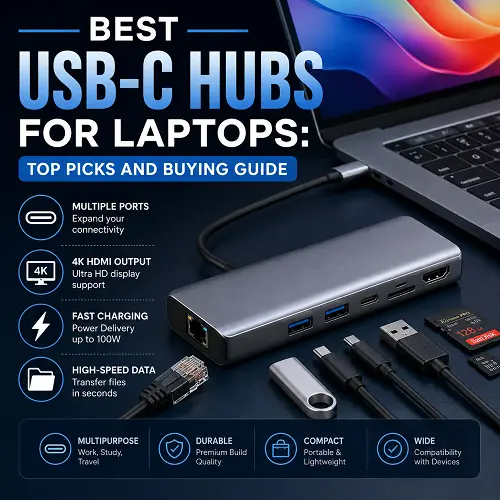
The Best USB-C Hubs for Laptops allow adding useful connections without carrying around a bunch of adapters separately. There is USB-A, USB-C, HDMI, Gigabit Ethernet, SD/TF card slots, and USB-C Power Delivery available in one compact device. The choice of a hub is determined by how you use your laptop. The person working mainly with mouse and USB drive has completely different needs compared to the photographer moving large data files or a professional using a 4K external monitor. Below we are talking about important factors and hub recommendations.
What Is a USB-C Hub and How Does It Work?
A USB-C Hub is a small device that attaches to the USB-C port of your laptop and turns it into multiple different types of ports.
For instance, using one USB-C port, you can get:
- Ports to connect your keyboard, mouse, flash drive and other devices.
- Another USB-C port to connect the compatible devices or charge them.
- HDMI Port to connect a monitor or TV.
- Gigabit Ethernet Port to connect your laptop to the internet.
- SD and TF/microSD card slots.
- USB-C PD charging port.
The key point to remember here is that your laptop’s USB-C port should be able to deliver the features you are looking for. Every USB-C port does not have the ability to transfer video or charging.
What to Look for in the Best USB-C Hubs for Laptops
Number and Type of Ports
First of all, consider your peripherals. A 4-in-1 hub will suffice for simple office tasks, whereas a 7-in-1 one provides much more freedom.
What you should pay attention to:
- Ports USB-A for your old peripherals.
- Ports USB-C for new devices.
- HDMI for external monitors.
- Ports SD and TF for cameras and memory cards.
- Ethernet for a wired network.
- Port PD charging in case you want to charge your laptop via the hub.
A hub equipped with all these ports is not always necessary. Choose the right combination according to your particular situation.
USB 3.0 Data Transfer Speed
USB 3.0 commonly provides data speeds of up to 5 Gbps, making it considerably more practical than older USB standards for external storage and large file transfers.
A USB-C hub with USB 3.0 is useful when moving:
- Photos and videos
- Large documents
- Files between external SSDs and laptops
- Backups
- Game files and other large data
Remember that the actual speed also depends on the connected device, cable, laptop port, and the hub’s internal controller.
HDMI and 4K Display Support
HDMI is one of the most crucial features to look for when using an external monitor on a regular basis.
Using a capable hub makes it easier to connect your laptop to your monitor or TV, but if you need 4K 60Hz, then your laptop should have a port and the necessary graphics, and your hub and your monitor should support it.
As for the everyday work, presentations, and streaming, you can notice the difference between 4K 60Hz and 4K 30Hz.
Power Delivery and Charging
The Power Delivery through USB-C ports is also known as USB-C PD, which allows your hubs to pass power from your charger to your laptop.
It might be quite helpful to have a hub with 100W PD for those laptops that need much power for charging.
Your laptop will get less energy than the maximum, since your hub uses the power as well.
Even if your hub supports up to 100W, you might not get the maximum output, as there are other factors affecting the result.
SD and TF Card Readers
The use of card readers in photographers, videographers, and content creators can become more efficient through card readers which are integrated into the hub.
Hub having:
- SD Card Reader – helps with reading memory cards used by cameras.
- TF / micro SD Reader – helps with reading cards from action cameras, drones, smartphones, and other such small devices.
Both card readers can be integrated into the hub to avoid carrying extra device.
Gigabit Ethernet Connectivity
Although Wi-Fi provides an easy way out, sometimes it becomes necessary to have wired Ethernet connectivity due to stability.
A USB-C Hub with Gigabit Ethernet will be helpful in the following situations:
- Office Work
- Large Downloads
- Cloud Backups
- On-line Gaming
- Video Meetings
- Desktop Setup
The wired connectivity can be useful in cases where Wi-Fi connection is slow and unreliable.
How to Choose the Best USB-C Hub for Your Laptop?
Before purchasing any of the Best USB-C Hubs for Laptops, consider the following:
- USB-C abilities on your laptop – see what exactly it offers in terms of data, video, and charging ports.
- Count the ports you actually need — avoid paying for ports you will never use.
- Check USB transfer speeds — USB 3.0 and faster standards are preferable for external storage.
- Check HDMI requirements — verify resolution and refresh rate.
- Check Power Delivery — make sure the hub supports your laptop’s charging requirements.
- Consider Ethernet — especially for office work, gaming, and unreliable Wi-Fi.
- Check card readers — SD and TF slots are valuable for creators.
- Consider build quality — aluminum alloy can provide a premium feel and useful durability.
- Consider portability — smaller hubs are easier to carry with a laptop or tablet.
Best USB-C Hubs for Laptops: Top Picks
Choice of suitable USB-C hub will to a large extent depend on requirements of individual users. The options will vary from USB ports for regular gadgets to HDMI for additional displays or Ethernet for reliable internet connection. Some hubs feature Power Delivery technology for charging devices. Here are examples of popular hubs that will suit various user requirements.
If you are looking for this type of product or other related products, you can also explore our best laptop stands for comfortable view or best laptop for trading guides on Pro Tech Base.
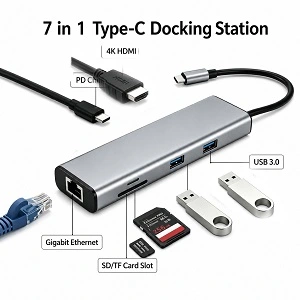
1. 7-in-1 USB-C Hub with 4K 60Hz HDMI – Best USB-C Hub for Gaming Laptop
If you require a few important ports in a single hub then select the 7-in-1 hub, which is ideal for office work, studies, travel, and laptops.
- Ideal for: Use at office, study purposes, traveling, and with laptops
- Important connectivity options: HDMI 2.0, USB 3.0, Gigabit Ethernet, SD card, TF/microSD card, USB-C PD support
- Transfer speed: The USB 3.0 port is significantly faster than older USB 2.0 versions
- Main advantage: This USB-C hub includes display, network, memory card reader, USB and power delivery capabilities in one handy unit
- Disadvantages: Display resolution, refresh rate, Power Delivery capabilities, and data transfer speed will largely depend on the computer, cables and other connected devices.
It has all-in-one features and hence very convenient for users of laptops. This product is available on the best online tech store for shoppers like Pro Tech Base online store.
2. UGREEN USB-C Hub —Best USB-C Hub for Windows Laptop
UGREEN USB-C Hub offer various types of hubs with various combinations of USB ports, HDMI port, Ethernet port, and even Power Delivery.
- Best for: Windows laptops, office settings, people with the need for additional USB and display connectivity
- Key ports: Different depending on the type of hub; usually includes USB-A, USB-C, HDMI, Ethernet, and card reader ports
- Display connectivity: Depends on the type of the hub and the ability of the computer to output video through its USB-C ports
- Charging: USB-C PD power supply is available on some types of hubs
- Data transfer: Depends on the type of the hub and ports’ specifications
- Main advantage: Variety of hubs allows to select a hub that meets your needs and budget
- Disadvantage: Many different types of UGREEN USB-C hubs exist, so you need to pay attention to their specifications like HDMI resolution, USB speed, Power Delivery, etc.
3. Satechi USB-C Hub — Best for People Who Need a Tidy Desk Setup
Satechi USB-C hubs were made portable and modern in look. Such hubs may suit people who need to increase their laptop’s connectivity but keep their desk setup tidy.
- Best for: MacBook users, people with a need for a tidy desk, professionals
- Key ports: Depending on the type, can include USB-A, USB-C, HDMI, SD/microSD card reader, and Ethernet
- Display connectivity: Depends on the chosen hub and host laptop
- Charging: USB-C PD power supply on some hubs
- Data speed: Depends on the individual port and hub
- Main advantage: Small size and a useful combination of ports for every day use
- Disadvantage: Portability of some hubs takes preference over their port diversity.
4. Plugable USB-C Hub — Best for Flexible Connectivity
Plugable’s USB-C hubs and dock stations are developed for users, who need to have more connection options for monitors, USB accessories, storage devices, and networking.
- Best for: Home offices, workstations, and users, who need additional connection ports
- Ports: Depend on particular product and could include USB-A, USB-C, HDMI, DisplayPort, Ethernet, card readers
- Display connection: Depends on particular product and laptop capabilities
- Charging: Some models are equipped with USB-C Power Delivery feature
- Data speed: Depends on particular USB standard of a chosen product
- Main advantage: There are different models, which allow to have simple connections or build up complex workstation
- Disadvantage: More advanced products could be bigger and costlier than simple USB-C hub
5. CalDigit USB-C Hub –Best USB-C Hub for Desktop
CalDigit is specialized in development of high-quality connectivity products for desktop and professional workstations. Its USB-C hubs and docking solutions could be suitable for those cases, when there are many peripheral devices and display monitors in the setup.
- Best for: Professionals, creative people, and advanced workstations
- Ports: Depends on particular product and could include USB-A, USB-C, HDMI, DisplayPort, Ethernet, and many other connectivity options
- Display connection: Depends on particular CalDigit product and laptop capabilities
- Charging: Some models have high-power USB-C Power Delivery capability
- Data speed: Some models could provide faster connectivity for compatible storage devices and peripheral gadgets
- Main advantage: Developed for users, who need to have reliable connections to many devices and peripheral gadgets
- Disadvantage: Advanced connectivity usually means higher price and less travel-oriented design in comparison to simple USB-C hub.
Which USB-C Hub Should You Choose?
The best USB-C hub depends on your setup, not on the number of ports. If you need a simple hub for daily use, 7-in-1 model is enough. Windows laptop owners could choose UGREEN, whereas MacBook owners could go for Satechi.
For those users, who need advanced connections for many peripheral devices and displays or just want to make up an advanced workstation, Plugable or CalDigit should be taken into account. But before buying, you should check your laptop’s USB-C capabilities because not all USB-C ports can transmit video signal, perform fast data transmission or provide power delivery.
Powered USB-C Hub vs Standard USB-C Hub
A standard USB-C hub generally draws power from the laptop. This is known as a bus-powered hub.
A powered USB-C hub or dock can receive additional power from an external adapter.
A powered setup makes more sense when you regularly connect:
- Multiple USB devices
- External hard drives
- High-power peripherals
- Multiple displays
- Several accessories simultaneously
For a keyboard, mouse, flash drive, and occasional monitor, a standard portable hub is usually sufficient.
USB-C Hub Ports and Connectivity Explained
USB-C Hub with HDMI
The USB-C hub with HDMI will allow connecting your laptop to a monitor/TV through HDMI port. The important specification would be resolution and refresh rate.
USB-C Hub with Gigabit Ethernet
This USB-C hub allows using the wired network via the USB-C connection and is handy when stability is more important than convenience of wireless connection.
USB-C Hub with USB 3.0
This hub is perfect for storage purposes, as well as for connecting the everyday USB devices with the possibility of data transfer up to 5Gbps in the right circumstances.
USB-C Hub with SD Card Reader
This is especially helpful for photographers, as USB-C hub with SD card reader helps to transfer files to/from cameras and memory cards.
USB-C Hub with 100W PD
It may transfer substantial power to a compatible laptop. But the maximum PD power does not mean that your laptop receives such power from the hub.
Are USB-C Hubs Good for Gaming Laptops?
Sure, the USB-C hub will be helpful for the gaming laptop especially if the laptop is low on ports.
The USB-C hub for gaming laptops can give:
- Gigabit Ethernet for wired networking
- Ports for keyboards, mice, controllers
- HDMI for connected external screens
- USB 3.0 for the storage
- PD when possible
- If it’s a gaming laptop, plug-in performance devices directly into the laptop if you can.
Frequently Asked Questions About USB-C Hubs
What Is the Best USB-C Hub for a Laptop?
The choice will be influenced by your needs. A 7-in-1 USB-C Hub with HDMI 2.0 is a very good all-purpose hub if HDMI, Ethernet, USB 3.0, SD/TF readers, and 100W PD are needed in one hub.
Is a Powered USB-C Hub Superior to a Standard USB-C Hub?
In most cases, a standard hub is sufficient while a powered hub suits better if a large number of peripherals with a high power demand is expected.
Is It Possible to Support 4K 60Hz with a USB-C Hub?
Yes, some USB-C hubs can support 4K 60Hz video, but this depends on the hub, laptop’s USB-C port, graphics capabilities, HDMI connection, and monitor.
Can You Charge a Laptop Through a USB-C Hub?
Only if it is equipped with USB-PD technology and the port of the laptop has such features.
Is It Possible to Connect a USB-C Hub to Windows Laptop?
Only if there is appropriate USB-C port on the laptop. Some features depend on the type of the port.
Final Thoughts
Your best choice should fit your laptop and workflow as opposed to just providing the highest number of ports. The simpler users might opt for a small hub while professionals and heavy users will need either a powered or docking type hub.
In case of a combination of HDMI 2.0, 4K 60Hz, gigabit Ethernet, USB 3.0, SD/TF cards reader, 100W PD and aluminum alloy build quality, 7-in-1 USB-C Hub with HDMI 2.0 is a worthy option. When choosing the Best USB-C Hubs for Laptops, focus on the features you actually need rather than simply choosing the hub with the most ports.