There may be huge distinctions between VR gaming and conventional gaming using an ordinary monitor or television. This is because, in contrast to watching a game world from afar on an ordinary screen, the best VR headsets for gaming involve a display positioned just before your eyes while tracking your body’s motions during the course of gaming. This can be particularly fascinating in the case of racing, action, adventure, fitness, simulation, and exploration games.
There are other factors besides image quality to consider when choosing a headset. These include the gaming console, PC equipment, comfort, the tracking technology, controllers, connectivity type, and the budget. Some headsets can be used standalone, whereas others depend on a gaming PC or PS5.
What Is a VR Headset for Gaming?
What Does a VR Headset Do?
A VR headset refers to a wearable equipment which projects a virtual world in front of your eyes. It has several components such as screens, lenses, sensors, tracking devices etc., which enable a sensation of depth and movement.
How Is VR Used for Gaming?
In gaming, the headset may be paired with some controls and hand tracking. By moving your head or hands, you will see this movement reflected in a virtual world. For example, turning your head or hands helps you to look around the cockpit of a racing car, aim an object, and examine a room within the virtual world.
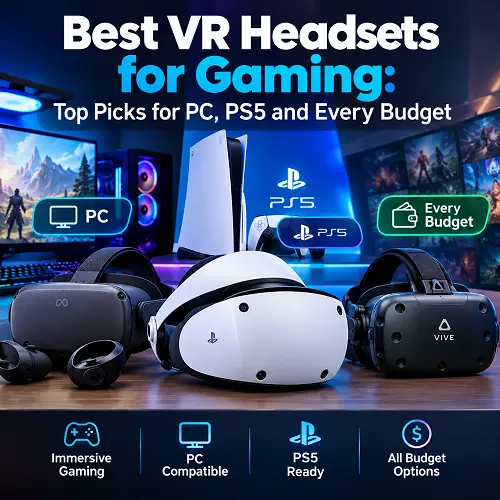
What Are the Three Types of Gaming VR Headsets?
There are three types of gaming VR headset:
- Standalone: It doesn’t require any computer or gaming console.
- PC VR: Compatible with gaming computer for playing VR games.
- PS5 VR: Intended for playing on PS5 platform.
The selection of headset depends upon your place of use and availability of hardware.
How Does a VR Headset Work?
A VR headset integrates different technologies that bring about the virtual reality experience.
The screen shows images for your left eye and right eye separately. The lenses are used to adjust the distance and angle of viewing of the images. Headset movement is tracked using sensors, while tracking of the headset and controllers can be done by cameras.
What Features Can Modern VR Headsets Have?
Modern VR headsets can have the following additional features:
- Motion sensors for head movement
- Inside-out cameras for tracking
- Hand or motion controllers
- Eye tracking on selected models
- Built-in or external audio
- Video pass-through cameras to see the physical world
What this means is that you get a dynamic virtual world that reacts to your actions instead of a static image of the world seen on television.
How Does VR Game Differ from Traditional Game?
A traditional game normally positions the player outside the gaming world. You watch the screen and then use the controller, keyboard, or mouse to control the character.
With VR gaming, everything changes. Head turns can cause changes in view, and movement of the controller can alter something within the virtual world.
What Games Work Well With VR?
This makes VR especially effective for:
- Racing and driving simulations
- Flight and space simulations
- First-person games
- Sports and fitness applications
- Exploration and adventure
- Virtual social experiences
VR also demands physical awareness. The need for sufficient room to maneuver in and prolonged play is physically exhausting as compared to normal gaming.
For racing and driving simulations, users may also combine VR with accessories such as Best Racing Wheels for PC to create a more immersive racing setup.
What Are Standalone, PC VR and PS5 VR Headsets?
Standalone VR Headsets
Standalone VR headsets have a separate processor, memory, battery and operating system. These headsets are convenient since they do not need to be connected to another gaming device in order to use the VR.
PC VR Headsets
The PC VR headsets rely on the computer to perform a lot of their processing. While this gives access to demanding PC VR games, the computer should have the necessary hardware and there might be the need for a cable or compatible wireless connection.
PS5 VR Headsets
PS5 VR works well within the PlayStation 5 ecosystem. For example, PlayStation VR2 has a USB type-C connection to PS5 with four integrated tracking cameras, eye-tracking and PS VR2 Sense controllers.
For users dealing with console connectivity problems, information about PS5 HDMI Port Repair in USA may also be relevant when checking the condition of their gaming setup.
How to Choose the Best VR Headset for Gaming?
Your gaming environment will determine which best VR headsets for gaming suits you rather than the specification sheet alone. A powerful PC user might go for high-resolution PC VR headsets, whereas a gamer that just wants wireless gaming might opt for the stand-alone headset.
What Should You Consider Before Buying?
Consider the following before purchase:
- Gaming platform
- Display quality
- Refresh rate
- Field of view
- Tracking
- Controller quality
- Comfort
- Wired or wireless operation
- Battery life
- Storage
- Available games
Not all VR headsets suitable for gaming apply to all gamers as everyone has unique hardware requirements.
When comparing available products and accessories, users can also explore the Best Online Tech Store for Shoppers for different technology products and gaming equipment.
Resolution & Image Quality
Resolution refers to the amount of visual detail that a VR headset can display. The higher the resolution, the more detailed the text, distant images, and game environment will be.
Lens quality matters as well. VR headsets with the same resolution may differ in terms of visuals due to the nature of their lenses and optical corrections.
What Should You Check in Display Quality?
When comparing VR headsets, you should consider:
- Resolution per eye
- Lens type
- Image clarity
- Edge-to-edge sharpness
- HDR support where available
- Lens adjustment options
Do not judge a headset by resolution alone. The complete display system matters more than one specification.
Refresh Rate and Field of View
Refresh rate refers to the frequency with which the display refreshes each second. Increased refresh rate may lead to smoother motion and more comfort during fast gameplay within VR.
The field of view or FOV is the angle that determines what part of the virtual environment you will see at once. The bigger FOV means that less of the virtual world will be invisible, thus making the experience more realistic.
For example, the refresh rates supported by PlayStation VR2 are 90 Hz and 120 Hz, and the field of view equals to approximately 110 degrees.
Tracking and VR Controllers
Tracking is one of the key components of the VR system.
Some headsets provide inside-out tracking through cameras that are incorporated in the headset and do not require any base stations.
What Is the Difference Between 3DoF and 6DoF?
It is also important that you know the distinction between 3DoF and 6DoF.
- 3DoF primarily monitors rotational motion, which includes looking left, right, up, and down.
- 6DoF is able to monitor both rotational and translational motion.
Controllers can provide another means of interaction. More precise tracking and good controls could make the game more intuitive, particularly while aiming, grabbing, throwing, and moving about.
Comfort and Weight of Headset
A headset may have all the great specifications and still be uncomfortable to use while playing games for long periods of time.
What Comfort Factors Should You Check?
Pay attention to:
- Overall weight
- Weight distribution
- Head strap design
- Face padding
- Lens adjustment
- Ventilation
- Glasses compatibility
Sometimes a headset which is properly balanced will have a more pleasant experience compared to one that is just well specified.
Wired or Wireless VR
Wired VR will usually mean a direct connection of the headset to the source. This can be important for PC gaming since the headset can receive input from the computer directly.
Wireless VR allows more flexibility while moving. Standalone headsets are naturally meant for that purpose, but wireless gaming always involves battery life considerations and network quality for PC VR when wireless PC streaming is used.
For those who play seated games, wired connection might be not that much of a problem, while wireless freedom becomes more important for room-scale VR.
PC, PS5 and Standalone Compatibility
Make sure that they are compatible.
The headset for PC VR can have requirements to graphics card, processor, USB connection, DisplayPort connection or wireless connection. The headset for PS5 needs to be able to work on the PlayStation platform. A standalone headset does not necessarily require another device for its basic operation.
Compatibility should be checked before focusing on resolution or other specifications because an otherwise excellent headset is not useful if it does not work with your setup.
Battery Life and Storage
For a battery-powered headset, there should be sufficient runtime based on how you intend to use it. Low runtime is okay for rare usage while more runtime or charging could be required by those who use them more often.
Storage capacity is more important for independent headsets since games and applications will be installed on the headset itself.
In case you will install a lot of games that have a lot of storage, a headset with higher capacity can help you to avoid removing and installing titles frequently.
Best VR Headsets for Gaming
Different types of users may require different best VR headsets for gaming based on their gaming needs. Therefore, what works best for one person may not work well for another.
Best VR Headset— Meta Quest 3
Meta Quest 3 is an excellent VR headset for gamers looking to get the top-notch VR experience. The headset offers not just standalone VR but can also run on compatible PC VR as well.
According to the specs that Meta currently lists for the product, the following features are included: the Snapdragon XR2 Gen 2 chip, 8GB RAM, 2064 x 2208 resolution per eye, 120Hz refresh rate, full color passthrough, and PC VR via Meta Quest Link and Air Link.
Key features:
- Standalone VR operation
- Snapdragon XR2 Gen 2 processor
- 8GB RAM
- 2064 × 2208 resolution per eye
- Up to 120Hz refresh rate
- Full-color passthrough
- PC VR support
Pros
- Flexible standalone and PC VR use
- High-resolution display
- Strong processing hardware
- Suitable for different types of VR gaming
Cons
- More expensive than entry-level models
- Battery life is limited by standalone use
- PC VR still requires a capable computer
Who should buy it?
The best VR headset overall category will be good for gamers that are looking for a single VR headset that will work for their stand-alone games, PC VR games, and MR applications without buying a PC-based VR headset.
Best VR Headsets for PC Gaming
PC VR could offer access to many different VR games and applications using the capabilities of a desktop computer or a gaming laptop. However, best VR headsets for PC gaming may differ from one another in terms of display quality, tracking, connectivity type, comfort, and hardware requirements.
Best PC VR Headset – Valve Index
Valve Index still can be considered an option for PC users who need a SteamVR-oriented headset. It is equipped with dual 1440 × 1600 RGB LCD screens and allows 80Hz, 90Hz, 120Hz, and even 144Hz refresh rates.
This headset uses SteamVR tracking and connects to the computer via DisplayPort and USB interface. There are also physical adjustments of IPD and eye relief.
In case of comparison of the best PC VR headsets, the Valve Index would be especially important if one needs a dedicated wired SteamVR setup.
Key features:
- Dual 1440 × 1600 LCD displays
- 80Hz, 90Hz, 120Hz, and 144Hz modes
- SteamVR tracking
- DisplayPort connection
- USB connection
- Physical IPD adjustment
- Eye-relief adjustment
- Index controllers
Pros
- High refresh-rate options
- Dedicated PC VR design
- SteamVR integration
- Adjustable fit and optics
Cons
- Requires a capable gaming PC
- Wired setup
- Requires SteamVR tracking hardware
Who should buy it?
The best PC VR headset class is recommended for PC gamers with the necessary hardware and who want an exclusive SteamVR experience instead of a standalone-first headset.
Best VR Gaming Headset for PC – Pimax Crystal Light
This device has been specially created for PC VR and has an emphasis on high-resolution display. The device offers 2880 x 2880 resolution per eye, 110 degrees field of view, and 72Hz, 90Hz, and 120Hz refresh rate choices.
According to Pimax, the device includes glass aspheric lenses, QLED with Mini-LED local dimming, inside-out tracking with 4 cameras, and DisplayPort 1.4a.
For people who need a VR headset for PC gaming, high resolution will be especially beneficial.
Key features:
- 2880 × 2880 resolution per eye
- 110° horizontal FOV
- 72Hz, 90Hz, and 120Hz refresh rates
- QLED + Mini-LED display
- Glass aspheric lenses
- Inside-out tracking
- DisplayPort 1.4a
- USB 3.0 connection
Pros
- Very high display resolution
- Wide field of view
- High refresh-rate options
- Strong option for detailed PC VR experiences
Cons
- Requires a powerful gaming PC
- Heavier than lightweight VR headsets
- PC-only design
Who should buy it?
A VR game headset that runs on a PC like Crystal Light will be ideal for someone who values image clarity and already owns a computer that is quite powerful enough to power a VR display.
Best VR Headsets by Price Range
Price is an important consideration when choosing the best VR headsets for gaming based on price range. Some cheap devices may offer a straightforward entry point to VR, while others with higher prices might emphasize displays, tracking, comfort, or PC capabilities.
Best VR Headset Under $500 — PICO 4
The PICO 4 VR headset may be a good choice when you want to purchase a VR headset at less than $500 based on the present market prices and availability.
It has both standalone and PC VR features and uses pancake lenses as its display mechanism.
Currently, its technical specifications include 2160 × 2160 pixels per eye resolution, 90Hz refresh rate, 105° field of view, Qualcomm XR2 processing, and 6DoF.
Key features:
- 2160 × 2160 resolution per eye
- Up to 90Hz refresh rate
- Pancake lenses
- 105° field of view
- Qualcomm XR2 processor
- 6DoF positioning
- Standalone operation
- PC VR support
Pros
- High-resolution display
- Pancake lens design
- Standalone and PC VR flexibility
- 6DoF tracking
Cons
- Availability varies by region
- Game ecosystem is smaller than some competitors
- Current pricing can vary significantly by market
Who should buy it?
The best VR headset under $500 category can suit users who want standalone VR with PC VR flexibility and prefer pancake optics without moving into a premium price range.
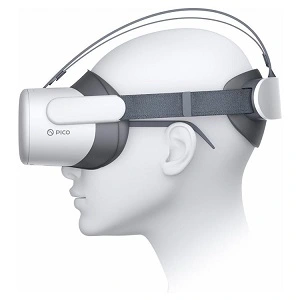
Best Affordable VR Headset — PICO G3
PICO G3 is an affordable VR headset option based on the specifications supplied for this article. It uses an all-in-one design with a 4K display, Qualcomm XR2 processor, and 3DoF controller.
Its supplied specifications include 3664 × 1920 resolution, a 98-degree field of view, a virtual screen size above 80 inches, polarized 3D glasses, and a 3DoF controller.
Key features:
- 4K display
- 3664 × 1920 resolution
- 98° field of view
- Qualcomm XR2 processor
- 3DoF controller
- All-in-one design
- Polarized 3D glasses
- Virtual screen size above 80 inches
Pros
- High-resolution display
- All-in-one design
- Qualcomm XR2 processor
- Wide 98° field of view
- Simple VR setup
Cons
- Uses 3DoF rather than 6DoF tracking
- Not intended for the same room-scale movement as 6DoF systems
- Buyers should understand the tracking limitation before purchasing
Who should buy it?
The best affordable VR headsets type may be useful to users interested in a fully-integrated VR headset, high resolution display screen, and simpler 3DoF VR experience than room-scale movements.
Best Budget VR Headset for PC Gaming – DPVR E4
A PC-tethered VR headset named DPVR E4 may be considered the budget VR headset for PC gaming choice for those who have a PC gaming computer already.
Current 2026 guides to buying suggest that the E4 is a budget PC VR headset that has a native DisplayPort interface.
A PC-tethered headset does not have its own processor to process and render games and relies on the power of the gaming computer.
Key features:
- PC-tethered VR design
- DisplayPort connection
- PC-based VR processing
- Designed for PC VR gaming
- Suitable for users with compatible gaming hardware
Pros
- Focused on PC VR
- Does not require standalone processing hardware
- Suitable for existing gaming PC setups
- Can provide a lower-cost route into PC VR
Cons
- Requires a compatible gaming PC
- Not a standalone headset
- Cable connection limits wireless freedom
- Availability can vary by market
Who should buy it?
A budget PC gaming VR headset is best for gamers who have a good gaming PC and want to experience VR gaming on it without buying an expensive headset.
Which VR Headset Is Best for PS5 Gaming?
For PS5 users, the best VR headsets for gaming include PlayStation VR2, which is a specialized headset designed to work with PlayStation 5. It offers features such as eye tracking, haptic feedback, inside-out tracking, and PS VR2 Sense controllers.
Best VR Headset for PS5 Gaming — PlayStation VR2
PlayStation VR2 has two OLED displays with 2000 × 2040 resolution for each eye and can support 90Hz and 120Hz refresh rate. The 110-degree field of view of this VR headset is designed to provide an increased view on supported VR games.
Features:
- Two OLED displays with 2000 × 2040 resolution per eye
- 90Hz and 120Hz refresh rates
- Approximate 110° field of view
- Four integrated cameras for inside-out tracking
- Eye tracking
- PS VR2 Sense controllers
- Headset feedback
- Direct connection to PS5
Why is PlayStation VR2 suitable for PS5?
- It is specifically designed for PS5 VR gaming
- Eye tracking can support compatible in-game features
- PS VR2 Sense controllers provide motion tracking and haptic feedback
- OLED displays provide strong contrast and detailed visuals
- Inside-out tracking does not require external tracking stations
Things to consider before buying:
- You need a PS5 for its main console VR experience
- The headset uses a wired connection
- It is not a standalone VR headset
- Some features and games require specific PS VR2 support
- If you are primarily a PC player.
Who Should Buy the PlayStation VR2?
PlayStation VR2 would suit people who already have their PS5 gaming console and require VR gaming on it. The device suits situations where the gaming experience requires PS5 gaming console and VR headset.
Conclusion: In case you need a VR headset to use only with your PS5 gaming, PlayStation VR2 would be the one you should consider buying first.
Frequently Asked Questions
Is it Necessary to Have a Gaming PC for a VR Headset?
No. Since stand-alone VR headsets have processors of their own, no gaming PC would be required to run the VR games supported by the headset. However, for the PC VR headsets, there is normally a need of compatible computer system.
Will You Be Able to Use a VR Headset With Your Gaming Laptop?
Yes, but again it all depends on the headset and the laptop configuration. Make sure to check out GPU of the laptop along with USB and/or DisplayPort connection of the laptop, processor, RAM of the laptop and software requirements of the VR headset.
Can You Use a VR Headset With PS5?
Yes, but the headset must support PS5. PlayStation VR2 is designed for PS5 and connects directly through USB Type-C.
Other VR headsets should not be assumed to work with PS5 simply because they support VR gaming.
What Are the Best VR Headsets for Gaming?
The best VR headsets for gaming depend on your gaming platform, budget, comfort preferences, and the features you need. Standalone headsets are suitable for wireless gaming, PC VR headsets can take advantage of a gaming computer, while PS5-compatible headsets are designed for console VR gaming.
What PC Specs Are Needed for VR Gaming?
Requirements differ depending on the headset and game you are playing. For instance, Sony requirements for the PC adapter for PS VR2 on the official website include Windows 10/11, 8 GB or more RAM, appropriate CPU, appropriate graphics cards, DisplayPort 1.4, USB and Bluetooth.
More advanced games require better hardware in order to operate with better graphics and smooth gameplay.
Are Standalone VR Headsets good for gaming?
Yes, they are especially useful for those who are looking for easy-to-carry and convenient wireless solution that does not involve a separate gaming computer.
The drawback of such hardware is the limited power of processing and the battery in comparison with the desktop computer.
What should you look for in a VR headset?
You have to begin with the issues of compatibility and comfort at first place. After that, you will be comparing resolutions, refresh rates, FOVs, tracking, controllers, connectivity, battery, memory and games.
Just because a VR headset is costly, it does not make it the right choice for you. You have to get those features which will work well for your gaming system.
Final Thoughts
Picking up the best VR headsets for gaming gets easy once you know what you want in terms of gaming experience. Headsets available standalone will help in wireless gaming, while the PC VR will benefit from your powerful computer hardware and the ones which are made for the PS5 will offer you the experience in the console.
All these issues of display quality, tracking, controllers, comfort, battery, and compatibility have to be taken into account before going for a purchase. A VR headset with excellent specifications can prove to be inappropriate if it is not compatible with your gaming system.
It all depends upon the level of experience you have as a gamer. Beginners would require simplicity, while more experienced gamers may look forward to better tracking, refresh rates, graphics and software availability. For readers looking for related technology products, the Pro Tech Base online store can also provide access to different tech products and accessories.
The Pro Tech Base online tech store is another place where users can explore technology products when comparing gaming hardware, accessories, and other devices.