Virtual reality makes gaming feel more interactive because you can move your hands, reach for objects, and perform actions inside a digital environment. The controllers you use have a major effect on how natural these interactions feel. A suitable pair can make it easier to pick up virtual objects, aim in supported games, navigate menus, and control your character without relying entirely on buttons.
The Best VR Controllers for your setup depend on the headset you own, the games you enjoy, and the features you need. Some controllers offer familiar thumbsticks and triggers, while others support finger-touch detection or advanced vibration effects. Comfort also matters because an awkward grip can become distracting during longer sessions. This article compares established controller systems for Meta Quest, PCVR, SteamVR, and PlayStation VR2, explains their main differences, and covers accessories that can improve comfort without requiring you to replace your existing hardware.
What Are VR Controllers?
VR controllers are handheld devices that let you interact with virtual environments. They usually include buttons, thumbsticks, triggers, and grip controls, while built-in sensors or tracking systems help the headset determine where the controllers are and how they move. Depending on the software, moving your hand can correspond to picking up an object, opening a door, selecting a menu option, or performing an action in a game.
VR Controllers vs. Traditional Gamepads
Unlike a traditional console gamepad, a motion controller is designed around physical movement in three-dimensional space. You can raise your hand, turn your wrist, or bring both hands together, and supported applications can translate those movements into virtual actions.
Not every experience needs motion controls, though. Racing games, platform games, and certain seated experiences may work better with a conventional gamepad, depending on the game’s design.
How Do VR Controllers Work?
How VR Motion Controllers Track Hand Movements
VR controllers combine physical input with a tracking system. When you press a trigger, move a thumbstick, or squeeze a grip button, the controller sends that input to the headset or connected computer. The system then uses the game’s control mapping to decide what should happen on screen. Motion tracking adds positional information, allowing supported software to represent your hand movements in the virtual world.
Inside-Out Tracking
Many modern standalone headsets use inside-out tracking, which relies on cameras and sensors on the headset to track the surrounding environment and compatible controllers.
External Tracking Hardware
Other PCVR systems use external tracking hardware, such as base stations, to follow supported devices. The two approaches serve similar purposes but are not interchangeable in every configuration.
Before buying a controller, check:
- Whether it works with your headset’s tracking system.
- Whether additional hardware is required.
- Whether your preferred games support its inputs.
What Is the Role of VR Controller Haptics?
Haptic feedback is the vibration or tactile response you feel when a controller reacts to something happening in a game. For example, a supported experience might use a short vibration when you select an item or a different effect when an object makes contact with a surface. These small signals can help an action feel more connected to what you see.
How Haptics Affect the Gaming Experience
Haptics vary between controller systems and games. A controller may have advanced vibration hardware, but the experience still depends on whether the software uses those features effectively.
Some titles offer subtle feedback, while others use stronger or more varied effects.
When comparing controllers, consider:
- Haptics
- Tracking
- Comfort
- Compatibility
Instead of treating vibration as the only measure of quality.
What Are the Different Types of VR Controllers?
VR Controllers with Finger Tracking
Finger tracking allows supported hardware and software to recognise certain finger positions or gestures. Depending on the device, this can mean detecting whether a finger is resting near a button or interpreting hand movements through cameras. The term covers different technologies, so it is important to distinguish controller-based finger detection from fully controller-free hand tracking.
Benefits of Finger Tracking
This feature can make supported interactions feel more natural, especially when an application lets you point, gesture, or manipulate virtual objects.
However, finger tracking does not mean every finger is independently tracked in every game. The hardware, software, and game design determine what is possible.
Check the official feature list for the exact headset and controller combination you plan to use.
Traditional VR Motion Controllers
Traditional motion controllers remain a practical choice for many VR games. They generally provide a physical grip, trigger, thumbstick, and buttons, making them useful for applications that require precise selections and repeated actions. Their familiar layout also helps players learn controls without memorising an entirely new system.
Main Benefits of Traditional VR Motion Controllers
The main benefit is versatility. The same pair may support games, fitness applications, virtual environments, and navigation, provided each application supports the controller.
Limitations of Traditional VR Motion Controllers
Their main limitation is that the physical buttons and grip shape can feel different between platforms. A controller made for one headset should not be assumed to work independently with another.
VR Gamepad Controllers
Gamepad-style controllers use a conventional layout with directional inputs, face buttons, and analogue sticks. They are useful for supported VR games that retain traditional controls or for seated play where large hand movements are unnecessary. Players who already use console or PC gamepads may find this layout easier to understand.
Gamepad Controller Compatibility
The important distinction is that a Bluetooth connection alone does not guarantee compatibility with a VR headset or application. The device must support the controller, and the game must recognise its inputs.
If you want motion-based interaction, a standard gamepad may not offer the same tracking features as dedicated VR controllers.
Best VR Controllers
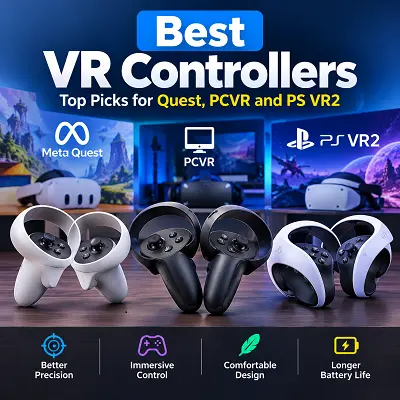
The most suitable choice depends on your platform. Meta Quest controllers are designed for the Quest ecosystem, Valve Index Controllers rely on a compatible SteamVR Tracking setup, and PlayStation VR2 Sense controllers are designed for Sony’s headset. The following recommendations explain where each system fits and what to check before purchasing.
Best VR Controllers for Meta Quest — Meta Quest 3 Touch Plus
For Meta Quest users, choosing the controller intended for their specific headset is usually the simplest approach. The Quest 3 Touch Plus controllers provide physical controls for applications that support them, while the headset’s tracking system enables movement-based interaction. They are suitable for a wide range of supported experiences, from casual games to more involved virtual environments.
Meta Quest Controller Compatibility
The key consideration is the exact headset generation. Quest 2, Quest 3, and Quest 3S are related products, but their controller and accessory compatibility should never be assumed to be identical.
Before ordering replacements or buying accessories, check the manufacturer’s compatibility information. A controller accessory that fits one model may not fit another, even if both devices look similar.
- Best for: People who own a Quest 3 and want controllers intended for that headset.
Best VR Controllers for PC Gaming — Valve Index Controllers
Valve Index Controllers are an option for PCVR enthusiasts whose equipment uses compatible SteamVR Tracking hardware. Their design supports grip-based interaction and finger-related input features in applications that implement them. These features can make them attractive to players who want more expressive hand interactions than a conventional button-only layout provides.
Compatibility Requirements
There is an important trade-off: the controllers are not a universal upgrade for every PCVR headset. A compatible headset and the required tracking hardware are essential.
You should also check whether your preferred games support the controller’s features and whether their input bindings work as expected.
- Best for: Enthusiasts with compatible SteamVR Tracking hardware who want more detailed hand interactions.
- Potential drawback: The additional hardware requirements can make this a less convenient option for someone starting from scratch.
Best VR Controllers for SteamVR — HTC VIVE Controller 2.0
SteamVR supports different controller types, but compatibility depends on the headset and tracking hardware. The HTC VIVE Controller 2.0 is an option for users with compatible HTC VIVE headsets and SteamVR Base Station 2.0 tracking setups. It features a multifunction trackpad, dual-stage trigger, HD haptic feedback, and a rechargeable battery.
What to Check Before Buying
Before purchasing, confirm that your complete setup supports the controller.
Check your:
- Headset model
- Base station version
- PC and software requirements
- Game compatibility
The controller is not a universal replacement for every VR headset, so check the manufacturer’s compatibility details before ordering.
- Best for: Existing HTC VIVE users with compatible base station tracking hardware.
Best VR Controllers for PlayStation VR2 — PS VR2 Sense
The PS VR2 Sense controllers are the natural choice for players using PlayStation VR2 on a supported PlayStation 5 setup. Their controls include analogue sticks, buttons, grip inputs, and adaptive triggers. Supported games can also use advanced haptic feedback to make interactions feel more responsive.
PlayStation VR2 Controller Compatibility
Sony’s controller system is designed for its own headset, rather than for unrestricted use with other VR devices. Sony confirms that PS VR2 Sense controllers are compatible with PS VR2 and PS5, while the headset is not compatible with the original PS VR controllers.
- Best for: PS5 owners who play compatible PS VR2 games.
- PC consideration: PS VR2 can also be used with a Windows PC through Sony’s PC adapter and the required software and connections. Some console features are unavailable or limited on PC, so check the official setup requirements before buying additional equipment.
Best VR Controllers with Finger Tracking — Meta Quest Touch Pro Controllers
The Meta Quest Touch Pro controllers are a useful option for players interested in more detailed finger input while retaining traditional physical controls. They support capacitive touch detection and additional sensing for index-finger movement, allowing compatible applications to represent certain finger positions and gestures. These features still depend on software support, so they should not be confused with completely controller-free hand tracking.
Understanding Finger-Touch Detection
This distinction matters because advanced sensing features do not automatically provide full finger tracking in every game. The Touch Pro controllers can detect specific finger movements, including index-finger curl and slide, but the practical benefits depend on how an application uses these inputs.
If a particular game does not support the relevant features, you may not notice a meaningful difference.
- Best for: Meta Quest users whose supported applications make use of advanced finger-input detection.
Best VR Motion Controllers for Immersive Gaming — HTC VIVE XR Elite Controllers
Motion controllers work particularly well in games where physical movement forms part of the experience. Reaching, turning your wrist, selecting objects, and using two hands can feel more direct than mapping every action to a traditional gamepad. The HTC VIVE XR Elite controllers offer six-degrees-of-freedom (6DoF) tracking, ergonomic grip buttons, triggers, and touch sensors for interactive VR experiences.
Factors That Improve Immersion
Immersion is not determined by controller hardware alone. The following factors also contribute to the experience:
- Tracking quality
- Comfortable grips
- Clear game instructions
- Responsive software
If you mainly play seated games with conventional controls, expensive motion-focused hardware may offer less value than it would for someone who prefers active VR experiences.
- Best for: HTC VIVE XR Elite users who enjoy movement-based games and interactive virtual environments.
Best Budget VR Controller — Meta Quest 3S Touch Plus
For buyers considering a more affordable Quest headset, the Quest 3S’s intended Touch Plus controller system is a sensible place to start. It provides the physical controls needed for compatible Quest applications without requiring you to assemble a separate PCVR tracking system. The total cost will depend on the headset bundle and the market where you purchase it.
What to Check Before Buying Budget Controllers
One important point: a lower-cost headset bundle does not necessarily mean its controllers are universal replacements.
Before purchasing controllers separately, check the model and replacement-part requirements. If you already own a different Quest headset, compare its compatibility details rather than assuming the lowest-priced listing is the correct option.
- Best for: New Quest 3S buyers looking for a straightforward controller setup.
Best VR Controller for Samsung Gear VR — Legacy Compatibility Considerations
Samsung Gear VR belongs to an older generation of smartphone-based virtual reality. Its controller and headset experience depends on the specific Gear VR model, compatible phone, software, and applications that remain available. This makes it different from current standalone headsets, which are designed to run VR applications without a phone inserted into the headset.
Samsung Gear VR Compatibility
If you still own Gear VR equipment, verify the exact model and whether your phone and desired applications remain supported. Do not purchase a modern Quest or PCVR controller expecting it to work with Gear VR.
For someone buying a VR setup today, a currently supported platform is generally the more practical choice because replacement hardware and compatible software are easier to assess.
- Best for: Existing Gear VR owners maintaining a legacy setup, rather than buyers looking for a new mainstream VR system.
Best VR Controller Grips and Accessories
A good controller is only part of the experience. An accessory may help you hold the controller more comfortably, keep it secure during movement, or adjust the grip to suit a particular activity. The most important rule is to buy accessories for your actual controller model rather than choosing something based only on appearance.
Best VR Controller Grips for Comfort and Control — AMVR Extended Controller Handles for Meta Quest 3
If you already own a Meta Quest 3 and want to change how its controllers feel in your hands, extended handles are an accessory worth considering. AMVR extended controller handle is designed for Quest 3 controller customisation and is described on ProTechBase as using silicone and plastic. It is an accessory rather than a standalone controller, so it does not replace the electronics, tracking system, or buttons of the original hardware.
Grip Comfort and Handling
The main reason to consider extended handles is the possibility of a different grip shape and handling experience. Whether that change feels more comfortable depends on your hand size, preferred grip, and the accessory’s fit.
A longer handle is not automatically better for everyone, and it should not be assumed to improve tracking accuracy or game performance.
What to Check Before Ordering
Before ordering, confirm the exact Quest 3 compatibility, the number of pieces included, the installation method, and whether the accessory leaves all buttons and tracking areas unobstructed.
The product page also advises checking the package contents and model information with the supplier. Its listing currently shows no customer reviews, so there is not enough review evidence on that page to make a strong claim about long-term durability.
Why Consider It?
- It offers a way to customise the grip of a compatible Quest 3 controller.
- Its listed silicone and plastic construction may appeal to buyers who prefer a different contact surface.
- It lets existing headset owners explore a comfort-related change without buying a complete new controller system.
What to check: The product’s exact fit, included components, attachment instructions, and return terms. Do not assume that an accessory made for Quest 3 will fit Quest 3S or Quest 2.
For buyers comparing compatible accessories and other technology products, the Pro Tech Base online tech store provides another place to review product listings and details before making a purchase.
Best VR Controller Straps for a Secure Fit
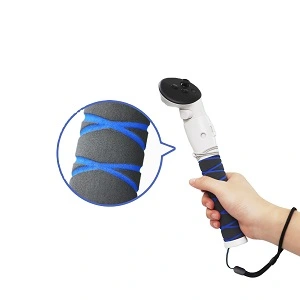
Controller straps can help keep a compatible controller attached to your hand while you play. They are especially relevant for games that involve frequent movement, although the correct strap must match the controller’s design. If you are comparing best VR head straps for your headset, check their compatibility separately because headset straps and controller straps serve different purposes.
Types of Controller Straps
Some accessories use a simple wrist loop, while others secure around the hand or attach through a model-specific mounting point.
Fit and Safety Considerations
The most important considerations are fit and unobstructed operation. A strap should not interfere with:
- Buttons
- Triggers
- Tracking components
- Normal circulation
Check the manufacturer’s instructions and inspect the attachment before playing. Straps are an additional layer of security, not a guarantee that a controller cannot be dropped or damaged.
Choosing Accessories for Different VR Games
The right accessory depends on the kind of interaction you prefer. Some people want a more comfortable grip for long sessions, while others prefer a secure attachment that reduces the chance of losing their hold during movement. Still others may not need any extra equipment at all. Accessories such as best VR lens protection products address a different concern, so choose them according to the headset component you want to protect rather than expecting them to improve controller performance.
Identify Your Specific Needs
Start by identifying a specific problem rather than buying several accessories at once.
- If the controller feels uncomfortable, check whether the shape or grip is the issue.
- If it feels loose in your hand, look into a compatible strap.
- If the standard controller already feels comfortable and secure, spending more may not improve your experience.
What to Look for in the Best VR Controller
Choosing between controller systems is easier when you compare practical features instead of relying on product names or marketing claims. Start with compatibility, then consider tracking, comfort, battery requirements, and the games you actually play. This order helps you avoid paying for features that your current setup cannot use.
Headset Compatibility and Tracking Technology
Compatibility should be your first check. Meta Quest controllers belong to the Quest ecosystem, PS VR2 Sense controllers are designed for PS VR2, and Valve Index Controllers require compatible SteamVR Tracking hardware. These systems have different connection and tracking requirements, so they should not be treated as interchangeable. The same model-specific approach is useful when comparing Best VR Prescription Lens Inserts, since lens inserts also need to match the intended headset.
Inside-Out Tracking vs. External Tracking
Inside-out tracking uses sensors and cameras on the headset to track the environment and compatible controllers. External tracking systems use additional equipment to follow supported devices.
Neither approach automatically makes a controller better for every player; the suitable choice is the one that works with your hardware and games.
Compatibility Checklist
Before ordering, check:
- The manufacturer’s compatibility page.
- The precise controller model.
- Any extra hardware required.
- The connection route and supported software if you play through a PC.
Button Layout, Grip Design, and Ergonomics
Buttons are important, but their placement and how the controller feels in your hand matter just as much. Thumbsticks are useful for directional movement, triggers support actions that require a press, and grip buttons provide another type of input. The exact layout varies by controller, so look for one that suits the games you play.
Understanding Controller Ergonomics
Ergonomics means how comfortably and naturally a device fits your body or hand. A controller that feels fine during a short session may become less comfortable over time. Overall headset comfort can also depend on accessories such as best VR face covers, which should be selected for the exact headset model and fit.
Consider:
- Your hand size.
- Your grip preference.
- Controller weight.
- How easily you can reach the buttons without changing your hold.
If possible, try the controller before purchasing it. If you cannot, check its shape, dimensions, return policy, and the availability of compatible comfort accessories. Avoid assuming that a larger or more expensive controller will necessarily be more comfortable.
Finger Tracking and Motion Accuracy
Finger tracking and motion tracking are related but different features. Motion tracking determines the controller’s position and movement, while finger-related features detect certain touches or gestures. Some controllers offer finger-touch detection without tracking every finger independently.
Factors That Affect Tracking Accuracy
Accuracy also depends on the complete system. The following factors can influence the experience:
- Lighting.
- The tracking environment.
- Headset design.
- Controller placement.
- Software.
If you notice tracking problems, check the manufacturer’s troubleshooting guidance before assuming the controller itself is faulty.
Choosing the Right Tracking Features
For most buyers, reliable basic tracking and responsive controls are more important than an advanced feature that their favourite games rarely use. Choose the feature set according to the applications you intend to play.
Haptic Feedback and Controller Performance
Haptic feedback adds tactile responses to compatible interactions. It can help communicate an event without requiring you to look away from the virtual environment. The quality of the experience depends on both the controller hardware and how a game uses it.
What to Consider When Comparing Haptics
When comparing options, check whether the games you enjoy support advanced vibration effects or adaptive triggers. A controller can include these features without every application making full use of them.
If you mainly play casual or seated experiences, comfort and straightforward controls may matter more than advanced haptics.
Battery Life and Charging
Battery arrangements vary by controller. Some use replaceable batteries, while others use built-in rechargeable batteries. The choice affects how you prepare for a session and what you need to maintain over time.
Replaceable Batteries
With replaceable batteries, keeping suitable spares available can make it easier to resume play.
Rechargeable Batteries
Rechargeable designs may be more convenient if you prefer charging between sessions, but you should understand how long charging takes and whether a cable or charging accessory is required.
Battery Life Considerations
Do not rely on a generic battery-life figure for every game or controller. Actual use can vary with features, battery condition, and usage patterns.
Check the manufacturer’s specifications for the exact model and consider how you normally play.
Price, Durability, and Availability
A sensible budget includes more than the initial purchase price. Replacement controllers, charging equipment, straps, grips, and shipping can all add to the total. If you already own a compatible controller, a modest accessory may be enough to address a comfort problem. Buyers searching for a best online tech store for shoppers should compare product details, compatibility information, final prices, and return terms before choosing where to order.
Build Quality and Replacement Parts
Build quality matters because controllers are handled frequently. Look for:
- Reliable product documentation.
- Clear compatibility information.
- A reasonable return policy.
- Accessible replacement parts.
Be cautious when a listing does not clearly identify the model or explain what is included.
Comparing Prices and Availability
Prices and stock also vary by region. Check the final checkout price rather than relying on an old comparison or a price shown in another country. The best value is a product that meets your needs, works with your equipment, and can be supported if something goes wrong.
Are VR Controllers Any Good?
Yes, dedicated VR controllers are useful for many virtual reality experiences because they connect physical movement with in-game actions. They allow you to reach for virtual objects, use directional controls, interact with menus, and perform movements that a traditional gamepad cannot represent in the same way. For supported applications, this can make interactions feel more direct.
Advantages of VR Controllers
- They connect physical movement with in-game actions.
- They allow you to reach for virtual objects.
- They support directional controls and menu interaction.
- They can make supported virtual experiences feel more direct.
Limitations of VR Controllers
However, motion controllers are not automatically the right choice for every type of game. Some players prefer a conventional gamepad for seated play or games built around familiar button layouts.
Controllers also require charging or battery replacement, and tracking or comfort issues can affect the experience.
Should You Choose VR Motion Controllers or a Gamepad?
The practical decision is simple: choose dedicated motion controllers if you want movement-based interactions and your headset supports them. Choose a gamepad when the application is designed for traditional controls.
If you already have a working setup, consider whether a specific limitation justifies buying additional hardware.
Frequently Asked Questions About VR Controllers
What Is the Best VR Controller?
The right controller depends on your headset and the games you play. Meta Quest 3 owners can start with the Touch Plus controllers designed for their headset. PS VR2 owners should use the supported Sense controllers, while Valve Index Controllers are an option for compatible SteamVR Tracking systems. Check compatibility before purchasing a replacement or upgrade.
What Are the Best VR Controllers for PC Gaming?
The best option depends on your PCVR headset. Valve Index Controllers suit compatible SteamVR Tracking setups, while PS VR2 Sense controllers can be used with PS VR2 through Sony’s supported PC adapter route. Quest controllers can also be used through the compatible Quest PCVR setup. Check the required hardware and game support first.
What Are the Best VR Controllers with Finger Tracking?
PS VR2 Sense controllers offer finger-touch detection for supported interactions. Valve Index Controllers also support finger-related input features in compatible applications. These technologies work differently, so compare the actual features and software support instead of assuming that every controller provides full individual finger tracking.
What Is the Difference Between VR Motion Controllers and Gamepad Controllers?
Motion controllers track hand movement and combine it with physical inputs such as buttons and triggers. Gamepads mainly use buttons, directional controls, and analogue sticks to send commands. Motion controllers suit experiences designed around physical interaction, while gamepads work well for compatible traditional or seated games.
Can You Use Any Controller with a VR Headset?
No. A controller must be compatible with the headset, its tracking system, and the software being used. A Bluetooth connection alone does not guarantee support. Before purchasing, check the manufacturer’s compatibility information and the game’s supported input devices.
What Are the Best VR Controllers for Samsung Gear VR?
There is no single modern controller recommendation that works with every Gear VR configuration. Owners should verify their specific headset model, compatible phone, available applications, and supported controller. Because Gear VR is a legacy platform, check current software availability before spending money on replacement equipment.
What Are the Best VR Controller Grips?
The best grip depends on your controller model, hand size, and preferred holding position. Look for an accessory that fits securely, leaves the buttons and tracking components unobstructed, and is clearly labelled for your exact device. For Quest 3 owners, the extended-handle accessory featured above is one option to investigate.
Are VR Controller Straps Worth Buying?
Straps can be useful if you want an additional way to keep compatible controllers attached to your hands. They may reduce the chance of accidental drops, but they cannot eliminate that risk. Choose a model-specific design and follow the manufacturer’s fitting instructions.
What Should You Check Before Buying a VR Controller Accessory?
Confirm the exact headset and controller model, the accessory’s fit, the package contents, and the return policy. Check whether installation requires tools or whether the accessory could block buttons or tracking components. If the product listing lacks important details, ask the seller before ordering.
What Is the Best VR Controller for SteamVR?
Valve Index Controllers are a relevant option for compatible SteamVR Tracking systems. If you use another headset, its intended controllers may be the simpler choice. Check the headset’s supported connection method, any required tracking equipment, and the input bindings for the games you want to play.
Final Thoughts
The right VR controller is the one that matches your headset, games, comfort preferences, and budget. Meta Quest users should begin with the controller system intended for their particular model, PS VR2 owners should use Sony’s supported controllers, and PCVR enthusiasts should check their tracking hardware before considering a different system.
Pay attention to the practical details that affect everyday use: button placement, grip comfort, motion tracking, battery arrangements, and compatibility with your favourite games. You do not need every available feature to enjoy VR, and an accessory is worthwhile only when it solves a genuine problem.
If your Quest 3 controllers already work well but you want to explore a different grip, consider the extended-handle accessory discussed above. If your current controllers are comfortable, secure, and responsive, there may be no reason to upgrade. Make the decision based on verified specifications and your own needs rather than buying extra equipment simply because it is available. You can also explore the Pro Tech Base online store for related technology products and accessories.