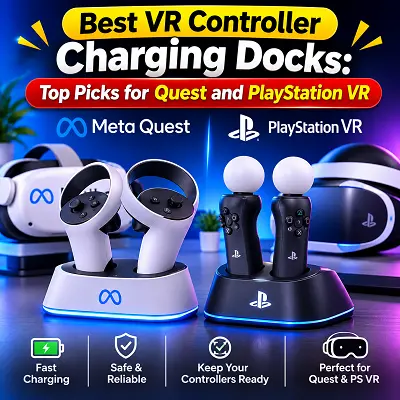
 Different VR headsets use different controller designs and charging systems. Meta Quest controllers, for example, generally use replaceable AA batteries, while PlayStation VR2 Sense controllers have built-in rechargeable batteries. This means that not every charging dock works with every headset or controller. Choosing the right option depends on your VR system, charging requirements, available space, and the accessories you already use.
What Is a VR Controller Charging Dock?
A VR controller charging dock is a dedicated stand or charging station designed to recharge compatible VR controllers. Some models can also charge the headset, making them a useful all-in-one solution for keeping VR equipment ready for the next session.
Instead of connecting separate cables every time, you can place compatible controllers into their charging positions. Magnetic contacts or dedicated charging adapters help establish the connection, depending on the design.
Most charging docks offer features such as:
- Convenient charging: Place compatible controllers on the dock instead of connecting cables individually.
- Organised storage: Keep controllers in one location when they are not being used.
- Charging indicators: LED lights can show whether a device is charging or fully charged.
- Multiple-device support: Some docks can charge a headset and two controllers together.
- Rechargeable battery support: Certain Quest docks include rechargeable battery packs and replacement controller covers.
Before buying one, check the product’s compatibility carefully. A dock designed for Meta Quest controllers may not support PlayStation VR2 Sense controllers.
How Do VR Controller Charging Docks Work?
Charging docks use different methods to transfer power to controllers. Some rely on magnetic charging contacts, while others use specially designed adapters that connect to the controller’s charging port.
With a magnetic charging dock, you usually need to position the controller correctly so that its charging contacts align with the dock. Magnets help guide the controller into place and maintain the connection.
Some Quest charging stations include rechargeable battery packs that replace the standard AA batteries. These packs allow compatible controllers to recharge when placed on the dock.
A typical charging process involves:
- Connect the charging dock to its recommended power adapter.
- Install any required rechargeable battery packs or charging adapters.
- Place the controllers in their designated positions.
- Check the LED indicators to confirm that charging has started.
- Remove the controllers when they are ready to use.
Charging speed depends on the dock, power adapter, battery capacity, and controller model. Always follow the manufacturer’s instructions rather than assuming that every dock supports the same charging time.
What Is the Difference Between VR Charging Docks?
Not all VR charging docks are designed for the same purpose. Some focus on charging Quest headsets and controllers, while others are made specifically for PlayStation VR2 controllers.
The main differences include:
- Quest charging docks: Some models charge the headset and controllers together, often using rechargeable battery packs for the controllers.
- PSVR2 controller docks: These are designed for the two PlayStation VR2 Sense controllers and use compatible charging adapters.
- Controller-only charging stations: These charge controllers without providing a charging connection for the headset.
- Rechargeable battery systems: Some accessories replace disposable batteries with rechargeable packs that can be charged separately or through a dock.
If you use Meta Quest controllers, remember that standard Touch controllers generally rely on replaceable AA batteries. A compatible rechargeable battery kit can make charging more convenient. You can also explore the Best VR Controllers to understand the different controller options available for Quest, PCVR, and PlayStation VR2.
Best VR Controller Charging Docks: Top Picks
The following best VR controller charging docks cover different VR systems and charging needs. The Kinwin and AMVR models are designed for compatible Meta Quest headsets, while Sony’s official charging station is made specifically for PlayStation VR2 Sense controllers.
1. Best Overall VR Controller Charging Dock – Kinwin Magnetic Charging Dock
The Kinwin Magnetic Charging Dock is an option for Meta Quest users who want a dedicated place to charge and store their headset and controllers. Compatible versions are marketed for Quest 3 and Quest 3S, while some listings may also mention Quest 2. Always confirm the exact model before ordering.
Its magnetic charging design helps make placing compatible devices on the dock easier. Depending on the package, the charging station may include rechargeable battery packs and replacement controller covers, allowing users to recharge their controllers without repeatedly replacing disposable batteries.
Key Features
- Designed for compatible Meta Quest headsets and controllers.
- Magnetic charging connections for convenient placement.
- Some versions support charging the headset and controllers together.
- Rechargeable controller battery packs may be included.
- LED lighting provides visual feedback.
- Certain versions advertise protection against overcharging and short circuits.
- Available versions may have different power-adapter specifications.
Benefits
- Keeps compatible VR equipment organised in one location.
- Reduces the need to connect separate charging cables.
- Rechargeable battery packs can reduce dependence on disposable AA batteries.
- Magnetic connections make everyday placement more convenient.
Things to Check Before Buying
- Confirm whether the selected version supports Quest 3, Quest 3S, or Quest 2.
- Check whether rechargeable battery packs and controller covers are included.
- Verify the required power adapter and its wattage.
- Make sure your existing headset accessories do not interfere with the dock.
For buyers comparing VR accessories and related technology products, the Pro Tech Base online store is another place to explore product information and available options.
2. Best VR Controller Charging Dock for Meta Quest 3 and 3S – AMVR CD2 Charging Dock
The AMVR CD2 Charging Dock is a three-in-one charging solution designed for compatible Meta Quest headsets. It is marketed for Quest 3 and Quest 3S, offering a central place to charge the headset and controllers.
One useful feature is its magnetic charging arrangement. The dock is designed to make placing compatible equipment easier, while its LED indicators help users understand the charging status.
The product listing also advertises compatibility with certain original, Halo-style, and Elite-style head straps. However, compatibility can depend on the exact strap design and dock configuration, so check the manufacturer’s compatibility information before purchasing.
Key Features
- Three-in-one charging design for compatible Quest equipment.
- Magnetic charging connections.
- LED indicators for charging status.
- Designed for Quest 3 and Quest 3S versions.
- Advertised compatibility with selected head strap designs.
- USB 3.0 data-transfer support is advertised in the product information.
Charging Indicators
The manufacturer describes different LED signals to help users identify the charging condition:
- No light: The device may not be connected or charging.
- Flashing green: Indicates charging on supported configurations.
- Solid green: Indicates that charging is complete.
- Red indicator: May signal an error or charging issue.
The product information also mentions using a 30W or higher power adapter for certain flashing-red troubleshooting situations. Follow the instructions supplied with your particular version.
Benefits
- Provides a dedicated charging location for compatible devices.
- Reduces cable clutter around a gaming setup.
- Offers visual charging-status information.
- Can be useful for users who regularly charge their headset and controllers together.
Things to Consider
- Check the exact Quest model supported by the version you are buying.
- Confirm whether the required adapter is included.
- Verify compatibility with your head strap.
- Do not assume that every package includes the same accessories.
If you are comparing more VR equipment and accessories, the Pro Tech Base online tech store can also help you explore related product categories.
3. Best VR Controller Charging Dock for PlayStation VR – Sony PSVR2 Dock
The Sony PlayStation VR2 Sense Controller Charging Station is designed specifically for PSVR2 Sense controllers. Unlike some Quest charging solutions, it focuses on charging the two controllers rather than the VR headset.
The station uses dedicated charging adapters that connect to the controllers. Once the adapters are installed, users can place the controllers into their charging positions without connecting a USB cable to each controller individually.
Sony lists an approximate charging time of 1.5 hours for controllers starting from an empty battery. Actual charging time may vary depending on the condition of the battery and charging setup.
Key Features
- Designed for PlayStation VR2 Sense controllers.
- Charges two controllers at the same time.
- Uses dedicated charging adapters.
- Includes an AC adapter and power cord.
- Allows controllers to be stored while charging.
- Uses built-in rechargeable controller batteries.
Benefits
- Provides a dedicated charging solution for both PSVR2 controllers.
- Helps keep the gaming area organised.
- Avoids connecting separate charging cables to the controllers.
- Offers a convenient charging location between gaming sessions.
Things to Consider
- It is designed for PSVR2 Sense controllers, not Meta Quest controllers.
- It does not charge the PSVR2 headset.
- The charging adapters must be installed correctly.
- It is a separate accessory, so check what is included in the package.
For PSVR2 owners who want a straightforward charging solution, Sony’s official station is a suitable option because it is specifically designed for the console’s Sense controllers.
What to Consider Before Buying a VR Controller Charging Dock
Choosing the right charging dock requires more than checking its appearance. Compatibility, charging performance, battery support, and safety features can all affect how useful it will be in everyday use.
VR Headset and Controller Compatibility
Compatibility should be your first consideration. Charging docks are usually designed around specific controller shapes and charging connections. A Quest 3 dock, for example, should not be assumed to work with Quest 2 or PSVR2 controllers.
Check these details before purchasing:
- Supported headset models.
- Supported controller versions.
- Whether rechargeable battery packs are included.
- Whether the dock requires separate charging adapters.
- Whether your existing accessories affect the fit.
Other headset accessories also have their own compatibility requirements. For example, Best VR Prescription Lens Inserts are designed around particular headset models and should be checked separately from charging dock compatibility.
Charging Speed and Power Requirements
Charging speed depends on the dock’s design, the power adapter, and the battery being charged. Some manufacturers advertise specific charging times, but these figures may be based on particular conditions.
Before buying, check:
- Recommended adapter wattage.
- Supported input voltage and current.
- Estimated charging time.
- Whether the dock charges multiple devices simultaneously.
- Whether the adapter is included in the package.
Using the recommended power supply helps the dock operate as intended. Avoid using an adapter that does not meet the manufacturer’s specifications.
Battery Capacity and Rechargeable Packs
Some Quest charging docks include rechargeable battery packs for controllers. These replace standard AA batteries and recharge through the dock.
Battery capacity is important because it affects how long controllers can operate between charging sessions. However, a higher advertised capacity does not automatically mean better overall performance. Battery quality, compatibility, and charging behaviour also matter.
Look for:
- Clearly stated battery capacity.
- Rechargeable battery packs included in the package.
- Replacement battery availability.
- Properly fitting controller covers.
- Manufacturer information about battery lifespan and charging cycles.
PSVR2 Sense controllers are different because they already have built-in rechargeable batteries. They do not require the same replacement battery system used by some Quest charging docks.
Magnetic Charging Contacts
Magnetic contacts make it easier to position controllers on compatible charging stations. They can reduce the effort involved in connecting cables and help keep devices in their correct positions.
However, the contacts must align properly. Dust, dirt, or incorrect placement can sometimes interrupt charging.
Choose a dock with secure positioning and clear instructions for placing each controller. Keep the contacts clean and avoid forcing a controller into the charging position.
LED Indicators and Charging Status
LED indicators help users check whether a controller is charging, fully charged, or experiencing a connection problem.
Different manufacturers use different light patterns, so check the product manual to understand what each indicator means.
Useful indicator features include:
- A clear charging signal.
- A separate full-charge indication.
- An error or warning signal.
- Lights that are not unnecessarily bright during use.
Design, Size, and Build Quality
A charging dock should fit comfortably into your gaming area. Consider its dimensions, stability, cable arrangement, and the amount of space needed for the headset and controllers.
Build quality also matters because the dock will be used regularly. A stable base, properly fitted charging positions, and durable connectors can make everyday use easier.
If you use an aftermarket headset strap, check the dock’s available clearance before buying. Some larger or differently shaped straps may not fit as neatly as the original headset configuration. This is also worth considering when comparing best VR head straps for comfort and headset support.
Safety and Charging Protection
Charging accessories should provide reliable power delivery and clear safety information. Some manufacturers advertise overcharge, overcurrent, or short-circuit protection, but the exact features vary by model.
Check whether the manufacturer provides details about:
- Overcharge protection.
- Overcurrent protection.
- Short-circuit protection.
- Recommended power adapters.
- Battery handling and charging instructions.
Do not leave damaged charging equipment connected to power. If a dock becomes unusually hot, produces an unusual smell, or shows signs of damage, disconnect it and follow the manufacturer’s guidance.
Benefits of Using a VR Controller Charging Dock
A charging dock can make VR equipment easier to manage, especially if you use your headset frequently.
Keeps Your Gaming Area Organised
Controllers, cables, and charging adapters can quickly create clutter. A dedicated dock provides a fixed location for compatible equipment, making it easier to store everything after a gaming session.
Reduces Repeated Cable Connections
Magnetic contacts and dedicated charging adapters can make charging more convenient. Instead of connecting individual cables each time, you can place compatible controllers directly onto the station.
Helps Keep Controllers Ready
A charging dock makes it easier to recharge controllers between sessions. This can be particularly useful for users who regularly play VR games and do not want to discover that their controllers have run out of power.
Supports Rechargeable Battery Systems
Some Quest charging docks include rechargeable battery packs. These can reduce the need to keep buying disposable AA batteries, although users should check the quality and replacement availability of the included packs.
Limitations of VR Controller Charging Docks
Despite their convenience, charging docks are not perfect for every user.
- Model restrictions: A dock may support only specific headset and controller versions.
- Additional cost: Some charging stations require a separate purchase of rechargeable battery packs or power adapters.
- Limited compatibility: Larger head straps or third-party accessories may not fit every dock.
- Extra space: A charging station needs a dedicated location near a suitable power outlet.
- Different charging systems: Quest and PSVR2 controllers use different battery arrangements, so one dock cannot be assumed to support both.
Checking these limitations before purchasing can help you avoid compatibility problems.
Other VR Accessories Worth Considering
A charging dock is useful for keeping controllers powered, but it is only one part of a complete VR setup. Depending on how you use your headset, other accessories may also improve comfort, tracking, and equipment protection.
VR Hand Tracking Accessories
Players interested in controller-free interaction can explore Best VR Hand Tracking Accessories. These accessories can support hand tracking or improve tracking capabilities on compatible VR systems. Their usefulness depends on the headset, software, and games being used.
VR Lens Protection
VR headset lenses need careful handling because scratches can affect the viewing experience. Products covered in Best VR Lens Protection can help users understand the available options for protecting lenses when storing or using their headsets.
Frequently Asked Questions
1. What Is a VR Controller Charging Dock?
A VR controller charging dock is a charging station designed for compatible virtual reality controllers. It may use magnetic contacts, charging adapters, or rechargeable battery packs to recharge controllers and keep them organised.
2. Do Charging Docks Work With Meta Quest 3?
Yes, several charging docks are designed for Meta Quest 3. However, compatibility depends on the exact dock model and whether it supports the headset, controllers, and any included rechargeable battery packs.
3. Can I Use a Charging Dock With Meta Quest 3S?
Some charging stations are designed for both Quest 3 and Quest 3S. Always check the manufacturer’s compatibility list because the included battery covers and charging components may differ between versions.
4. Can a Charging Dock Charge the Headset and Controllers Together?
Some Quest charging docks support simultaneous charging of the headset and controllers. Controller-only stations do not provide this feature, so check the product description before purchasing.
5. Does the Sony PSVR2 Charging Station Charge Both Controllers?
Yes. Sony’s official PSVR2 Sense Controller Charging Station is designed to charge two Sense controllers at the same time. It does not charge the PSVR2 headset.
6. What Is the Difference Between a Charging Dock and a Regular Charger?
A regular charger generally connects directly to a device through a cable. A charging dock provides a dedicated stand or station where compatible devices can be placed for charging and storage.
7. Can I Charge VR Controllers Without a Dock?
Yes. The available method depends on the controller. Some controllers use replaceable batteries, while others support direct USB charging or dedicated charging accessories. Check your controller’s instructions for the correct method.
8. Are Rechargeable Batteries Better Than Disposable AA Batteries for Quest Controllers?
Rechargeable batteries can be more convenient for regular VR users because they can be reused instead of repeatedly replacing disposable batteries. However, battery quality, capacity, and compatibility should be considered before buying.
9. Do VR Charging Docks Require a Special Power Adapter?
Some docks include their own power adapter, while others require a compatible adapter purchased separately. Always check the recommended wattage and power requirements for the specific model.
10. Can I Use a Third-Party Head Strap With a VR Charging Dock?
Some docks support selected third-party head straps, but compatibility is not universal. Larger straps or different designs may prevent the headset from sitting correctly on the charging station. Check the dock manufacturer’s compatibility information before purchasing.
Final Thoughts
A VR controller charging dock can make your gaming setup more organised and convenient by providing a dedicated place to recharge compatible controllers. The Kinwin Magnetic Charging Dock and AMVR CD2 are among the best VR controller charging docks to consider for supported Meta Quest headsets, while Sony’s official charging station is designed for PlayStation VR2 Sense controllers. The right choice depends on your headset, controller type, charging preferences, and budget.
Before making a purchase, check the supported models, included accessories, power requirements, and charging features. A little research can help you choose a dock that fits your setup and avoids unnecessary compatibility problems. You can also explore a best online tech store for shoppers to compare technology products and find accessories that suit your requirements.