
A good monitor arm will help you improve the appearance, comfort, and functionality of your home office. Rather than having your monitor stay on its initial base, a monitor arm allows you to move it around, adjust its height and viewing angle to fit your desk and seating. For users building a complete workstation, choosing the best monitor arms for home offices can make the workspace more practical.
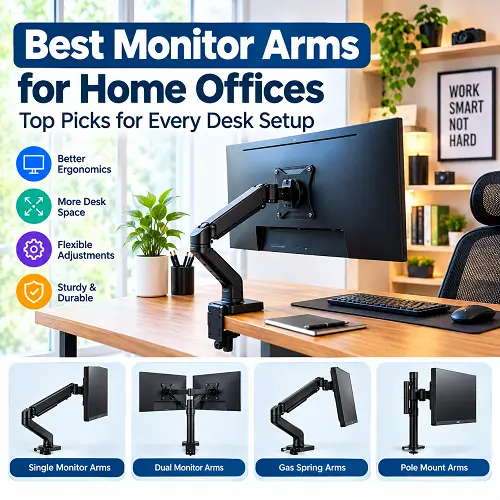
Monitor arms may also help you save a lot of room on your desk. Monitor arms will work not only with basic one-monitor systems but also with two monitors, three monitors, and even ultra wide monitors. It all depends on your monitor type and size, the VESA pattern, desk thickness, mounting, and mobility needed.
What Is a Monitor Arm and How Does It Work?
Monitor arms are an accessory type that holds the monitor to your desktop or wall rather than using the monitor’s original mount. Typically, they connect to the monitor by way of a VESA mount located on the back of the monitor. Once installed, you can move the screen up or down, tilt it, swivel it from side to side, and sometimes rotate it between landscape and portrait mode. Some models use a gas spring mechanism. This makes the arm easier to move and helps balance the monitor’s weight.
For a home office, a monitor arm can provide:
- More usable desk space
- Better monitor height
- Easier viewing-angle adjustment
- Cleaner cable management
- More flexibility for different working positions
How to Choose the Right Monitor Arm for Your Desk
Choosing an arm is not only about looks. It needs to match both your monitor and desk. When comparing the best monitor arms for home offices, checking these basic requirements can help you avoid choosing an arm that does not fit your setup.
Check Monitor Size and Weight
Monitor size and weight are two of the most important specifications to check. A monitor arm for 32 inch monitor should have enough weight capacity to safely support the display. A lighter arm may work well with 24- or 27-inch monitors but may not be suitable for large ultrawide screens. For heavier displays, choose a heavy duty monitor arm with a suitable weight range.
Always check:
- Monitor size
- Monitor weight without its original stand
- Maximum arm capacity
- Recommended screen-size range
Check VESA Compatibility
Most monitor arms support common VESA patterns such as 75×75 mm and 100×100 mm. Check the mounting holes on the back of your monitor and compare them with the arm’s specifications. Proper VESA compatibility ensures the monitor attaches securely.
Check Your Desk Thickness
It is essential to get a suitable clamp that fits your thick desk when getting a monitor arm for thick desks. Take the measurement of your desk thickness and ensure that there is sufficient room under your desk to accommodate the clamp. The clamp will enhance the stability of your monitors.
Choose Between Clamp and Grommet Mounts
Most monitor arms that fit in desk setups are mounted either using C-clamps or grommet mounts. A C-clamp mount is mounted at the edge of the desk. It is relatively easy to install. Grommet mount involves passing the monitor through a drilled hole in the desk.
Consider Arm Reach and Adjustment
The arm should provide enough movement for your workspace. Look for:
- Height adjustment
- Tilt
- Swivel
- Rotation
- Forward and backward reach
A longer arm can be useful for deep desks or when you need to position the monitor farther away.
Consider Gas Spring Support
Gas spring monitor arms provide smoother movement and help balance the monitor’s weight. They are especially useful if you frequently adjust your monitor between different sitting or standing positions and viewing angles.
Best Monitor Arms for Home Offices in 2026
This list includes various types of home office configurations. Factors such as screen size, load capacity, VESA compatibility, adjustment capability, mounting type, arm span, and general stability were taken into account. These factors are important when selecting the best monitor arms for home offices for different desk and monitor configurations.
Best Single Monitor Arm – Ergotron LX Desk Monitor Arm
Ergotron LX Desk Monitor Arm monitor arm provides an excellent option for a conventional single monitor home office setup. It has a highly adjustable design that allows moving the screen around and changing its orientation without taking much desk space.
It is especially suitable for those who like to keep their workplace clean with a single screen only.
Why it stands out:
- Designed for single-monitor setups
- Supports common VESA mounting patterns
- Flexible height and viewing-angle adjustment
- Desk-mounted design
- Helps free up desk space
- Integrated cable management
- Good choice for everyday office work
If you mainly work with documents, browsers, spreadsheets, or video calls, a single arm like this can provide all the flexibility you need without adding unnecessary hardware.
Best Dual Monitor Arm — Adjustable Gas Spring Dual Monitor Arm
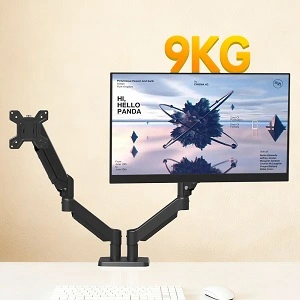
Those who usually use two monitors at work can consider using an adjustable gas spring dual monitor stand. This type of stand allows for mounting monitors up to 32 inches with a 9 kg capacity.
The gas spring makes the process of adjusting easier, and the two arms let users position the monitors next to each other.
Key features include:
- Supports monitors up to 32 inches
- Up to 9 kg weight capacity
- Gas spring adjustment
- VESA 75×75 and 100×100 support
- Height adjustment
- Tilt and swivel movement
- Desk mounting
- Suitable for multitasking and productivity
It is a useful option for users who keep email, research, documents, or communication tools open on a second screen. The best nnline tech store for shoppers offers this product for shoppers looking for reliable tech products, available at Pro Tech Base online tech store.
Best Triple Monitor Arm — VIVO Triple Monitor Desk Mount
The triple monitor mount is ideal when a single display is inadequate for your processes. The VIVO Triple Monitor Desk Mount is built for people who need to have three displays set up in their workspace. The mount is suitable for applications such as trading, video editing, gaming, programming, and others where multiple monitors are advantageous.
Prior to installation, ensure that your desk will support the weight of the monitors and mount.
Best suited for:
- Three-screen productivity
- Trading workstations
- Video editing
- Gaming setups
- Multitasking
- Users who need several applications visible at once
Best Monitor Arm for Ultrawide Monitors — Ergotron HX Monitor Arm
Large ultrawide and curved displays need stronger support than many standard monitors. The Ergotron HX Monitor Arm is designed for larger and heavier displays and is a good choice when a regular monitor arm may not provide enough support. Its design is suitable for large screens where stability is particularly important.
When choosing an ultrawide monitor arm, always compare the exact monitor weight with the arm’s supported weight range. A display that is too heavy can cause unwanted movement or make adjustment difficult.
Best Long Monitor Arm for Deep Desks — AVLT Long Pole Monitor Arm
A deep desk can make a standard arm feel too short. The AVLT Long Pole Monitor Arm is designed for users who need additional reach and height flexibility. Its longer design can help position a monitor farther across a large workspace while maintaining a comfortable viewing distance.
It is particularly useful for:
- Deep home-office desks
- Large workstations
- Users who need extra reach
- Flexible monitor positioning
- Displays that need greater height adjustment
Single vs Dual vs Triple Monitor Arms
Single Monitor Arm
A single monitor arm is the simplest option. It serves great for those who require just one screen and wish to cut down on the space occupied by the stand of the original monitor.
In addition, it is simpler to install and customize compared to multiple monitor systems. For users who already have other desk accessories, such as the Best Laptop Cooling Pads, keeping the monitor setup simple can also help maintain usable desk space.
Dual Monitor Arms
Dual monitor arms serve great for multitasking. Two programs can be opened simultaneously, like one program on one screen and another on the other. A dual monitor arm system serves great for working from distance, programming, researching, and content creation.
Triple Monitor Arms
A triple monitor arm system serves great for people who need more workspace. Three screens give more space for programs, timelines, dashboards, or means of communication. However, with three monitors there will be more weight, which requires a more robust desk.
Quad Monitor Arms
A quad monitor arm supports four screens. This type of system is better used for advanced workstations rather than home offices. Four screens serve great for professional trading, monitoring of systems, heavy data workflows, and productivity environments.
Wall-Mounted vs Desk-Mounted Monitor Arms
Wall-Mounted Monitor Arms
With wall mounting of the monitor arm, there will be plenty of desk space left since the monitor itself will be mounted on the wall. Wall mounting will work effectively for a permanent station, but it would need a proper wall and mounting points. It might not be the best solution for those who rent or have to change workplace often.
Monitor Arms that Are Mounted to Desk
The monitor arms mounted to a desk will be easier to change and remove. They use C-clamp or grommet mounts. This kind of mounting is more flexible for home office users since one will be able to adjust monitor position without drilling holes into the wall.
What is the Best Solution for a Home Office User?
For most home office users, desk mounting will be a better option. It will be easier to install and more flexible than wall mounting. Wall mounting can be considered in case of limited desk space or permanent station setup.
Best Monitor Arms for Different Desk Setups
Best Monitor Arm for Small Desks
Small desks benefit from compact arms that remove the large original monitor stand from the desktop. A single monitor arm is usually the best starting point because it gives you more free space without adding the weight and complexity of a multi-monitor mount. This can be especially useful when you want the best monitor arms for home offices without making a small workspace feel crowded.
Best Monitor Arm for Thick Desks
When choosing a monitor arm for thick desk setups, pay close attention to the clamp’s maximum supported thickness. Also check the desk edge and underside. Even if the clamp technically fits, the desk should be strong enough to support the monitor without excessive movement.
Best Monitor Arm for Standing Desks
A sit stand monitor arm needs enough vertical movement to follow the desk as it moves between sitting and standing positions. Look for smooth height adjustment, a suitable reach, and strong support. The arm should remain stable while the desk is raised or lowered.
Best Monitor Arm for Ultrawide Monitors
A monitor arm that is ultra wide should be bought depending on the weight and the VESA pattern of the display. Curved monitors are heavy and add weight on the arm which makes stability and weight tolerance essential aspects.
Best Monitor Arm for Curved Monitors
The best monitor arm for curved displays should accommodate the VESA pattern and weight of the monitor. It is the weight and the size that affect stability. The curviness of the display does not necessarily interfere with mounting the arm. The flexible nature of the monitor arm can help you set the right viewing angle.
Best Monitor Arm for 32 Inch Monitors
The monitor arm for 32 inch monitors should have enough weight capacity for the display. When buying an arm for a 32 inch monitor, the weight capacity, the VESA pattern and arm reach are more important than the screen size.
How to Set Up a Monitor Arm
Attach the Desk Clamp or Mount
Secure the clamp or grommet mount to the desk according to the manufacturer’s instructions. Make sure it is firmly tightened before attaching the monitor.
Install the VESA Plate
Attach the VESA plate to the mounting holes on the back of the monitor. Use the correct screws and avoid overtightening them.
Attach the Monitor
Carefully connect the monitor to the arm. Larger displays may require two people during installation to avoid damaging the screen.
Adjust Arm Tension
Adjust the arm tension so that the monitor stays in position without slowly dropping or moving upward.
Set the Correct Monitor Height
For comfortable everyday use, position the monitor so you can look at the screen without constantly bending your neck downward.
Organize the Cables
Use the built-in cable clips or cable channels to route power and display cables neatly along the arm.
A clean monitor arm setup should leave enough cable slack for normal movement without allowing cables to hang loosely across the desk.
Common Monitor Arm Buying Mistakes
Avoid these common mistakes before purchasing:
- Choosing an arm with insufficient weight capacity
- Ignoring VESA compatibility
- Not measuring desk thickness
- Using a standard arm for an unusually heavy ultrawide
- Choosing the wrong mounting system
- Not checking arm reach
- Ignoring cable management
- Buying a multi-monitor mount when one screen is enough
- Forgetting to check the desk’s strength
- Failing to account for the monitor’s actual weight
The safest approach is to compare the monitor and desk specifications with the arm specifications before ordering. The same approach is useful when choosing other workspace equipment, including Best Docking Stations for Laptops.
Frequently Asked Questions About Monitor Arms
What is the best monitor arm for a home office?
The right choice depends on your monitor and desk. A single arm is usually enough for one display, while dual or triple mounts are better for multitasking. For large displays, choose a stronger arm designed for higher weight capacity.
Are monitor arms worth it for a desk?
Yes. Monitor arms in desktop settings provide space savings and easy adjustment of height and angle of view. Monitor arms become very handy if you have an original stand taking up much space.
Can monitor arm handle a 32 inch monitor?
Yes, lots of monitor arms will be able to accommodate 32-inch screen, but you need to pay attention to weight and VESA compatibility of arm. Never choose an arm by screen size.
Are dual monitor arms more productive?
Maybe, because dual monitor arms give you possibility to work simultaneously with two programs. But a second screen is only necessary if your workflow needs it.
What is the best monitor arm for an ultrawide monitor?
It should have adequate weight support, right VESA, and stability.
Do you need a thick monitor arm for your large and curved monitors?
A bulky monitor arm is better for large and curved monitors.
Which is better: wall monitor arm or desk monitor arm?
There is no better option; wall monitor arm saves desk space while desk monitor arm is easier to install and reposition.
Steps in installing a monitor arm
First fix the desk clamp or grommet mount, fix the VESA plate, fasten the monitor, adjust the tension of the arm, fix the monitor height, and finally organize cables.
Final Thoughts
Right monitor arm is largely determined by your monitor, desktop, and work process. Single monitor arms are ideal for average home office, while double arms fit multitasking much better. Triple arms are needed for advanced multi-monitor stations and heavy-duty arms are better with regard to larger ultrawide monitors.
Long reach design is the best option in case you need to work with deep desks. For those who are using standing desks, it is important to have good height adjustment. The most important thing is that you should always pay attention to monitor weight, VESA compatibility, desk thickness and mounting needs.
With right best monitor arms for home offices, you will be able to organize your desk perfectly. Right monitor arms for desk arrangement may help you to make your office more organized and comfortable. Users looking for related technology and workspace products can also explore the Pro Tech Base online store for other useful options.