Choosing your first 3D printer can be exciting, but finding the right one is not always easy. There are different printing technologies, materials, features, and price ranges to consider. Some machines are designed for simple home projects, while others focus on detailed miniatures, colorful models, or large creative designs. The best 3D printers for beginners should offer a manageable setup, reliable printing features, and software that does not require advanced technical knowledge.
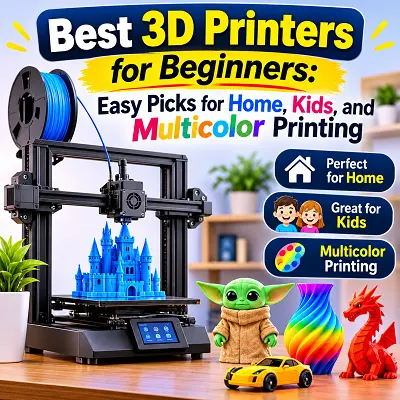
Automatic bed leveling, easy filament loading, and ready-made printing profiles can make the learning process much smoother. Your choice should also depend on what you want to create, how much space you have, and how much you are willing to spend. Whether you want a printer for household accessories, children’s projects, cosplay designs, or multicolor models, there are suitable options available. Understanding the differences between FDM and resin printing will also help you avoid buying a machine that does not match your needs.
What Are 3D Printers and How Do They Work?
A 3D printer is a machine that creates physical objects from digital designs. Unlike traditional manufacturing methods that often remove material from a larger piece, 3D printing builds an object layer by layer. This process is known as additive manufacturing.
The process begins with a digital 3D model. You can create one using design software or download a ready-made model from an online library. The model is then opened in slicing software, which divides it into thin layers and prepares instructions for the printer.
The printer follows these instructions to build the object. Depending on the technology, it either melts plastic filament through a heated nozzle or hardens liquid resin using controlled light.
How the Printing Process Works
A typical FDM printing process follows these steps:
- Select a 3D design: Choose a model from an online library or create one using design software.
- Prepare the model: Open the design in slicing software and select the printer, material, layer height, and other settings.
- Generate the print file: The slicer converts the model into instructions that the printer can understand.
- Transfer the file: Send it through Wi-Fi, USB, or a memory card, depending on the printer.
- Start printing: The machine creates the object one layer at a time.
- Remove the finished object: Allow the print to cool if necessary, remove it from the build plate, and clean or finish it when required.
Resin printers follow a different process because they use liquid photopolymer resin instead of filament. Their printed parts generally need washing and UV curing before they are ready for use.
Common Materials Used in 3D Printing
Different materials offer different levels of strength, flexibility, detail, and heat resistance. The correct choice depends on your printer and the purpose of the finished object.
- PLA: A popular beginner material for decorative objects, toys, organizers, and simple household accessories. It is generally easy to print.
- PETG: A useful option for parts that need more toughness and flexibility than standard PLA.
- TPU: A flexible filament used for soft grips, protective covers, and bendable accessories.
- ABS: A plastic used for certain durable and heat-resistant parts. It generally needs more controlled printing conditions and good ventilation.
- Photopolymer resin: A liquid material used in resin printers to create detailed miniatures, jewelry models, and small precision components.
Not every printer supports every material. Check the manufacturer’s compatibility information before purchasing filament or resin.
Everyday Applications of 3D Printers
A home 3D printer can create many useful objects, including cable organizers, phone stands, drawer dividers, storage hooks, replacement knobs, plant labels, and decorative accessories.
It can also support educational activities, gaming projects, model making, product prototyping, and cosplay. The main advantage is customization. You can adjust the size, shape, and design of an object to suit a particular purpose instead of relying only on ready-made products.
Are 3D Printers Easy to Use for Beginners?
Modern desktop 3D printers are generally easier to operate than older DIY machines. Many models include automatic calibration, guided setup, and software profiles that reduce the amount of manual work required.
However, ease of use still depends on the printer. Some arrive mostly assembled and can be prepared quickly, while others require more construction and adjustment. Beginners should look for a machine that offers clear instructions, reliable software, and accessible maintenance.
Automatic Bed Leveling
The print bed is the surface where an FDM printer builds an object. It needs to be correctly positioned so that the first layer sticks evenly.
Automatic bed leveling uses sensors to measure the bed and compensate for small surface differences. This can reduce the need for manual adjustments and make the first printing experience easier.
However, automatic leveling does not solve every printing problem. A dirty build plate, incorrect nozzle height, or unsuitable material settings can still affect the first layer.
Preassembled vs. DIY Printers
Preassembled printers are usually a better choice for beginners who want to start printing without spending hours building the machine. They generally require less mechanical knowledge and often include setup instructions.
DIY or partially assembled printers can be more affordable and help users understand how the machine works. However, assembly, belt adjustment, wiring, and calibration may require additional time. If you prefer a straightforward introduction to 3D printing, choose a printer that arrives mostly assembled.
Beginner-Friendly Software
Slicing software prepares a 3D model for printing. It lets you choose settings such as layer height, infill, print speed, supports, and material temperature. Many manufacturers provide their own slicers with recommended profiles for compatible printers. These profiles help beginners avoid configuring every setting manually.
Setup and Maintenance Requirements
Even beginner-friendly printers need regular care. FDM machines may require build plate cleaning, nozzle maintenance, belt checks, and occasional replacement of worn components.
Resin printers need additional attention. Users must handle liquid resin carefully, clean printed objects, and cure them before use. For a first printer, automatic calibration and simple material loading can reduce setup difficulties. However, you should still be prepared to learn basic maintenance.
Best 3D Printers for Beginners: Top Picks
Different 3D printers serve different purposes. Some are better for general home printing, while others are designed for children’s projects, multicolor models, detailed miniatures, or large creative designs.
The following options cover several common beginner needs. Before purchasing, check the exact package because accessories such as automatic filament systems may be sold separately.
1. Best Overall 3D Printer for Beginners – Bambu Lab A1
The Bambu Lab A1 is a strong option for beginners who want a modern FDM printer with automatic calibration and a practical build area. It is designed to make everyday printing more accessible without requiring users to handle every adjustment manually.
The printer offers a build volume of 256 × 256 × 256 mm, which is suitable for household accessories, toys, organizers, decorative objects, and many hobby projects.
Main Features
- Build volume: 256 × 256 × 256 mm.
- Maximum toolhead speed: 500 mm/s.
- Maximum hotend temperature: 300°C.
- Automatic calibration: Helps simplify the setup process.
- Filament monitoring: Includes filament runout and tangle detection features.
- Connectivity: Supports wireless printing and compatible software workflows.
- Compatible materials: PLA, PETG, TPU, and PVA are listed as suitable materials.
The A1 also supports an optional or bundled AMS lite system for multicolor printing. The A1 Combo includes the AMS lite, while the standard A1 package should not be assumed to include it.
Why It Is Suitable for Beginners
Automatic calibration makes the A1 easier to prepare for printing. Its software ecosystem also provides ready-made profiles, which can help new users start with recommended settings.
The build area is large enough for many common projects without making the printer as bulky as a large-format machine. Its filament monitoring features can also help identify certain printing interruptions.
Who Should Choose It?
The Bambu Lab A1 is suitable for first-time users, students, hobbyists, and home users who want a convenient FDM printer for everyday projects.
Its main limitation is the open-frame design. Although it works well with common materials such as PLA and PETG, it is not the ideal choice for regular printing with materials that require a controlled enclosed environment, such as ABS and ASA. Users interested in those materials should consider an enclosed printer instead.
2. Best 3D Printer for Home Use – Bambu Lab P2S
The Bambu Lab P2S is designed for users who want a more advanced desktop printer for regular home and hobby use. Its enclosed structure, automatic features, and broader material compatibility make it more versatile than a basic open-frame machine.
It has a build volume of 256 × 256 × 256 mm, a hardened-steel nozzle, and a maximum nozzle temperature of 300°C. Its heated bed can reach 110°C, allowing it to work with a wider selection of materials when used with the correct settings.
Important Features
- Enclosed design: Provides a more controlled printing environment.
- Build volume: 256 × 256 × 256 mm.
- Maximum toolhead speed: 600 mm/s.
- Hardened-steel nozzle and extruder gears: Designed to handle a broader range of filament types.
- Filtration: Includes an activated-carbon filter and support for VOC and particulate filtration.
- Monitoring: Features a built-in HD camera and filament detection.
- Software: Works with Bambu Studio and compatible third-party slicers.
The P2S supports materials including PLA, PETG, ABS, ASA, TPU, and several reinforced filaments. Actual compatibility depends on the material, print settings, and required conditions.
What Makes It Useful at Home?
The enclosed design makes the P2S suitable for users who want to explore more than basic PLA printing. It can produce desk organizers, custom storage parts, household accessories, decorative models, and functional components.
Its additional monitoring and calibration features can also make regular printing more convenient. The P2S Combo includes the AMS 2 Pro for automatic filament management and multicolor printing. The standard P2S does not automatically include this accessory, so check the package before buying.
Who Should Choose It?
The P2S is suitable for home users who plan to print regularly and want more material flexibility. It is also a reasonable choice for hobbyists who may move towards more advanced projects.
However, it costs more than entry-level printers and needs more workspace than a small open-frame model. Its advanced features may also be unnecessary if you only plan to print simple objects using PLA.
3. Best 3D Printer for Kids – Toybox 3D Printer
The Toybox 3D Printer is designed to make 3D printing more approachable for children and families. Instead of requiring users to learn complex design software first, it provides access to a library of ready-made designs through its app and web-based platform.
Children can browse available models, choose a design, and send it to the printer. This makes it easier to start creating toys and small objects without learning advanced slicing settings.
Key Features
- App and web support: Works with iOS, Android, and web browsers.
- Ready-made designs: Provides access to a collection of printable models.
- Compact build area: The original Toybox printer has a print volume of approximately 7 × 8 × 9 cm.
- PLA printing: Uses PLA-based printing material.
- Simple operation: Designed around a more accessible printing workflow.
- Supported files: Includes STL, OBJ, and G-code compatibility.
The original Toybox specifications list a printing speed of 60 mm/s and a resolution of 200 microns. These details apply to that model, so check the exact Toybox version if you are comparing newer packages.
Why It Can Work for Children
Toybox focuses on creativity rather than technical setup. Children can explore shapes, toys, characters, and simple educational designs. They can also learn how digital models become physical objects. The small print area is suitable for compact toys and accessories, but it limits the size of objects that can be created.
Who Should Choose It?
Toybox is best suited to families who want a simple introduction to 3D printing. It can be useful for children who enjoy creative activities and want to see their designs become physical objects.
It is not the best choice for users who want to print large functional parts, work with many different materials, or learn advanced slicer settings.
Adult supervision is essential. The printer contains hot components and moving parts, and finished prints should be checked for small pieces or sharp edges before children use them.
4. Best Multicolor 3D Printer for Beginners – Elegoo Centauri Carbon 2
The Elegoo Centauri Carbon 2 is an enclosed CoreXY FDM printer designed for users who want strong printing performance and the option to add multicolor capability.
It has a build volume of 256 × 256 × 256 mm and a maximum listed printing speed of 500 mm/s, with 250 mm/s recommended by the manufacturer. Its enclosed design and high-temperature hotend also make it suitable for a broader range of filament materials than many basic open-frame machines.
Main Features
- CoreXY motion system: Designed for controlled, fast movement.
- Build volume: 256 × 256 × 256 mm.
- Maximum listed speed: 500 mm/s.
- Recommended speed: 250 mm/s.
- Nozzle temperature: Up to 350°C.
- Automatic calibration: Helps reduce manual setup.
- Enclosed chamber: Supports printing with compatible materials that benefit from more controlled conditions.
- Material compatibility: Includes PLA, PETG, TPU, PLA-CF, ABS, ASA, and other supported materials.
Multicolor Printing Considerations
The Centauri Carbon 2 is multicolor-upgrade ready, but the CANVAS multicolor system is sold separately in some packages. This is an important difference when comparing the standard printer with a multicolor bundle.
With the compatible system, users can create colorful models, decorative objects, signs, toys, and customized designs without manually changing filament for every color.
Who Should Choose It?
The Centauri Carbon 2 is suitable for hobbyists who want an enclosed printer and may want to add multicolor printing later. Its build volume and material support also make it useful for more demanding creative projects.
The main consideration is the additional cost of the multicolor system. If you want automatic color changes immediately, choose a bundle that includes the required CANVAS equipment.
5. Best Budget 3D Printer for Beginners – Creality Ender-3 V3 SE
The Creality Ender-3 V3 SE is an affordable entry-level FDM printer designed for users who want to learn 3D printing without starting with a more expensive machine.
It offers a build volume of 220 × 220 × 250 mm, which is suitable for small household accessories, toys, organizers, and basic hobby projects.
Important Features
- Build volume: 220 × 220 × 250 mm.
- Maximum printing speed: 250 mm/s.
- Typical printing speed: Depends on the model and selected settings.
- Automatic bed leveling: Uses CR Touch and automatic Z-offset features.
- Direct-drive extruder: Supports PLA, PETG, and TPU.
- Dual Z-axis: Helps support stable movement of the printhead.
- Power-loss recovery: Supports recovery after certain power interruptions.
Why It Is a Good Budget Option
The Ender-3 V3 SE provides several useful features without the price of a premium enclosed printer. Automatic leveling reduces one of the common setup challenges, while the direct-drive extruder makes it easier to experiment with flexible TPU filament.
It is suitable for printing basic household items, small toys, desk accessories, and learning models.
Who Should Choose It?
This printer is suitable for students, hobbyists, and budget-conscious beginners who want to understand how FDM printing works.
Its main limitation is that it does not offer the same level of automation or enclosure as more expensive machines. Users may need to learn basic troubleshooting, bed cleaning, and slicer adjustments. It is also not designed for materials that require a heated enclosure.
6. Best 3D Printer for Miniatures – Resin 3D Printers
Resin 3D printer is particularly useful for creating small models that require fine surface details. Instead of melting plastic filament through a nozzle, these machines use light to harden liquid photopolymer resin layer by layer.
This process can reproduce small features that may be difficult to achieve with many standard FDM printers. Resin printing is therefore popular for tabletop gaming figures, collectible characters, miniature buildings, jewelry prototypes, and detailed decorative models.
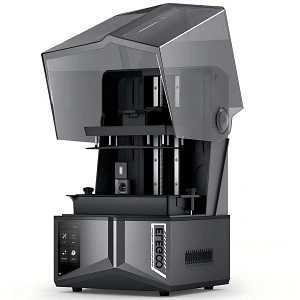
ELEGOO Saturn 4 Ultra 16K Resin Printer
The ELEGOO Saturn 4 Ultra 16K printer is a large-format resin printer designed for detailed models and precision-focused projects. It uses MSLA technology, which combines a monochrome LCD screen with a controlled light source to cure resin.
Its 10-inch 16K monochrome LCD provides a resolution of 15,120 × 6,230 pixels and an XY resolution of 14 × 19 microns. This makes it suitable for detailed miniatures, small collectible models, jewelry designs, and other objects where fine surface detail matters.
Main Features
- 10-inch 16K monochrome LCD: Designed to reproduce fine model details.
- MSLA printing technology: Uses an LCD screen to control resin exposure.
- Build volume: 211.68 × 118.37 × 220 mm.
- XY resolution: 14 × 19 microns.
- Smart heating resin tank: Helps maintain a more consistent resin temperature.
- AI camera: Provides print monitoring and detection features.
- COB light source with Fresnel collimating lens: Designed to provide more uniform light exposure.
- Automatic leveling: Helps simplify build-plate preparation.
This product is available at the Pro Tech Base online store, one of the best choices for shoppers looking for technology products at the best online tech store for shoppers.
Why It Is Suitable for Miniatures
The high-resolution LCD is the main reason to consider this printer for miniature work. Small figures often contain fine facial features, clothing textures, tiny accessories, and detailed surfaces. Resin printing can reproduce these elements more clearly than many entry-level filament printers.
Its build area also provides room to print several smaller models in one batch, depending on their arrangement and support requirements.
Who Should Choose It?
The Saturn 4 Ultra 16K is suitable for miniature artists, collectors, model makers, and hobbyists who prioritize detail over simple operation.
However, it is not the easiest printer for someone who wants to avoid additional cleaning and safety steps. Resin requires protective gloves, careful handling, washing, and UV curing. Users also need a suitable ventilated workspace and a safe method for storing and disposing of uncured resin.
For household organizers, larger functional parts, and general-purpose home printing, an FDM printer will usually be more convenient. For detailed miniature models, the Saturn 4 Ultra 16K is a more suitable option.
7. Best 3D Printer for Cosplay Projects – Creality K2 Plus
Cosplay projects often involve large helmets, armor sections, masks, costume accessories, and decorative props. These designs may be too large for a compact desktop printer, which means they often need to be divided into several smaller pieces.
The Creality K2 Plus is designed for larger and more advanced printing projects. Its build volume measures 350 × 350 × 350 mm, providing considerably more space than standard entry-level machines.
Main Features
- Large build volume: 350 × 350 × 350 mm.
- Maximum listed printing speed: 600 mm/s.
- Maximum nozzle temperature: 350°C.
- Heated bed temperature: Up to 120°C.
- Enclosed chamber: Includes active chamber heating.
- Automatic leveling: Full-auto leveling and bed calibration.
- AI cameras: Support monitoring and calibration functions.
- Material support: Includes PLA, ABS, PETG, ASA, and selected reinforced filaments.
- CFS compatibility: Supports multicolor printing with compatible CFS units.
The K2 Plus Combo includes a CFS system. With up to four CFS units, the compatible setup can support printing with as many as 16 colors.
Why It Works for Cosplay
The larger build area makes it easier to print bigger costume sections and reduce the number of separate pieces required. This can save time during assembly and make certain designs easier to manage.
Its enclosed chamber and higher-temperature hotend also allow users to experiment with materials beyond basic PLA, provided they follow the manufacturer’s material recommendations.
Who Should Choose It?
The K2 Plus is suitable for serious hobbyists, cosplay makers, and users who regularly print large models. It is also useful for advanced home projects and larger functional parts.
However, its size, weight, and price make it excessive for someone who only wants to print small toys or simple accessories. A large build volume also does not guarantee that every helmet or armor design will fit in one piece. Always compare the actual model dimensions with the available printing area.
Best Multicolor 3D Printers for Beginners
Multicolor printing allows a single object to contain different filament colors without requiring you to paint the finished model manually. This is useful for toys, signs, decorative objects, educational models, and personalized gifts.
Some printers include automatic filament systems in their standard packages, while others require an additional unit. Always check the package contents before buying because a multicolor-ready printer is not necessarily a complete multicolor package.
How Do Multicolor 3D Printers Work?
Most beginner-friendly multicolor FDM printers use an automatic filament management system. The printer loads one color, prints the required sections, and changes to another filament when the design needs a different color.
The basic process works as follows:
- Select a 3D model that supports separate color regions.
- Open the model in compatible slicing software.
- Assign a filament color to each section.
- Load the required filament spools into the printer’s material system.
- Start printing while the printer changes filaments automatically.
Some printers use multiple independent printheads, while others use a single nozzle and switch between filament spools.
Single-nozzle systems can create filament waste because the printer may need to remove leftover material from the nozzle before using another color. This process is called purging. It can also increase printing time, especially when a model requires frequent color changes.
SPARKX i7 Nano vs. Anycubic Kobra X
The Creality SPARKX i7 Nano and Anycubic Kobra X are designed for users who want multicolor printing in a desktop FDM machine. Both provide automatic leveling and a build area around 260 mm on each side, but their material systems and configurations differ.
Creality SPARKX i7 Nano
The SPARKX i7 Nano is a compact multicolor configuration in Creality’s SPARKX i7 range. It is designed for users who want to add automatic color changes without moving to a large professional machine.
The SPARKX i7 platform has a build volume of 260 × 260 × 255 mm and a maximum listed printing speed of 500 mm/s. It includes a direct-drive extruder, automatic leveling, and an AI camera for print monitoring.
Its compatible CFS nano system has four filament slots and supports automatic filament loading and unloading. The CFS nano is designed for compact multicolor printing, although its supported materials and spool compatibility should be checked before purchase.
Main Features:
- Build volume of 260 × 260 × 255 mm.
- Maximum listed speed of 500 mm/s.
- Direct-drive extrusion.
- Full automatic bed leveling.
- 720p AI camera.
- Compatible with CFS nano for four-color printing.
- Support for common materials such as PLA and PETG, subject to the selected configuration.
The SPARKX i7 Nano Combo is worth considering if you want a compact multicolor setup. Check the exact bundle because the standard SPARKX i7 and the Nano Combo are not identical packages.
Anycubic Kobra X
The Anycubic Kobra X is designed around native four-color printing, with an expansion option for up to 19 colors using compatible additional equipment.
It offers a build volume of 260 × 260 × 260 mm and a recommended printing speed of 300 mm/s. Its maximum listed speed is 600 mm/s, although actual results depend on the model, filament, and print settings.
Main Features:
- Build volume of 260 × 260 × 260 mm.
- Native four-color printing.
- Expandable to up to 19 colors with compatible accessories.
- Direct-drive extrusion.
- LeviQ 3.0 automatic leveling.
- Maximum nozzle temperature of 300°C.
- Support for PLA, PETG, TPU, PVA, and selected reinforced materials.
- Filament detection and print-monitoring features.
The Kobra X is suitable for users who want multicolor printing and the option to expand their setup later. However, the additional equipment needed for expansion may increase the total cost.
Are Multicolor 3D Printers Worth Buying?
A multicolor printer can be worth the extra cost if you regularly create objects that need different colors. It can reduce the need for painting and make decorative prints look more complete straight from the machine.
They are especially useful for:
- Colorful toys and models.
- Educational diagrams.
- Personalized signs and nameplates.
- Decorative home accessories.
- Multi-color characters and display pieces.
- Custom gifts and hobby projects.
However, multicolor printing is not necessary for every user. Color changes can increase print time, and single-nozzle systems may waste filament during purging. The additional material system also adds cost and takes up workspace.
If you mainly print functional objects in one color, a standard FDM printer may offer better value. If appearance is an important part of your projects, a multicolor system can be a worthwhile investment.
What Can You Make With a 3D Printer at Home?
A 3D printer can produce much more than toys and decorative models. It allows you to make objects based on your own measurements and requirements. The best projects depend on the printer’s build volume, material support, and printing technology.
Useful Household Items and Accessories
You can print small objects that make everyday tasks easier. Examples include:
- Cable clips and wire organizers.
- Phone and tablet stands.
- Drawer dividers.
- Remote-control holders.
- Plant labels and small pots.
- Storage hooks and holders.
- Custom brackets and organizers.
For these projects, an FDM printer using PLA or PETG is usually a practical starting point. PLA works well for many indoor decorative items, while PETG can be useful for parts that need more toughness or flexibility.
Toys and Educational Projects for Kids
Children can use 3D printing to explore creativity, shapes, and basic engineering ideas. Parents and teachers can introduce simple projects such as geometric shapes, puzzle pieces, name tags, model buildings, and basic mechanical demonstrations.
A child-friendly printer or simple app-based workflow can make the process easier. Adults should supervise the printer and check finished objects before giving them to younger children. Small printed parts can pose choking risks, and the printhead and build plate can become hot.
Miniatures and Detailed Models
Miniatures are small, detailed versions of people, buildings, vehicles, creatures, or other objects. They are popular among tabletop gamers, collectors, model makers, and hobby artists.
Resin printers are often preferred for these projects because they can reproduce fine details. FDM printers can also make larger miniatures and display models, but very small features may not look as sharp.
Cosplay Props and Custom Accessories
Cosplay makers can use 3D printers to create helmet parts, armor panels, decorative badges, costume details, masks, and custom accessories. For larger costume projects, an FDM printer with a generous build volume is often more practical. The printed parts may still need sanding, filling, painting, and assembly to achieve the desired finish.
3D Printers: Resin vs. Filament
The two common types of desktop 3D printers are FDM filament printers and resin printers. Both create objects layer by layer, but they use different materials and printing methods.
An FDM printer melts plastic filament and places it through a nozzle. A resin printer uses light to harden liquid resin inside a tank. This difference affects print detail, material handling, maintenance, and the types of projects each machine suits.
FDM Filament 3D Printers
FDM stands for Fused Deposition Modeling. These printers feed plastic filament through a heated nozzle, which deposits material in thin layers to build the object.
FDM printers are popular for home use because filament is available in many colors and material types. They are generally easier to manage than resin printers and are suitable for functional objects.
Advantages of FDM Printers
- Good for household accessories and larger models.
- Wide choice of filament colors and materials.
- No liquid resin handling.
- Suitable for learning basic 3D printing.
- Generally simpler post-print cleanup.
Limitations of FDM Printers
- Layer lines may be visible on finished objects.
- Very small details can be harder to reproduce.
- Some materials need higher temperatures or an enclosed printer.
- Large prints can take several hours or longer.
Resin 3D Printers
Resin printers use a light-sensitive liquid that hardens when exposed to a controlled light source. In MSLA printers, an LCD screen controls which areas of resin receive light during each layer. This technology is useful for detailed miniatures, jewelry models, small collectibles, and precision-focused designs.
Advantages of Resin Printers
- Fine surface details.
- Smooth-looking small models.
- Useful for miniature figures and intricate designs.
- Can reproduce details that are challenging for basic FDM machines.
Limitations of Resin Printers
- Liquid resin needs careful handling.
- Prints usually require washing and curing.
- Gloves and appropriate protective equipment are important.
- Cleaning and waste disposal require more care.
- Proper ventilation is necessary.
Which Type of 3D Printer Is Better for Beginners?
For most first-time users, an FDM printer is the easier starting point. PLA filament is relatively straightforward to use, and FDM machines can create useful household items, toys, organizers, and larger models without the additional resin-washing process.
A resin printer is a better choice if detailed miniatures or small precision models are your main priority. However, you should be comfortable following resin safety instructions and handling the post-processing steps.
The best choice depends on what you want to make. A beginner who wants practical objects will usually be better served by FDM, while a miniature artist may prefer resin.
What to Look for When Buying a Beginner 3D Printer
Choosing a best 3D printer for beginners is not only about its price or maximum speed. A machine with useful beginner-friendly features can save time and reduce failed prints. Before buying one of the best 3D printers for beginners, consider the size of the objects you want to make, the materials you plan to use, and how much maintenance you are comfortable handling.
Print Quality and Printing Speed
Print quality depends on several factors, including nozzle size, layer height, calibration, material, and printer stability. A smaller layer height can produce finer-looking layers, but it usually increases printing time.
Manufacturers often advertise very high maximum speeds. These figures describe the printer’s movement capability and do not mean every model will print at that speed with good results. Detailed objects, flexible materials, and complex shapes may need slower settings. For a first printer, consistent results are usually more useful than the highest advertised speed.
Build Volume and Printing Area
Build volume describes the maximum size of an object the printer can create in one piece. A larger build area gives you more freedom, but it also increases the machine’s footprint and may raise its price.
Consider these general needs:
- Small build volume: Suitable for mini accessories, small toys, and simple models.
- Medium build volume: Useful for household organizers, desk accessories, and many hobby projects.
- Large build volume: Better for helmets, cosplay parts, larger models, and objects that would otherwise need to be printed in sections.
Measure your available workspace before choosing a large printer. Remember to leave enough room for the door, spool holder, cables, and maintenance access.
Automatic Bed Leveling and Ease of Setup
Automatic bed leveling is one of the most useful features for beginners. It helps the printer measure the build surface and compensate for small differences. Also check whether the machine arrives assembled or requires significant construction. A printer with guided setup, clear instructions, and automatic calibration can make the first few prints less frustrating.
Direct Drive vs. Bowden Extruder
The extruder feeds filament towards the hotend, where it melts and comes out of the nozzle. There are two common arrangements.
- Direct drive: The extruder is mounted close to the hotend. This short filament path can provide better control, particularly when printing flexible materials such as TPU.
- Bowden: The extruder is mounted away from the printhead and pushes filament through a tube. This can reduce the weight of the moving printhead, but flexible filament may be more difficult to feed reliably.
For a beginner who wants to experiment with different materials, a direct-drive printer can be a convenient option. However, a well-designed Bowden printer can still produce good results with suitable filament and settings.
Filament Compatibility
Check which materials the printer supports before purchasing. PLA is a sensible first choice because it is widely available and works well for many basic projects.
Other materials have different requirements:
- PLA: Suitable for models, toys, organizers, and decorative objects.
- PETG: Useful for parts that need more toughness and flexibility.
- TPU: Designed for flexible objects such as soft grips and protective parts.
- ABS and ASA: Useful for certain durable applications but generally need more controlled printing conditions and ventilation.
- Carbon-fiber-filled filament: Often requires a compatible wear-resistant nozzle and suitable printer specifications.
Do not assume that a printer supports every material simply because its nozzle can reach a high temperature. The build plate, enclosure, extruder, and manufacturer’s material guidance also matter.
Multicolor Printing Capabilities
If you want to create colorful objects, check whether the printer includes a multicolor system or only supports an optional upgrade. Some packages include the necessary material-handling unit, while others sell it separately.
Also consider filament waste, color-change time, and the number of colors supported. A four-color setup may be enough for toys and signs, while larger systems are useful for more complex designs.
Software and Connectivity
The printer’s software affects how easily you can prepare and send designs. Look for a slicer that offers beginner-friendly profiles and supports common file formats.
Connectivity options may include:
- Wi-Fi for sending files wirelessly.
- USB drives or memory cards for transferring print files.
- Mobile apps for monitoring or controlling supported printers.
- Cameras for checking print progress remotely.
A simple workflow is often more valuable than a long list of advanced software features.
Maintenance and Long-Term Costs
The purchase price is only part of the cost of owning a 3D printer. You may also need filament or resin, replacement nozzles, build plates, cleaning supplies, tools, and occasional replacement parts.
FDM printers generally have simpler post-print cleanup, but they still need regular care. Resin printers require additional supplies for washing, curing, protective equipment, and safe handling of liquid resin.
Before choosing a model, check the availability and cost of replacement parts. A printer that is affordable to buy but difficult to maintain may not offer the best long-term value.
What File Formats Do 3D Printers Use?
A 3D printer usually does not print directly from an ordinary 3D model file. The model first goes through slicing software, which converts its geometry into machine instructions. Those instructions control the printer’s movement, temperature, and material delivery.
Different file formats are used at different stages of this process. STL, 3MF, and OBJ are common formats for storing or transferring 3D models.
Common 3D Printing File Types: STL, 3MF, and OBJ
- STL: One of the most widely used formats for 3D printing. It describes the surface geometry of a model but does not normally store information such as color or material assignments.
- 3MF: A more modern format that can store additional model information, including colors, multiple parts, and other project details. It is useful when working with multicolor or more complex print projects.
- OBJ: A format commonly used for 3D models and digital design. It can work with material information when accompanied by the appropriate supporting files.
For a simple single-color print, STL is often enough. For projects involving several parts, colors, or more detailed project information, 3MF can be more convenient.
Do 3D Printers Come With Software?
Most consumer 3D printers are designed to work with slicing software, and manufacturers commonly provide or recommend a compatible program. Some printers also support third-party slicers.
The software is used to prepare a model by selecting settings such as:
- Layer height.
- Print speed.
- Infill density.
- Supports for overhanging sections.
- Nozzle and bed temperatures.
- Filament type.
- Wall thickness.
The software then creates a file that the printer can read. Depending on the machine, you may transfer it through Wi-Fi, USB, or a memory card.
Best 3D Printing Software for Beginners
The right software depends on your printer and the type of projects you want to create.
- Bambu Studio: A suitable choice for compatible Bambu Lab printers. It provides printer profiles and tools for preparing standard and multicolor prints.
- Creality Print: Designed for Creality printers and supports workflows for preparing and managing prints.
- UltiMaker Cura: A widely used slicer with configurable settings and support for a range of FDM printers.
- PrusaSlicer: Offers detailed control over print settings and supports many compatible FDM machines.
Beginners should start with the slicer recommended by their printer manufacturer. Use the default profile for the selected printer and filament before experimenting with advanced settings.
Do 3D Printers Need Ventilation?
Yes. A suitable printing location and good ventilation are important, even when using a beginner-friendly machine. 3D printing can release ultrafine particles and volatile organic compounds (VOCs). The type and amount of emissions depend on the printer, material, temperature, and surrounding conditions.
Ventilation for FDM Printers
FDM printers heat plastic filament to create each layer. During this process, some materials release particles and gases. Using the printer in a well-ventilated area is a sensible precaution.
Avoid placing a printer in a small, poorly ventilated bedroom or close to where people spend long periods. An enclosure or suitable filtration system may help reduce exposure, but it should not be treated as a replacement for appropriate ventilation.
PLA and ABS Filament Emissions
PLA is commonly recommended for beginners and generally produces lower emissions than ABS. However, lower emissions do not mean there are none.
ABS can release higher levels of certain emissions, including styrene, and generally benefits from a more controlled printing setup. If you plan to use ABS or similar materials regularly, follow the manufacturer’s ventilation recommendations and consider an enclosed printer with suitable exhaust or filtration.
Resin Printer Ventilation and Safety
Resin printers need extra care because they use liquid chemicals. Uncured resin can irritate the skin and eyes, and cleaning may involve solvents such as isopropyl alcohol.
For safer use:
- Work in a well-ventilated area.
- Wear gloves and other protective equipment recommended by the resin manufacturer.
- Avoid direct skin contact with liquid resin.
- Keep resin containers closed when not in use.
- Follow the safety data sheet for the resin and cleaning products.
- Wash and cure prints according to the manufacturer’s instructions.
- Keep resin and cleaning chemicals away from children and pets.
Safe Printer Placement at Home
Choose a stable surface away from children, pets, food preparation areas, and direct contact with curtains or other flammable materials. Keep enough space around the printer for airflow and maintenance. Do not leave children to operate a printer unsupervised. Hot nozzles, heated beds, moving parts, and resin chemicals all require care.
Creality vs. Bambu Lab: Which 3D Printer Brand Is Better?
Creality and Bambu Lab are two well-known names in consumer FDM printing. Both offer machines for beginners and more experienced users, but their product ranges focus on somewhat different experiences.
Creality offers a wide selection, from budget-friendly open-frame printers to enclosed machines with large build volumes. Bambu Lab is known for its integrated hardware and software workflow, automatic calibration features, and optional automatic material systems.
Creality 3D Printers for Beginners
Creality is worth considering if you want several price and feature levels to choose from. Models such as the Ender-3 V3 SE provide an accessible entry point, while the K2 series offers larger and more advanced machines.
Potential advantages include:
- Options across different budgets.
- A broad range of printer sizes and configurations.
- Models with direct-drive extrusion and automatic leveling.
- Enclosed options for users interested in more demanding materials.
- Multicolor capability on compatible models and bundles.
The main consideration is that the user experience varies between models. A budget printer may need more manual adjustment than a higher-priced machine, so check the setup and maintenance requirements of the exact model.
Bambu Lab 3D Printers for Beginners
Bambu Lab is a strong option for users who prefer an integrated printing workflow. The A1 offers an approachable open-frame design, while the P2S provides an enclosed platform with broader material support.
Potential advantages include:
- Automatic calibration features on suitable models.
- Integrated slicer and printer workflows.
- Optional automatic material systems.
- Monitoring and print-management features.
- Models for both basic home printing and more advanced projects.
The main consideration is the price of the printer and its accessories. If you want multicolor printing, check whether the package includes the required AMS system.
Which Brand Should You Choose?
There is no single winner for every beginner. Your choice should depend on budget, project type, and how much manual setup you are comfortable with.
Choose Creality if you want to compare a wide range of machine types and price levels, including budget and large-format models. Consider Bambu Lab if you prefer an integrated workflow with automatic calibration and a closely connected software ecosystem.
For either brand, compare the exact printer model rather than judging the entire company by one product. A budget machine and a premium enclosed printer are designed for different users.
Frequently Asked Questions About 3D Printers
Are 3D Printers Worth It?
A 3D printer can be worth buying if you enjoy making custom objects, building models, creating prototypes, or working on creative projects. It can also help you produce useful household accessories and replacement parts.
However, it may not save money if you only need to print one or two small objects. Consider how often you will use it, the cost of materials, and the time required to prepare and finish prints.
How Long Do 3D Printers Take to Print an Object?
Printing time depends on the object’s size, design, layer height, material, and selected speed. A small, simple object may take less than an hour, while a large or detailed model can take many hours or even more than a day.
Multicolor prints may take longer because the printer needs to change filaments during the process. Resin printers also need time for printing, washing, and curing.
How Long Do 3D Printers Last?
A 3D printer can last for several years with proper maintenance, but its lifespan depends on build quality, usage, operating conditions, and replacement-part availability.
Nozzles, build surfaces, belts, fans, and other moving components may need replacement over time. Regular cleaning and following the manufacturer’s maintenance instructions can help keep the machine working properly.
Are 3D Printers Loud?
Noise levels vary between models. Fans, motors, movement systems, and vibration can all contribute to operating noise. Some modern printers include quieter motion systems or noise-reduction features, but no printer should be assumed to be silent. If you plan to use one in a shared living space, check independent noise measurements where available and consider its placement.
Are 3D Printers Easy to Use?
Many current models are designed to make printing easier through automatic bed leveling, guided setup, and ready-made software profiles. These features reduce the amount of manual work needed before printing.
However, beginners still need to learn how to prepare files, choose materials, clean the build plate, and identify common print problems. Starting with PLA and a printer that includes automatic calibration is a practical way to learn.
Do 3D Printers Need a Computer?
A computer is useful for creating models and preparing files in slicing software. However, you do not always need to connect a computer directly to the printer.
Many models can receive prepared files through Wi-Fi, a mobile app, USB drive, or memory card. Some beginner-friendly systems also let users choose ready-made designs through an app.
Can Kids Use 3D Printers Safely?
Children can learn from 3D printing, but adult supervision is important. The nozzle and heated bed can become hot, and moving parts may cause injuries if touched during operation.
Resin printers require even greater care because liquid resin and cleaning chemicals should not come into contact with skin or eyes. For children, an FDM printer using PLA is generally a more practical starting point, with adults handling setup and supervision.
What Is the Best Filament for Beginners?
PLA is usually the best starting material for beginners. It is widely available, comes in many colors, and works well for decorative objects, toys, organizers, and simple models.
Once you understand basic printing settings, you can explore PETG for parts that need more toughness or TPU for flexible designs. Always check that your printer supports the material you intend to use.
Are 3D Printers Good for Home Use?
Yes. A 3D printer can be useful at home for making organizers, cable holders, phone stands, small replacement parts, decorations, toys, and custom accessories.
The best model depends on the available space and the type of objects you plan to print. A compact FDM printer is a practical choice for general household projects, while a resin printer is more suitable for detailed miniatures and small models.
Final Thoughts
Choosing best 3D printers for beginners becomes easier when you focus on the projects you actually want to create. The Bambu Lab A1 is a strong all-round option for beginners, while the P2S is better suited to home users who want an enclosed machine and broader material support. Toybox is designed for families and children, the Ender-3 V3 SE offers a budget-friendly starting point, and the ELEGOO Saturn 4 Ultra 16K is worth considering for detailed resin miniatures.
For multicolor printing, compare the SPARKX i7 Nano and Anycubic Kobra X packages carefully, especially their included filament systems. The Elegoo Centauri Carbon 2 is another option if you want an enclosed printer with a separate multicolor upgrade, while the Creality K2 Plus is better suited to large cosplay projects and advanced creative work.
Before buying, consider build volume, automatic leveling, material compatibility, software, ventilation, and long-term maintenance costs. You can explore different options at the Pro Tech Base online tech store to find a printer that suits your requirements. You do not need the most expensive or fastest printer to get started. A machine that matches your budget, workspace, and project needs will usually be the better investment.