
Computers are important devices for work, gaming, studying, and everyday activities. However, sudden changes in electricity supply can put these devices at risk. A voltage spike can damage sensitive electronic components, including computer power supplies, motherboards, monitors, and other connected equipment. Best surge protectors for computers helps to reduce this risk by limiting or redirecting excess electrical energy before it reaches connected devices.
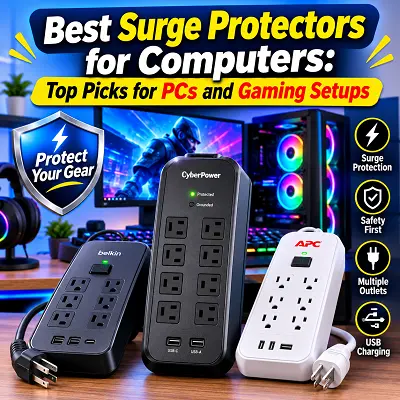
It is particularly useful for desktop PCs, gaming computers, laptops, and home office workstations where several electronic devices share one power source. Not all power strips provide the same level of protection. Some only offer additional electrical outlets, while genuine surge protectors include internal components designed to control certain voltage spikes. Their protection capacity, outlet arrangement, cord length, safety features, and electrical ratings can also vary.
What Are Surge Protectors for Computers?
A computer surge protector is an electrical device that connects to a wall outlet and provides additional protection against sudden increases in voltage. It allows users to connect multiple electronic devices while helping reduce the risk of damage from certain electrical surges.
Computers contain sensitive electronic components that operate within specific voltage limits. When excess voltage reaches these components, it can create electrical stress and potentially damage connected equipment. A surge protector uses internal components to limit or divert excess voltage. This helps protect devices from certain electrical disturbances.
You can connect several compatible devices to a computer surge protector, including:
- Desktop computers and gaming PCs.
- Computer monitors and displays.
- Laptops and charging adapters.
- Wi-Fi routers and networking equipment.
- Speakers and other computer accessories.
- External hard drives and storage devices.
- Compatible printers and scanners.
One important difference between an ordinary power strip and a surge protector is the protection mechanism. A regular power strip simply provides extra outlets, while a genuine surge protector includes components designed to limit certain voltage spikes.
However, surge protectors do not provide unlimited protection. Their effectiveness depends on their design, condition, electrical ratings, and proper grounding.
How Do Computer Surge Protectors Work?
How Surge Protectors Control Electrical Surges
An electrical surge is a sudden increase in voltage above the normal level supplied to electronic equipment. These voltage changes can occur for different reasons and may affect connected computers and accessories. Most common surge protectors use components called Metal Oxide Varistors (MOVs). These components respond when voltage rises above a particular level.
Under normal electrical conditions, an MOV allows electricity to pass through with very little interference. When a voltage spike occurs, its electrical resistance decreases, helping limit the excess voltage and redirect surge energy through the appropriate protection path.
Important specifications that explain how a surge protector works include:
- Joule rating: Indicates the amount of surge energy the protection components are designed to absorb.
- Clamping voltage: Describes the voltage level at which the protection device starts limiting excess voltage.
- Response time: Refers to how quickly the protection components respond to a voltage disturbance.
- Grounding: Provides an important electrical path required for the protection system to work as designed.
What Can Cause Power Surges in Computers?
Several electrical problems and events can cause voltage spikes.
- Lightning strikes: Lightning can create powerful electrical disturbances that travel through power lines and affect connected equipment.
- Power outages: Changes in the electricity supply when power returns may produce temporary voltage disturbances.
- Electrical grid switching: Switching operations within the electricity network can sometimes cause sudden voltage changes.
- Faulty wiring: Damaged wiring and incorrect electrical installations can create unsafe power conditions.
- Sudden changes in electrical loads: Large appliances switching on or off can affect the electrical supply.
These events do not always cause damage, but they can increase electrical risks for sensitive equipment.
Can a Surge Protector Prevent Computer Damage?
A suitable surge protector can reduce the risk of damage caused by certain voltage spikes. However, it cannot guarantee complete protection against every electrical problem. Severe lightning events, incorrect wiring, poor grounding, and major electrical faults may exceed the protection capacity of a standard device.
For better protection, always use a properly grounded electrical outlet and select a surge protector with recognised safety certification. You should also replace damaged or worn-out units when necessary.
Best Surge Protectors for Computers
Choosing a surge protector depends on the number of devices you want to connect, the electrical requirements of your computer, and the protection features you need. The following products serve different purposes, from everyday computer use to gaming setups and battery backup.
Best Surge Protector for Computer Overall – Belkin 12-Outlet Pivot-Plug Surge Protector
The Belkin 12-Outlet Pivot-Plug Surge Protector is designed for users who need multiple electrical connections for their computer equipment and accessories. Its pivoting outlet arrangement makes it easier to connect bulky adapters without blocking nearby sockets.
Important features:
- 12 AC outlets: Provides connections for a desktop computer, monitors, speakers, chargers, and other compatible devices.
- 4,320-joule surge protection: Offers a substantial energy absorption rating.
- Pivoting outlets: Allows selected outlets to rotate for better adapter spacing.
- 8-foot power cord: Provides flexibility when arranging a workstation.
- 400V clamping voltage: Helps limit excessive voltage under the specified test conditions.
- Safety indicators: Helps users monitor the grounding and protection status.
- Overload protection: Provides an additional layer of electrical safety.
Why choose this product?
The Belkin 12-Outlet Pivot-Plug model is suitable for everyday computer setups where several devices need to share one power connection. Its multiple outlets and flexible arrangement make it useful for home offices and desktop workstations. It can accommodate a computer, monitor, router, speakers, and other compatible accessories without requiring several separate power strips.
Important consideration: Check the exact model number and regional electrical rating before purchasing. Many Belkin 12-outlet models are designed for 125V electrical systems and are not suitable for direct connection to Pakistan’s standard 230V supply.
Best Surge Protector for Desktop Computer – Anker 351 Power Strip
The Anker 351 Power Strip is a practical option for desktop computer users who also need USB charging connections. It combines multiple AC outlets with USB-A and USB-C ports, allowing users to power computer accessories and charge compatible mobile devices from one location.
Important features:
- 2,100-joule surge protection: Provides protection against certain electrical surges.
- 12 AC outlets: Offers multiple connections for desktop equipment and accessories.
- Two USB-A ports: Supports charging for compatible USB devices.
- One USB-C port: Provides up to 20W charging output.
- 5-foot power cord: Works well for desks positioned relatively close to an electrical outlet.
- Multiple charging options: Reduces the need for separate USB charging adapters.
Why choose this product?
The Anker 351 is useful for desktop workstations with several connected devices. Its combination of AC outlets and USB charging ports makes it convenient for users who regularly charge smartphones, tablets, and other small electronics. It can support a computer, monitor, speakers, and compatible charging accessories, provided the combined electrical load stays within its rated capacity.
Important consideration: Its 5-foot cord may be too short for some desk arrangements. Also, check its electrical rating and plug compatibility before using it with your computer equipment.
Best Surge Protector for Gaming Computer – Eaton Tripp Lite Protect It TLP1208SAT
Gaming computers often have more connected equipment than basic desktop systems. A gaming setup may include a powerful computer, multiple monitors, speakers, routers, and other accessories.
The Eaton Tripp Lite Protect It TLP1208SAT is designed to provide multiple electrical connections and additional protection for compatible communication lines.
Important features:
- 2,880-joule surge protection: Provides a substantial surge energy rating.
- 12 AC outlets: Offers connections for gaming computers and compatible accessories.
- 8-foot power cord: Provides flexibility when positioning a gaming workstation.
- Ethernet protection: Helps protect compatible network connections against electrical surges.
- Telephone and coaxial protection: Provides additional protection for supported communication connections.
- Diagnostic indicator lights: Help users check protection and grounding status.
- Automatic shutdown: Disconnects power when the protection circuit becomes incapacitated.
- UL 1449 safety certification: Indicates compliance with a recognised surge protection safety standard.
Why choose this product?
The TLP1208SAT is suitable for gaming workstations that require several outlets and additional network protection. Its outlet capacity can help organise a gaming desk with a computer, monitor, speakers, and other compatible equipment. Ethernet protection is another useful feature for users who rely on wired internet connections.
Important consideration: This is a 120V product. It should not be connected directly to Pakistan’s standard 230V electrical supply. Always confirm the exact model’s voltage requirements before purchasing.
Best Surge Protector for Laptop and Mac Computers – Anker Nano Desk Clamp Strip (341)
Laptop and Mac computer users often need a convenient power solution that fits into a smaller workspace. The Anker 341 USB Power Strip offers multiple AC outlets and USB charging connections for compatible devices.
Its compact design makes it a useful option for people who want to organise their laptop accessories without using a large power strip.
Important features:
- 2,000-joule surge protection: Helps protect connected devices against certain voltage spikes.
- Eight AC outlets: Provides connections for compatible computer equipment.
- Two USB-A ports: Supports charging for compatible USB devices.
- One USB-C port: Provides up to 20W charging output.
- Three-sided outlet arrangement: Helps accommodate multiple plugs.
- Compact construction: Makes it suitable for smaller desks and workstations.
Why choose this product?
The Anker 341 is a convenient option for laptop users who need multiple connections in a limited space. It can support compatible laptop charging adapters, monitors, phone chargers, and other office accessories. MacBook users can also consider its USB charging options for compatible devices, although the USB-C output should be checked against the laptop’s charging requirements.
Important consideration: The Anker 341 model should not be confused with a desk-clamp product unless the exact version includes that feature. Confirm the model number, cord length, surge rating, and electrical compatibility before purchasing.
Best Battery Backup Surge Protector for Computer – APC Back-UPS Pro 1500VA
A standard surge protector cannot keep a computer running when electricity goes out. Users who need temporary backup power should consider a UPS with built-in surge protection.
The APC Back-UPS Pro 1500VA combines battery backup, surge protection, and automatic voltage regulation. It is designed for computer systems that need temporary power during electrical interruptions.
Important features:
- 1,500VA / 900W capacity: Provides a maximum rated output of 900 watts.
- 10 AC outlets: Includes battery-backup and surge-protected connections, alongside surge-only outlets.
- Automatic Voltage Regulation (AVR): Helps correct certain voltage variations without using battery power.
- LCD display: Shows important operating information.
- USB charging: Provides USB charging connections on compatible versions.
- Replaceable battery: Allows the battery to be replaced when required.
- Sine-wave output: Provides a suitable output waveform for compatible equipment.
Why choose this product?
The APC Back-UPS Pro is useful for desktop users who want time to save their work and shut down their computers properly during power outages. It can also support compatible monitors, networking equipment, and other accessories, provided the total connected load stays within the UPS capacity.
Important consideration: Battery runtime depends on the amount of power being used. A computer with a powerful graphics card and several connected devices may receive less backup time than a basic office computer.
Also, confirm the exact APC model and regional voltage rating. The commonly listed BR1500MS2 version is designed for 120V systems and is not suitable for direct connection to a 230V supply.
Best Surge Protector for Laptop and Mac Computers – Tripp Lite SWIVEL6 Compact 6-Outlet Surge Protector
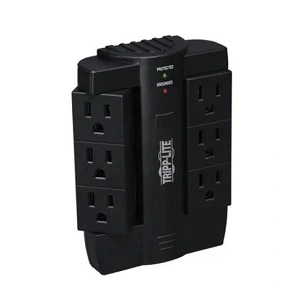
The Tripp Lite SWIVEL6 Compact 6-Outlet Surge Protector is a practical power protection option for laptop users and small computer workspaces. Its compact direct plug-in design connects to a compatible wall outlet without requiring an additional power cord. It provides six AC outlets, making it convenient for connecting a laptop adapter, monitor, router, and other compatible accessories.
Important features:
- Six AC outlets: Provides connections for laptops, monitors, routers, and other compatible electronic devices.
- 1,200-joule surge protection: Helps protect connected equipment against certain electrical surges.
- Three rotatable outlets: Helps accommodate different plug sizes and bulky adapters.
- Three stationary outlets: Provides additional connections for everyday electronic equipment.
- Direct plug-in design: Connects directly to a compatible wall outlet without a separate power cord.
- Diagnostic LED indicators: Help users check the protection and grounding status.
- EMI/RFI filtering: Helps reduce certain electrical line noise.
Why choose this product?
The Tripp Lite SWIVEL6 is a useful option for users who need a compact power solution for a laptop or small computer workstation. Its six outlets provide connections for several compatible devices, while the three rotatable outlets make it easier to connect larger adapters without blocking nearby sockets.
MacBook users can also connect a compatible charging adapter along with accessories such as monitors and routers. Its compact design is especially useful for workspaces where a traditional power strip with a long cable may take up unnecessary space.
Quick Comparison of the Best Computer Surge Protectors
Each product has different strengths. Before making a decision, consider its protection capacity, number of outlets, charging options, and intended use.
The Belkin model offers a high joule rating and pivoting outlets, while the Anker 351 focuses on everyday desktop connections and USB charging. Eaton provides additional network protection, and the Anker 341 offers a compact arrangement for smaller workspaces.
The APC Back-UPS Pro is different because it provides battery backup in addition to surge protection.
For a simple selection:
- Choose Belkin for multiple connected devices and flexible outlet spacing.
- Choose Anker 351 for a desktop workstation with USB charging needs.
- Consider Eaton for gaming equipment and compatible network connections.
- Consider Anker 341 for a compact laptop or office setup.
- Choose APC when temporary battery backup is important.
Remember that a higher joule rating does not automatically make a product the best option. Electrical compatibility, grounding, safety certification, and total power capacity also matter.
What to Look for in the Best Surge Protector for Computers
Before purchasing, compare the technical specifications and safety features of different products. The right choice should match your equipment, electrical supply, and workspace.
Joule Rating and Surge Protection Capacity
The joule rating indicates how much surge energy a protection device is designed to absorb. It helps users compare the energy absorption capacity of different surge protectors. For example, a 600-joule model has a lower rated energy absorption capacity than a 2,000-joule model.
Generally, a higher joule rating can provide greater capacity to absorb surge energy. This can be useful for workstations with several connected electronic devices.
However, the joule rating is not the only specification to consider. Also check:
- The manufacturer’s stated clamping voltage.
- Safety certification.
- Grounding requirements.
- Protection indicator lights.
- Warranty and replacement conditions.
How Many Joules Does a Computer Need?
There is no universal joule requirement for every computer. The appropriate rating depends on the equipment and the protection level you want.
Consider the following points:
- Desktop computers: Choose a properly certified surge protector with a suitable protection rating for your computer and monitor.
- Gaming PCs: Consider models with higher joule ratings because gaming workstations may have several connected devices.
- Monitors and peripherals: Include all connected equipment when selecting outlet capacity and protection.
- Basic computer setups: A properly certified model with an appropriate joule rating can provide useful protection.
Is 600 joules enough for a computer? It may provide some protection, but it is a relatively modest rating. A higher-rated model may offer greater energy absorption capacity.
Remember that a high joule rating does not guarantee protection against every electrical event. A balanced combination of safety certification, clamping voltage, and proper grounding is more important than focusing on one number.
Clamping Voltage and Response Time
Clamping voltage describes the voltage level at which a surge protector starts limiting excess voltage. Generally, a lower clamping voltage means the device starts controlling voltage at a lower level under the relevant testing conditions. Response time refers to how quickly the internal protection components react to a voltage disturbance.
When comparing different products, consider:
- Manufacturer-specified clamping voltage.
- Voltage Protection Rating (VPR), where available.
- Recognised safety testing.
- Protection status indicators.
- The manufacturer’s technical documentation.
Do not choose a product based only on advertised response time. Its overall protection design and safety certification are also important.
Number of Outlets and Spacing
The number of outlets determines how many devices you can connect to one power source. A desktop workstation may need connections for a computer tower, monitor, speakers, router, printer, and charging adapters.
Consider these features:
- Outlet quantity: Choose enough outlets for your current equipment.
- Outlet spacing: Widely spaced sockets help accommodate larger power adapters.
- USB-A ports: Useful for charging compatible older USB devices.
- USB-C ports: Convenient for supported modern charging devices.
- Power cord length: A longer cord provides more flexibility when positioning your workstation.
If you regularly switch between multiple computers, you may also benefit from understanding how the Best KVM Switches can simplify your desk arrangement. A KVM switch allows compatible computers to share peripherals such as a monitor, keyboard, and mouse. However, it does not provide electrical surge protection.
Safety Features and Electrical Protection
Safety features help users monitor the condition of a surge protector and reduce certain electrical risks.
Look for the following features:
- Overload protection: Helps prevent excessive electrical loads.
- Grounding indicator: Shows whether the grounding connection is present.
- Protection indicator light: Helps identify whether the surge protection system is functioning.
- Thermal protection: Helps manage overheating risks.
- Automatic shutdown: Some models disconnect power when their protection components become ineffective.
- UL 1449 certification: A recognised safety standard for surge protective devices.
Proper grounding is particularly important. A surge protector cannot correct faulty electrical wiring or create a missing ground connection.
Warranty and Connected Equipment Protection
Some manufacturers offer warranties and connected equipment protection policies with their surge protectors. These policies may provide financial coverage if eligible equipment gets damaged while properly connected to a qualifying product.
Before purchasing, check:
- Warranty duration.
- Maximum connected equipment coverage.
- Eligible devices.
- Required proof of purchase.
- Claim submission requirements.
- Regional coverage and exclusions.
Do not assume that the advertised coverage amount guarantees payment for every damage claim. Always read the manufacturer’s terms and conditions.
Build Quality, Design, and Mounting Options
The physical design of a surge protector affects how easily it fits into your workspace.
Different designs offer different benefits:
- Compact models: Suitable for small desks and limited spaces.
- Tower-style models: Provide a vertical arrangement that can save desk space.
- Wall-mounted models: Help keep electrical connections organised.
- Pivot-plug designs: Provide more flexibility for bulky adapters.
- Cable management features: Help reduce cable clutter.
Choose a model with durable housing, convenient outlet spacing, and a power cord that suits your desk arrangement.
What Type of Surge Protector Is Best for Computers?
The right type depends on your computer equipment and the electrical protection you need. Standard surge protectors are suitable for users who mainly want protection against certain voltage spikes. Advanced models may offer higher joule ratings, additional data-line protection, more outlets, and improved monitoring features.
Here are some practical recommendations:
- Desktop PCs: Choose a grounded and properly certified model with enough outlets.
- Gaming computers: Look for suitable surge protection and sufficient connections for monitors and peripherals.
- Laptop workstations: Consider compact models with USB charging options.
- Home offices: Prioritise outlet capacity, cord length, and protection for networking equipment.
- Computers requiring backup power: Consider a UPS with battery backup and built-in surge protection.
A portable power solution can also be useful when working away from a fixed desk. For example, the Best Portable Power Bank with AC Outlet may help users understand available portable power options. However, a power bank does not automatically provide the same protection or backup functionality as a dedicated UPS.
Surge Protector vs UPS vs Power Strip vs GFCI Outlet
These electrical products have different purposes. Understanding their functions can help you choose the right option for your computer.
Surge Protector vs UPS for Computers
A surge protector and a UPS both help protect computer equipment, but they provide different levels of functionality. A standard surge protector helps limit certain voltage spikes. It does not contain a battery to keep your computer running during a power outage.
A UPS, or Uninterruptible Power Supply, includes a battery that provides temporary power when the main electricity supply fails. Choose a surge protector if your main requirement is protection against voltage spikes. Consider a UPS if you need time to save your files and shut down your computer during power interruptions.
A UPS may also include Automatic Voltage Regulation, which helps manage certain voltage variations without constantly switching to battery power.
Power Strip vs Surge Protector
A power strip increases the number of available electrical outlets. It allows multiple devices to connect to one wall outlet, but it does not necessarily provide surge protection. A surge protector looks similar to an ordinary power strip but contains additional internal components designed to limit voltage spikes.
Before purchasing, check whether the product clearly specifies:
- Surge protection functionality.
- Joule rating.
- Safety certification.
- Maximum electrical load.
- Protection indicator lights.
Never assume that every power strip offers protection against electrical surges.
Surge Protector vs GFCI Outlet
A GFCI (Ground Fault Circuit Interrupter) outlet is designed to detect certain electrical current imbalances and quickly interrupt power to reduce the risk of electric shock. A surge protector has a different purpose. It helps protect connected electronic equipment against certain voltage spikes.
The two devices do not replace each other. A GFCI outlet does not automatically provide surge protection, and a surge protector does not replace ground-fault protection.
Both serve different purposes in electrical safety.
Can You Use a Surge Protector with Different Computer Equipment?
Most computer surge protectors can support different electronic devices, provided they are compatible with the product’s voltage, current, and power ratings. However, you should always check the total electrical load and manufacturer recommendations before connecting multiple devices.
Desktop Computers and Gaming PCs
Desktop computers and gaming PCs usually have several connected components and accessories. These may include computer towers, monitors, speakers, routers, and external storage devices.
You can generally connect compatible equipment such as:
- Desktop computer towers.
- Gaming monitors.
- Speakers and headphones with powered adapters.
- Wi-Fi routers.
- External storage devices.
- Other compatible computer accessories.
Before connecting everything, check the combined wattage and current requirements. Avoid overloading the surge protector or connecting several power strips together.
Gaming PCs with powerful graphics cards may have higher power requirements, so check their power supply specifications before choosing a suitable electrical connection.
Laptops, MacBooks, and iMacs
Laptops generally use external charging adapters, making a surge protector with suitable outlet spacing convenient for everyday work.
For laptop and Apple computer setups, consider:
- Enough outlets for charging adapters.
- USB-C ports for compatible charging devices.
- Suitable USB Power Delivery specifications.
- Space for larger adapters.
- Appropriate electrical protection ratings.
MacBooks can use compatible USB-C charging accessories, while iMacs require a suitable AC power connection. Remember that USB charging ports do not automatically support every laptop’s charging requirements. Always check the required charging wattage.
Monitors, Printers, and Other Peripherals
Monitors and smaller computer accessories can generally share a suitable surge protector with a computer. Printers require additional attention because their electrical requirements can vary.
Consider the following:
- Standard monitors can connect to compatible protected outlets.
- Speakers and small accessories can share available outlets.
- External drives and routers can use suitable protected connections.
- Printers should follow their manufacturer’s electrical recommendations.
Laser printers can draw considerable power during operation, particularly when heating their printing components. Some manufacturers recommend connecting them directly to a suitable wall outlet instead of a UPS or shared surge protector.
Always check the printer manual before connecting it.
TVs and Home Office Equipment
A suitable surge protector can also be used for compatible TVs and home office equipment. A home entertainment workstation may include a television, desktop computer, monitor, router, and speakers.
Before connecting these devices:
- Check their combined electrical load.
- Confirm the surge protector supports the required voltage and current.
- Make sure enough outlets are available.
- Avoid connecting several high-power devices to an overloaded strip.
- Keep the surge protector in a dry and properly ventilated location.
When comparing computer accessories, networking products, and other electronics, a reliable best online tech store for shoppers can make it easier to explore different product categories and compare available options.
Frequently Asked Questions About Computer Surge Protectors
What Is the Best Surge Protector for a Computer?
The right choice depends on your computer setup and electrical requirements. The Belkin 12-Outlet Pivot-Plug offers multiple outlets and a high stated joule rating, while the Anker 351 provides USB charging connections alongside AC outlets. For users who need temporary backup power, the APC Back-UPS Pro is another option because it combines battery backup with surge protection.
Do I Need a Surge Protector for My Gaming PC?
A suitable surge protector is a useful additional safety measure for gaming computers. Gaming setups often include expensive computer components, monitors, networking equipment, and other accessories. Choose a model with an appropriate protection rating, sufficient outlets, and a compatible electrical rating.
Can I Plug a Computer into a Regular Power Strip?
Yes, a computer can generally connect to a properly rated ordinary power strip. However, an ordinary power strip does not necessarily provide surge protection. If you want additional protection against voltage spikes, choose a genuine surge protector with suitable safety certification.
Is a UPS or Surge Protector Better for a Computer?
Both have different purposes. A surge protector helps limit certain voltage spikes, while a UPS provides temporary battery power during an outage and usually includes surge protection. Choose a standard surge protector for basic surge protection. Consider a UPS if you need time to save your work and shut down your computer during power interruptions.
Can You Plug a Surge Protector into an Extension Cord?
It is generally better to connect a surge protector directly to a properly grounded wall outlet. Connecting surge protectors to extension cords or other power strips can create additional electrical safety risks. Follow the manufacturer’s instructions and avoid connecting multiple power strips together.
How Often Should You Replace a Surge Protector?
There is no fixed replacement period for every surge protector. Replacement depends on its condition, usage, protection capacity, and manufacturer recommendations. Consider replacing it when its protection indicator shows that protection is no longer available, when the housing or cord is damaged, or when the manufacturer recommends replacement after a significant surge. Do not continue using a damaged or overheated unit.
Is It Safe to Plug a Laser Printer into a Surge Protector?
It depends on the printer’s electrical requirements and manufacturer recommendations. Laser printers can have high power demands, particularly during heating cycles. Some manufacturers recommend connecting them directly to a suitable wall outlet. Check the printer manual before connecting it to a shared surge protector or UPS.
Can a Surge Protector Protect a Computer from Lightning?
A surge protector can reduce the risk of damage from certain voltage spikes, but it cannot guarantee protection against a direct lightning strike or every severe electrical event. Use properly installed electrical protection and follow local electrical safety recommendations.
Can You Plug a Monitor and Computer into the Same Surge Protector?
Yes, provided the surge protector has enough outlets and supports the combined electrical load. Check the power requirements of both devices and avoid exceeding the product’s rated capacity.
Do Surge Protectors Stop Working After a Power Surge?
Some surge protectors can continue working after absorbing smaller surges. However, their internal protection components can gradually wear out. Some models include automatic shutdown features that disconnect power when protection is no longer available. Check the protection indicator regularly and replace the unit when required.
Final Thoughts
Choosing the right surge protector is an important part of organising a safer computer workstation. A suitable product can help reduce the risk of damage from certain voltage spikes while providing convenient power connections for computers and accessories. When comparing the best surge protectors for computers, pay attention to joule ratings, clamping voltage, outlet capacity, grounding, safety certification, and connected equipment protection. These specifications help you evaluate products beyond their appearance and number of outlets.
Different computer setups also have different requirements. Desktop users may prefer multiple protected outlets, while gaming PC owners may need additional connections for monitors and peripherals. Laptop users may find compact models with USB charging more convenient. If your computer needs temporary backup power, a UPS may be a better option. You can explore different computer accessories and electronics through the Pro Tech Base online store and compare products according to your requirements. The Pro Tech Base online tech store also provides a place to explore technology-related product categories and accessories.
One important consideration for international buyers is electrical compatibility. Always check the input voltage, plug type, current rating, and grounding requirements before purchasing. Several products discussed above are designed for 120V US electrical systems and should not be connected directly to Pakistan’s standard 230V supply. Ultimately, the right product is the one that matches your equipment, electrical requirements, and workspace. Prioritise proper safety features and electrical compatibility instead of selecting a model based only on its outlet count or advertised joule rating.