
A laptop can become noticeably hot during gaming, video editing, programming, multitasking, or other demanding workloads. When heat builds up, the internal hardware may reduce its operating speed to control temperatures, a process commonly known as thermal throttling. This can affect performance and make long sessions less comfortable.
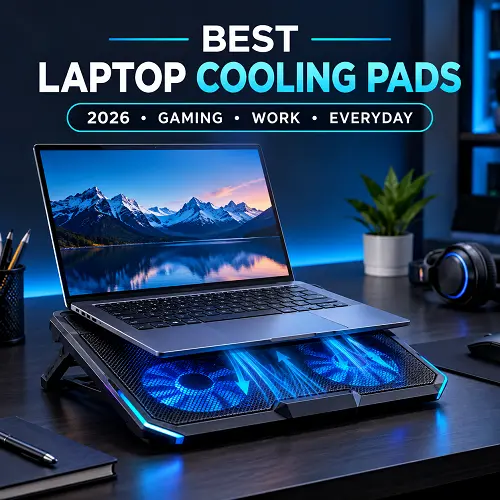
The best laptop cooling pads can improve airflow around the underside of a notebook while providing a more stable surface for extended use. The right model can be particularly useful for gaming laptops, larger notebooks, and systems that regularly run demanding applications.
What Is a Laptop Cooling Pad and How Does It Work?
A laptop cooling pad is an external stand with one or more fans that sits underneath a laptop. It usually connects through USB and provides additional airflow around the device.
How Cooling Fans Improve Airflow
- Moves additional air around the laptop’s base.
- Supports the laptop’s built-in cooling system during demanding workloads.
- Works best when the fans align with the laptop’s intake vents.
How a Cooling Pad Helps Reduce Heat
- Adds airflow around the underside of the laptop.
- Supplements the laptop’s internal cooling system.
- Can be useful during long gaming or work sessions.
Active vs Passive Laptop Cooling
- Active cooling: Uses powered fans to provide additional airflow.
- Passive cooling: Uses a raised or ventilated surface without powered fans.
- Active models are generally more suitable for gaming and demanding workloads.
- Passive stands are useful when the main goal is better positioning and ventilation.
Why You Need the Best Laptop Cooling Pads
Not every laptop requires external cooling. However, a cooling solution can be useful if your system regularly becomes hot during gaming, rendering, compiling, or other intensive workloads.
A suitable model can provide:
- Additional airflow underneath the laptop
- A raised and more comfortable viewing position
- Better ventilation around intake areas
- More comfortable use during long sessions
- Improved desk ergonomics
- Extra USB connectivity on selected models
The important point is to choose a design that matches your laptop rather than simply buying the model with the largest number of fans.
How to Choose the Best Cooling Pad for Laptop
Choose the Right Size for Your Laptop
- Match the cooling pad with your laptop’s screen size.
- For smaller devices, consider a cooling pad 14 inch laptop users can fit comfortably.
- For larger laptops, look for a 17 inch laptop cooling pad or 18 inch laptop cooling pad that supports your device.
- Always check the manufacturer’s supported laptop size before buying.
Check Your Laptop’s Vent Placement
- Check where the intake vents are located underneath your laptop.
- Choose a design that directs airflow toward those vents.
- Keep the laptop’s underside clear for better ventilation.
- Avoid using your laptop on blankets or soft surfaces that can block airflow.
Consider Fan Size and Number
- Cooling pads may use one large fan or several smaller fans.
- Multiple fans can spread airflow across a wider area.
- Larger fans can provide focused airflow over specific sections.
- Choose the fan layout based on your laptop’s vents and workload.
Choose Between Quiet and Powerful Cooling
- A quiet laptop cooling pad is better for work, study, and meetings.
- Check the manufacturer’s noise information instead of relying only on the word “silent.”
- A silent laptop cooling pad can mean different things depending on how noise is measured.
- For gaming, stronger airflow may be more important than low fan noise.
Look for Adjustable Height and Ergonomics
- A laptop stand with cooling pad functionality can provide both cooling and better positioning.
- Adjustable height can improve screen viewing comfort.
- Look for stable support and non-slip surfaces.
- Ergonomic adjustment can be especially useful during long sessions.
Users comparing Best Laptop Stands can also consider models that combine adjustable height with active cooling, especially when they spend several hours working at a desk.
Consider USB Ports and Connectivity
- A laptop cooling pad with USB ports can make your desk setup more convenient.
- Extra ports may help connect a mouse, keyboard, or USB drive.
- Check whether the USB ports support data transfer or only provide power.
- Choose connectivity features based on the accessories you regularly use.
The Best Laptop Cooling Pads in 2026
The best laptop cooling pads can improve airflow, provide a more comfortable viewing angle, and offer useful features such as RGB lighting and extra USB ports.Here are some options for different laptop sizes, budgets, workloads, and gaming setups.
1. Best Laptop Cooling Pad – Havit F2071
The Havit F2071 combines six cooling fans, an adjustable stand, RGB lighting, and support for 9–17-inch notebooks. Its ABS and metal construction makes it a versatile option for gaming and everyday workloads.
Pros
- Six cooling fans
- Adjustable stand
- RGB lighting
- 9–17-inch support
- ABS and metal construction
Cons
- Relatively large design
- RGB may not matter for every user
Best For: Gamers and users who want an adjustable all-round cooling stand.
2. Best Budget Laptop Cooler Pad – Coolcold K40
The Coolcold K40 is a budget-friendly 6 Fan RGB Laptop Cooler with six fans, RGB lighting, USB 5V power, and support for laptops up to 17 inches. Its ABS and metal construction provides a stable base.
Pros
- Six fans
- Up to 17-inch support
- RGB lighting
- USB powered
- ABS and metal build
Cons
- Better suited to desk use
- No independent performance testing
Best For: Budget-conscious users who want a multi-fan laptop cooler pad with RGB styling.
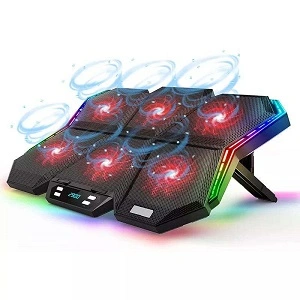
3. Best Cooling Pad for Gaming Laptops – Professional Gaming Cooler
This six-fan gaming cooler supports laptops from 15.6 to 21 inches. Its wider cooling surface makes it suitable for larger gaming notebooks that need additional airflow.
Pros
- Supports large laptops
- Six fans
- RGB lighting
- Suitable for gaming setups
Cons
- Larger footprint
- Not ideal for small laptops
Best For: Gamers using large or 18-inch-class laptops.
4. Best Quiet Laptop Cooling Pad – Coolcold K39
The Coolcold K39 features 10 fans, adjustable legs, RGB lighting, and support for laptops up to 17 inches. It is designed for users who want active airflow while working, studying, or gaming.
Pros
- 10-fan design
- Adjustable legs
- RGB lighting
- Up to 17-inch support
Cons
- Larger multi-fan design
- Actual noise can vary with fan speed
Best For: Users looking for active cooling while keeping fan noise in consideration.
5. Best 17-Inch Laptop Cooling Pad – H9
The H9 is an adjustable six-fan cooler designed for 17-inch notebooks. It also includes two USB ports, making it useful for larger gaming and performance laptops.
Pros
- Six cooling fans
- 17-inch support
- Two USB ports
- Adjustable design
Cons
- Larger footprint
- Less suitable for small laptops
Best For: Owners of 17-inch gaming and performance laptops.
6. Best Portable Laptop Cooling Pad – NUOXI 5-Fan Cooler
The NUOXI cooler combines five fans with a foldable design, RGB lighting, two USB ports, and adjustable functionality. Its portable structure makes it convenient for users who frequently move their laptop setup.
Pros
- Five fans
- Foldable design
- Two USB ports
- RGB lighting
- Portable structure
Cons
- Not ideal for very large laptops
Best For: Students, remote workers, and users who frequently travel with their laptops.
7. Best Laptop Cooling Pad With USB Ports – F12 RGB Cooling Pad
The F12 features six cooling fans, two USB ports, adjustable fan speed, and an ergonomic design. It is a practical option for users who want active cooling and additional connectivity in one stand.
Pros
- Six fans
- Two USB ports
- Adjustable fan speed
- Ergonomic design
Cons
- USB functionality can vary by model
Best For: Users who need extra USB connectivity alongside active cooling.
8. Best RGB Laptop Cooling Pad – Great Roc 4-Fan RGB Cooler
The Great Roc four-fan cooler combines RGB lighting with adjustable height and airflow-focused design. Its smaller fan setup can suit users who want a gaming-style appearance without choosing a larger multi-fan stand.
Pros
- Four fans
- RGB lighting
- Adjustable height
- Gaming-focused design
Cons
- Fewer fans than larger models
- Cooling coverage may be more limited
Best For: Gamers who want RGB lighting and a compact cooling setup.
Do Laptop Cooling Pads Actually Work?
Yes, they can help, but the results depend heavily on the laptop.
A cooling pad can improve airflow around the underside and potentially help the laptop’s internal cooling system operate in a better environment. However, it cannot completely overcome problems such as blocked vents, excessive dust, failing internal fans, or poorly designed thermal hardware. The biggest benefit often comes during sustained workloads. Gaming, rendering, compiling, and other demanding tasks can keep the CPU and GPU under load for long periods. If your laptop frequently reaches high temperatures and begins reducing performance through thermal throttling, additional airflow may be useful.
Does a Cooling Pad Help a Laptop?
A cooling pad can help a laptop by providing additional airflow and raising the device above the desk surface.
Potential benefits include:
- Better airflow underneath the notebook
- More comfortable positioning
- Reduced heat buildup around intake areas
- Potentially less thermal throttling in suitable setups
- Better comfort during long sessions
However, a cooling pad should be viewed as an additional cooling aid rather than a replacement for proper internal maintenance.
Are Laptop Cooling Pads Worth It?
For gaming laptops and systems used for demanding workloads, laptop cooling pads can be worthwhile. They are especially useful when you regularly use the laptop for several hours, notice excessive heat, or want a more ergonomic setup.
For light browsing, email, and document work, an external cooler may not be necessary if the laptop already maintains comfortable temperatures. The value therefore depends on how you use your laptop rather than simply how hot the chassis feels. For shoppers researching technology products, a Best Online Tech Store for Shoppers can also be useful when comparing specifications, features, and different buying options.
Best Laptop Cooling Pads for Different Laptop Types
Best Cooling Pad for Gaming Laptops
Recommended: Havit H2068 Gaming Laptop Cooling Pad
- Active cooling is useful for gaming laptops under sustained workloads.
- Multi-fan designs can provide airflow across a wider area.
- Adjustable stands can improve both cooling and viewing comfort.
Best Laptop Cooling Pad for 14-Inch Laptops
Recommended: BAJEAL N19 LED Light Laptop Cooling Pad
- Compact designs are easier to carry with smaller notebooks.
- Make sure the cooling surface fits the laptop properly.
- A cooling pad 14 inch laptop users can easily transport is ideal for mobile setups.
Best Laptop Cooling Pad for 17-Inch Gaming Laptops
Recommended: Custom 17-Inch 8-Fan Laptop Cooling Pad
- A wider cooling surface can better support large gaming laptops.
- Check that the fans align with the laptop’s intake vents.
- A 17 inch laptop cooling pad should provide stable support without blocking ventilation.
Best Laptop Cooling Pad for Large 18-Inch Laptops
Recommended: X6 Smart Digital Display Cooling Pad
- Large laptops need a cooling stand with sufficient surface area.
- Always compare the supported dimensions with your laptop.
- Models designed for 18-inch-class notebooks generally provide a better fit.
Best Laptop Cooling Pad for Work and Study
Recommended: OULAIKE Aluminum Alloy P22 Laptop Stand & Cooling Pad
- Prioritize stability and comfortable viewing angles.
- Lower fan noise can be more important than maximum fan count.
- A simple, adjustable design works well for long study and office sessions.
For users who spend long hours working with charts, spreadsheets, or multiple applications, the Best Laptop for Trading should also offer good cooling and comfortable positioning.
Common Benefits of Using Laptop Cooling Pads
Helps Improve Airflow
Powered fans can provide additional air movement around the bottom of the laptop.
Can Reduce Surface Temperatures
Additional airflow may help reduce heat around the laptop’s exterior, although results vary between devices.
May Reduce Thermal Throttling
If heat is contributing to throttling, improved airflow may help the laptop sustain performance more consistently.
Improves Typing Comfort
A raised position can create a more comfortable angle for some users.
Provides Better Ergonomics
Adjustable stands can raise the display and improve viewing posture.
Helps During Long Gaming Sessions
Long gaming sessions place sustained demands on laptop hardware, making additional airflow useful for some systems.
Frequently Asked Questions
Do Cooling Pads Work for Laptops?
Yes. They can provide additional airflow underneath a laptop, although their effectiveness varies according to the laptop’s ventilation design and internal cooling system.
Do Laptop Cooling Pads Actually Work?
They can. A cooling pad is most useful when its fans align reasonably well with the laptop’s intake areas and the system is under sustained load.
Does a Cooling Pad Help a Laptop?
It can help by improving airflow and raising the laptop above the desk. It should not be considered a replacement for cleaning or repairing the laptop’s internal cooling system.
Are Laptop Cooling Pads Worth It?
They can be worthwhile for gaming, rendering, programming, and other demanding workloads. For light everyday use, a cooling stand may be more useful for ergonomics than temperature management.
What Is a Laptop Cooling Pad?
It is an external stand containing one or more fans that provides additional airflow beneath a laptop.
How Does a Cooling Pad for Laptop Work?
The fans draw or move air around the underside of the notebook. The raised structure also creates more space between the laptop and the desk.
Do Cooling Pads Work for Gaming Laptops?
They can be particularly useful for gaming laptops because these systems can produce substantial heat during sustained loads. Results vary by laptop design.
Can a Laptop Cooling Pad Damage My Laptop?
A properly designed and compatible cooling stand should not normally damage a laptop. Choose a stable model, avoid forcing the laptop onto an unsuitable surface, and use the correct USB power connection.
Can I Use a Laptop Cooling Pad on a Bed?
It is better to avoid using a laptop on a bed or other soft surface. Fabric can block ventilation openings and restrict airflow. A firm desk or table is a safer surface for cooling.
Which Size Laptop Cooling Pad Should I Buy?
Match the stand to your laptop’s dimensions. Smaller notebooks may work with compact models, while 17-inch and 18-inch systems require larger compatible stands.
The Pro Tech Base online store can also provide technology-related buying resources for readers who want to research different products before making a decision.
Final Thoughts
The best laptop cooling pads depend on your laptop, workload, and daily needs. Gaming laptops and systems used for demanding tasks can benefit from stronger multi-fan cooling, while students, office users, and casual users may prefer a quieter and more comfortable design. Before buying, check the laptop size, vent placement, airflow direction, noise level, and stand stability. Features such as adjustable height, USB ports, and portability can also make a cooling pad more useful depending on your setup.
A cooling pad is not a replacement for proper laptop maintenance, but it can provide additional airflow and improve comfort during long sessions. Choosing a model that matches your laptop can help create a cooler, more stable, and more comfortable setup for gaming, work, and everyday use. For additional technology research and product recommendations, Pro Tech Base online tech store can help readers explore relevant buying resources alongside this guide.


This post was exactly what I needed to read today Your words have provided me with much-needed clarity and reassurance
Your writing is so eloquent and heartfelt It’s impossible not to be moved by your words Thank you for sharing your gift with the world