Today, USB flash drives remain one of the most convenient options for transferring files, backing up data, and moving data between gadgets. There are new options of the USB drives with faster USB connection, large memory capacity, USB C plugs, and slim design to fit into your pocket.
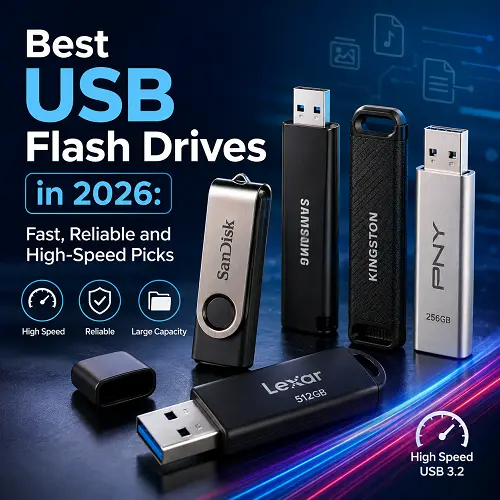
There are many best USB flash drives that are not just an option for storing documents anymore. For example, there are some drives which can work as fast as portable SSD drives or drives with focus on mobility, price, or compatibility with mobile gadgets and laptops. In case you want to compare portable storage with other handy tech, then visit Pro Tech Base online tech store.
What Is a USB Flash Drive?
A USB flash drive is a small and portable storage device that is directly connected to the computer or any device through the USB port. The storage space in a USB flash drive contains flash memory.
Some of the other names for USB flash drives are:
- Pen drives
- Thumb drives
- Memory sticks
- USB sticks
The biggest benefit of a USB flash drive is that it is very portable and unlike the external hard drive, it is usually portable enough to be carried in a pocket.
Common applications are:
- To transfer files between computers
- As a backup of important files
- To carry photos and videos
- For making bootable installation media
- To transfer files between compatible phones and laptops
- To have offline copies of important data
What Is the Fastest USB Flash Drive?
It depends on various factors, like USB type, flash memory inside the flash drive, controller, as well as USB port on the PC.
In order to get the most of USB flash drive, USB 3.2 Gen 2 flash drive is much faster than previous USB 2.0 flash drive. But often advertised speed of any flash drive is different from the actual one.
So, when we compare speed of a flash drive, we should consider the following aspects:
- Maximum read speed
- Maximum write speed
- USB generation
- Results of tests/benchmark
- Large file transfer performance
Fastest USB 3.0 Flash Drive vs Newer USB Flash Drives
USB 3.0 is still popular search term, but in many cases newer flash drives might have other naming like USB 3.2 Gen 1/Gen 2.
Flash drive with USB 3.2 Gen 2 will be much faster than USB 3.0 flash drive if it uses proper port which supports 10Gbps speed.
Kingston DataTraveler Max flash drive shows very good performance and is one of the best USB flash drives at the moment.
How to Choose the Best USB Flash Drives
However, choosing the proper drive involves more than just getting the one with the largest storage. It does not always pay to purchase a drive with the highest capacity possible. There are other factors that may influence how you work with a drive.
Check Read/Write Transfer Speeds
It becomes particularly important when handling large files.
Look for:
- Higher read speeds when accessing and transferring files
- Higher write speeds when writing large files
- USB 3.2 Gen 1 or USB 3.2 Gen 2 technology
- Reputable benchmark tests
High speed may not be necessary if you deal with standard documents. High-speed storage is very beneficial when working with 4K videos, photo libraries or software files.
Select the Appropriate USB Version
There are several versions of USB interface:
- USB 2.0 – good for basic file operations but rather slow
- USB 3.0 / USB 3.2 Gen 1 – good for everyday use
- USB 3.2 Gen 2 – specifically designed for fast operations
Selecting the best drive does not just involve purchasing the largest storage size. Performance, compatibility, connectivity and design should be considered.
Transfer Speed
Read and write speeds should be considered especially when moving large files.
These include:
- Higher reading speeds for file access and copying
- Faster writing speeds when saving large files
- At least USB 3.2 Gen 1 or Gen 2
- Real world benchmark results when available
When transferring simple documents, extremely fast speed may not matter. However, fast storage can make a lot of difference when it comes to 4K videos, photo libraries and software.
Select the USB Version
Most common USB versions are:
- USB 2.0: Good for basic files and slower
- USB 3.0/ USB 3.2 Gen 1: For average performance
- USB 3.2 Gen 2: For fast performance
A USB 3 flash drive is better option than USB 2.0.
It is recommended to buy USB 3 flash drive, rather than old USB 2.0.
Select Between USB-A and USB-C
While USB-A ports are still common in desktops and some older laptops:
- USB-C is more and more common in modern laptops,
- smartphones,
- tablets,
Choose Between USB-A and USB-C
USB-A is widely used in desktops and old laptops.
USB-C is commonly used in:
- Laptops
- Smartphones
- TABLETS
- MacBooks
Double-port drives might come in handy if you are going to exchange files from older USB-A equipped devices and newer USB-C enabled gadgets.
Storage Capacity Choice
Select capacity according to your needs:
- 32 GB – documents and files;
- 64 GB – everyday use;
- 128 GB – photos and routine backups;
- 256 GB – bigger media libraries;
- 512 GB – heavy file storage;
- 1 TB – professional and high storage needs.
Size and Portability
Smaller drives are more portable but may be easier to misplace.
Factors to Consider:
- Portability
- Compactness
- Low profile drives
- Built-in keyring loop
- Covered connectors
Build and Durability
A metal USB flash drive may provide more durable construction compared to simple plastic ones.
Features to Look For:
- Metal or reinforced body
- Special connector protection
- Resistance to water and shocks (if needed)
- Guarantee coverage
Best USB Flash Drives for Fast File Transfers in 2026: Our Top Picks
A fast drive should have more than a modern USB label. Real performance depends on the controller, flash memory, capacity, and your computer’s USB port.
For this guide, the selected products cover different needs:
- Overall performance
- Convenient file transfers
- Budget storage
- Maximum speed
- USB-C compatibility
- Dual connectivity
- Compact designs
- Low-profile use
- Large storage capacity
Kingston DataTraveler Max – Best Overall USB Flash Drive
DataTraveler Max by Kingston is an outstanding option for people who are seeking a drive that has great speeds but still remains a traditional USB Flash drive.
Main features:
- USB 3.2 Gen 2 connection
- Also comes in USB-A and USB-C form factors
- Capacity of up to 1 TB
- Extremely high speeds of reading and writing
- Pocket-sized slider form factor
- 5-year warranty
It is especially convenient for those who transfer large files on a regular basis. It has been recognized as the fastest and most cost-effective choice among other high-speed flash drives by independent reviewers and buyers’ guides of 2026.
Best for: People who are looking for the optimal balance of speed, capacity, size, and reliability.
DM PD060 – Best USB Flash Drive for Fast File Transfers
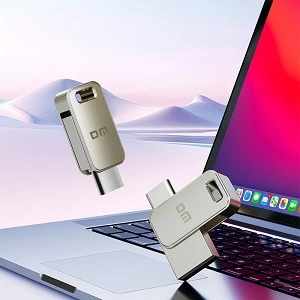
The DM PD060 is a compact USB 3.2 Type-C flash drive designed for portable storage and convenient transfers between compatible devices. This product is available at the Best online Tech store for shoppers.
Key features include:
- USB 3.2 and Type-C interface
- Zinc alloy construction
- Compact and lightweight design
- Portable storage solution
- Custom logo option
- One-year warranty
- Return and replacement service
Its Type-C connectivity makes it useful for modern laptops, computers, smartphones, and other compatible devices.
Best for: Everyday file transfers, portable Type-C storage, business use, promotions, and users who want a compact metal USB stick.
Verbatim PinStripe – Best Budget USB Flash Drive
The Verbatim PinStripe is a simple choice for users who need affordable portable storage without paying for premium performance.
Its advantages include:
- Affordable pricing
- Simple retractable connector design
- Multiple capacity options
- Lightweight construction
- Suitable for everyday documents
This is not designed for demanding professional transfers, but it can be a practical option for students and everyday users. WIRED lists the PinStripe among its current budget recommendations.
Best for: Students, documents, presentations, and affordable everyday storage.
SanDisk Extreme Pro – Fastest USB 3 Flash Drive
The SanDisk Extreme Pro is one of the best choices for users looking for high performance through a USB-A connection.
Important specifications include:
- USB 3.2 Gen 1 Type-A
- Capacities from 128GB to 1TB
- Up to 420 MB/s read speed
- Up to 380 MB/s write speed
- Aluminum construction
- Limited lifetime warranty
The device offers superior performance compared to conventional USB devices and can be used for transferring large files. Tests have shown that its actual performance corresponds to its technical specifications.
Recommendations: The product is recommended for those who need the fastest USB 3.0 flash drive with high read/write performance.
Samsung Type-C Flash Drive – Best USB-C Flash Drive
The Samsung Type-C Flash Drive is intended for contemporary devices with USB-C ports.
Its main features are:
- USB-C connector
- USB 3.2 Gen 1 interface
- Upto 400 MB/s read speed
- Convenient size
- Durable in terms of environment
- Variety of capacities
This flash drive will be extremely convenient for those who use mainly laptops, tablets, and phones.
Most suitable for: Contemporary USB-C laptops, smartphones, tablets, and general purposes.
SanDisk Ultra Dual Drive Luxe – Best Dual USB-C Flash Drive
The SanDisk Ultra Dual Drive Luxe combines USB-C and USB-A connectivity in one compact device.
Key benefits:
- USB-C connector
- USB-A connector
- Metal swivel design
- Useful for transferring files between old and new devices
- Available in high capacities
This dual-interface design removes the need for carrying separate adapters.
Best for: Users who regularly move files between USB-A computers and USB-C devices.
Patriot Supersonic Rage Prime – Best Compact USB Flash Drive
The Patriot Supersonic Rage Prime is characterized by its relatively small size and excellent performance.
Product characteristics:
- USB 3.2 Gen 2 Type-A
- Memory capacity up to 1 TB
- Small sliding case design
- Up to 600 MB/s claimed speed
- 5-year warranty
The product has proven to be very fast in reading and writing files, therefore it surpasses many other common compact USB flash drives.
Useful for: People who are looking for portable small-sized storage with decent speed.
SanDisk Ultra Fit – Best Low-Profile USB Flash Drive
The SanDisk Ultra Fit drive is made in such a way as to be near the USB port; it makes it handy for permanent use in the laptop.
Pros are as follows:
- It is very tiny in size
- Low profile
- Easy to leave plugged
- It is great to extend storage of the laptop
- Capacities are various
It is not protruding too much as usual drives because of its size.
Good for: People using laptops and needing extra storage left plugged.
Buffalo SSD-PUT – Best High-Capacity USB Flash Drive
Buffalo SSD-PUT is a product meant for people requiring much more portable storage capacity than that offered by normal flash drives.
Features include:
- Capacity of up to 2TB
- USB 3.2 Gen 2 interface
- USB-A connection
- USB-C adapter
- Warranty period of three years
This device is one of the best options for people requiring very high capacity of portable storage.
Suitable for: Big video files, professional backup purposes, and 2TB of portable storage requirement.
USB 2.0 vs USB 3.0 vs USB 3.2 Flash Drives
USB 2.0 Flash Drives
USB 2.0 Flash Drives are appropriate for:
- Documents
- Small photos
- Basement backups
They are slower and not ideal for regular large file transfers.
USB 3.0 Flash Drives
USB 3.0 is much faster compared to USB 2.0.
It is appropriate for:
- Large documents
- Photos
- Videos
- Routine backups
The name USB 3.0 is often searched despite the change in naming conventions regarding USBs through time.
USB 3.2 Flash Drives
USB 3.2 flash drives may provide high-speed performance based on the generation.
Ensure that the product is:
- USB 3.2 Gen 1
- USB 3.2 Gen 2
Gen 2 USB 3.2 flash drives have higher theoretical speed but your computer should have a compatible port.
USB-A vs USB-C Flash Drives
USB-A Flash Drives
USB-A drives work with:
- Traditional laptops
- Desktop computers
- Older devices
They remain highly compatible but may require an adapter for USB-C-only devices.
USB-C Flash Drives
USB-C drives are ideal for newer hardware.
They work particularly well with:
- Modern laptops
- Smartphones
- Tablets
- USB-C desktops
Dual USB-A and USB-C Flash Drives
Dual drives provide both connector types.
They are useful when:
- Moving files between old and new computers
- Transferring files from phones to PCs
- Avoiding separate adapters
Low-Profile vs Regular USB Flash Drives
Low-Profile USB Flash Drive
A low-profile drive sits close to the device.
Advantages:
- Less likely to get bumped
- Suitable for leaving connected
- Minimal space required
Low-Profile USB-C Flash Drive
Low-profile USB-C drives offer similar benefits but are designed for modern ports.
Potential disadvantages include:
- Small size makes them easier to lose
- Some compact models may become warm
- Capacity and speed can vary significantly
What Storage Capacity Do You Need?
32GB and 64GB
Suitable for:
- Documents
- School files
- Presentations
- Basic photo storage
128GB and 256GB
A good balance for:
- Photos
- Videos
- Regular backups
- Larger applications
512GB and 1TB
Better for:
- Large video libraries
- Professional projects
- Extensive backups
- Large media collections
Are Metal USB Flash Drives Worth It?
A metal USB flash drive can be worth considering if durability is important.
Advantages include:
- Stronger construction
- Premium appearance
- Better resistance to everyday wear
However, metal construction does not automatically mean better storage performance.
When choosing a drive, consider:
- Actual read/write speeds
- Warranty
- Capacity
- Connector compatibility
- Build quality
A durable design is useful, but performance should still match your workload.
USB Flash Drive vs External SSD
While there are similarities between USB flash drives and external SSDs, the two types of technology have various applications.
Portability
A USB flash drive is more compact than an external SSD and is more likely to fit into your pocket. The external SSD is portable as well; however, it may be bigger and require cables.
Speed
There are USB flash drives that boast high-speed transfers, including the newer generation of USB 3.2 flash drives. On the other hand, the external SSDs will offer higher speeds and reliability in terms of transferring large files and working on demanding files.
Storage Capacity
It is possible to find different kinds of flash drives with different storage capacities, which is why they will suit regular file transfers or back up of your information. On the other hand, external SSDs are more suitable for users with large storage requirements for professional and video content.
Price
USB flash drives will cost less compared to the external SSDs, especially those with small storage capacity.
Which One Should You Choose?
Choose a USB flash drive if you need:
- Maximum portability
- Quick file transfers
- Small and lightweight storage
- Everyday documents and media files
- An affordable portable storage solution
Choose an external SSD if you need:
- Faster and more consistent performance
- Professional workloads
- Very large file transfers
- Video editing or large media projects
- Frequent heavy data transfers
For more powerful portable storage options, you can also read our guide to Best External SSDs for Laptops.
If you are comparing storage products with other technology for work and travel, Best Portable Monitors for Laptops is another useful guide to explore.
How We Selected These USB Flash Drives
Transfer Speed
We considered:
- USB generation
- Read speed
- Write speed
- Real-world performance reports
Reliability
Preference was given to products from established manufacturers with warranties and strong long-term reputations.
Storage Capacity
The list covers different requirements, from basic document storage to multi-terabyte portable storage.
Compatibility
Both USB-A and USB-C users are represented.
Build Quality
We considered:
- Metal construction
- Protective designs
- Compactness
- Durability
Value for Money
The most expensive drive is not always the best option. The recommendations cover different budgets and use cases.
Frequently Asked Questions
Which USB flash drive is the fastest?
One of the quickest flash drives on the market today is the Kingston DataTraveler Max, which provides almost SSD-level transfer speeds.
Is USB 3.0 faster than USB 2.0?
Yes. The USB 3.0 and later USB versions offer much faster transfer speeds compared to USB 2.0.
What Is the Best USB Flash Drives Size?
For most users, 128GB or 256GB provides a good balance between capacity and price.
Are USB-C flash drives faster?
Not necessarily. What determines speed is not only the connector but the USB version and internal hardware as well.
Can I use a USB flash drive for data backup?
Yes. Flash drives can be very helpful in storing backup copies of important documents and small numbers of files.
What is the difference between a flash drive and USB drive?
The two words are often used synonymously. The USB flash drive uses flash memory technology and has a USB interface.
Final Thoughts
However, understanding how the flash drive will be used is important for determining which of the Best USB Flash Drives best suits your needs. For people who are concerned about the speed of the drive, Kingston DataTraveler Max and SanDisk Extreme Pro are great options, whereas for budget users Verbatim PinStripe will be the best option.
For people using USB Type-C gadgets, the Samsung Type-C Flash Drive is an excellent gadget. If capacity is the primary requirement, Buffalo SSD-PUT will be the best while for people having laptops with small ports, the SanDisk Ultra Fit is the best choice. From comparing storage devices to looking for technology for office, travel, and everyday use, Pro Tech Base online store offers a convenient platform to compare different products.