Video conferencing has become part of life at work, learning, interviewing, and even general interaction. With an inferior camera, even the best online meeting may not be professional enough. The quality of images captured by the camera as well as lighting and audio may make it hard for other people to listen and see you. Choosing the Best Webcams for Online Meetings is sure to give you better images and professional experience.
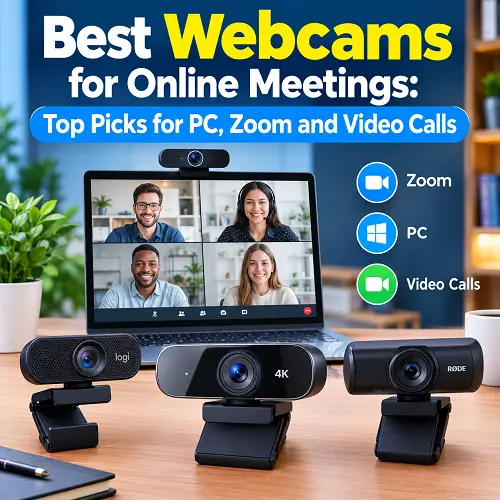
The use of a dedicated webcam is better than the default webcam available in most computer or laptop models. It doesn’t matter whether you use Zoom, Microsoft Teams, Google Meet, or any other video conference platform; you will benefit significantly.
What Is a Web Camera and How Does It Work?
What Is a Web Camera?
The web camera is a small camera that is intended to record videos to send to a computer. Nowadays most webcams can be connected through the USB and work with popular video calling software.
A quality webcam will allow you to have better image quality, better colors, and a bigger range of vision compared to the average built-in camera. Also, many of such devices come with a built-in microphone that allows to use it for conferences and video calling.
Web Camera vs Built-In Laptop Camera
It is very handy to have a camera integrated into a laptop but sometimes it is limited in terms of quality. Using a webcam will give you more options to use it since you are free to position it as needed.
For instance, when setting up your professional space, a quality camera can work well with the Best Monitor Arms for Home Offices to have a neat desktop space.
How to Choose the Best Web Camera for PC
When choosing a webcam, take into account the way and places of its intended use. Not necessarily the most expensive product will be needed, and the right set of functions depends on the needs of each person.
Video Resolution and Image Quality
Resolution is responsible for the picture quality of your videos. It is recommended to start with Full HD 1080p resolution as a basic option for online chats, providing a good picture without too high requirements for bandwidth. The use of more advanced cameras, like 4K ones, is possible, however, such webcams may be quite costly.
Auto-Focusing and AI Auto-Framing
The function of auto-focusing is responsible for keeping the image sharp when you are moving slightly during a call. Some modern webcams also feature the ability to automatically center a person in the frame. Such a feature will be useful for those users who move during calls or presentations.
Low-Light Performance
Proper lighting is important, however, sometimes even an excellent webcam can help you overcome low lighting. In case you regularly participate in conferences in different locations, choose a webcam with good lighting capabilities.
Built-In Microphone Quality
The best thing about a webcam that comes with an inbuilt microphone is that you don’t have to buy any other equipment for normal meetings. However, not all microphones in webcams are of the same quality.
In case you frequently record videos or hold live classes over the internet or attend professional conference calls, you will find one of the Best USB Microphones for PC more convenient than the webcam microphone.
Field of View
The field of view shows what kind of space the camera captures. A normal field of view is sufficient enough if only one person needs to be on the camera while seated at a desk. If two people should be seen on the camera, or you wish to show your workstation, then having a bigger field of view will be more useful.
USB Connectivity and Compatibility
USB webcams are easy to use because they come with USB connectivity and usually work with a Windows PC and laptop. In case your laptop has fewer USB slots, you could use the webcam along with one of the Best USB-C Hubs for Laptops.
Best Webcams for Online Meetings
Choosing the Best Webcams for Video Meetings depends on the requirements that one has in his or her webcam. For example, a person who simply takes part in meetings does not require the same specifications as a professional that takes videos of their presentations. The following webcams cater for varying needs.
Best Web Camera for Online Meetings – Logitech Brio 100
Logitech Brio 100 is a practical choice for individuals looking to make a straightforward improvement to the built-in laptop camera. The Full HD resolution of the device is sufficient for typical use cases, and its small form factor can be easily placed on a conventional computer screen or laptop.
The device is designed to be used for general video calls instead of advanced productions. It means that it is appropriate for individuals seeking a hassle-free solution without extra expenses on unused functionality.
Key benefits:
- Full HD 1080p video
- USB connection for easy setup
- Compact design for desks and monitors
- Suitable for common video meeting platforms
- Good option for everyday video calls
Best for: Remote workers, students, and home users who need dependable video for regular meetings and calls.
Best 4K Web Camera for Professional Meetings – Logitech Brio 4K
Logitech Brio 4K is intended for those users that prefer high quality and better resolution. The 4K resolution provides the camera with more clarity making it perfect for use in professional conferences, presentations, and other places where your camera quality matters a lot.
Moreover, higher resolution may come in handy for content creators that will need the same camera for both meetings and video creation. Though, for some people, 4K resolution is not obligatory because of their usage..
Key benefits:
- 4K video resolution
- High level of image detail
- Suitable for professional video communication
- Useful for presentations and content creation
- More suitable for users who prioritize video quality
Best for: Professionals, presenters, business users, and creators who want sharper video than a standard 1080p webcam.
Best Budget Web Camera for PC – 1080p USB Webcam With Microphone
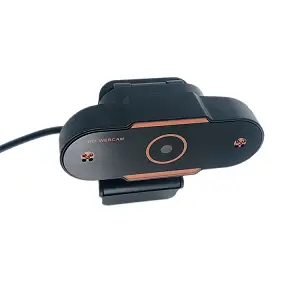
For consumers who are looking for an inexpensive Web Camera for PC, the Web Cam 1080p Usb Camera Video Web Camera Webcam With Microphone for Pc Computer is a simple choice. It concentrates on the basics for the task at hand without having to include unnecessary advanced capabilities that would increase costs.
The camera has 1920×1080 Full HD resolution and CMOS image sensor. The camera has a built-in microphone, making it possible for basic audio and video functionality from a single USB port.
Key features:
- 1920×1080 Full HD video
- CMOS image sensor
- USB connectivity
- Built-in microphone
- PC and laptop compatibility
- Suitable for online meetings and video calls
- Compact design for convenient desktop placement
Best for: Students, home users, and people who need an affordable camera for meetings, online classes, video calls, and everyday computer communication. Best Online Tech Store for Shoppers offers this product for users looking for reliable tech accessories, and you can find it through the Pro Tech Base online tech store.
Best Web Camera for Zoom Meetings – Logitech C920s Pro HD
The Logitech C920s Pro HD is a great option for those who frequently make use of Zoom and other online meeting platforms. With its 1080p resolution, it ensures good picture clarity in usual meetings without being too expensive and demanding like a 4K camera.
Webcams like this one prove to be really beneficial for telecommuters who devote the majority of their workday to making video calls.
Key benefits:
- Full HD 1080p video
- Suitable for Zoom and other meeting platforms
- USB connectivity
- Designed for regular video communication
- Good fit for home and office workstations
Best for: Remote employees, freelancers, teachers, and business users who frequently join Zoom meetings.
Best Camera and Microphone for PC – Logitech MX Brio
The Logitech MX Brio is specifically made for people who need something more sophisticated than just a webcam for their meetings, calls, and other kinds of content creation. This kind of webcam will provide great video together with a microphone integrated into the webcam.
When compared to regular webcams, such a webcam would be more appropriate for people who are concerned about video quality and don’t want to use two devices for their communication and content creation.
Key benefits:
- High-resolution video
- Built-in microphone
- Suitable for professional meetings
- Useful for content creation
- Works as an all-in-one video and audio solution
Best for: Professionals, creators, streamers, and users who want a more capable webcam for both communication and content production.
Best Web Cameras for Different Needs
Everyone has their unique reason to have a webcam. For instance, a remote worker would be interested in the video reliability when working during meetings, whereas a student would be interested in getting a simple camera for the online classes. Gamers and content creators require better picture quality and control. Also, Best Webcams for Online Meetings will depend on your particular needs and preferences, computer equipment used, among other factors.
Best Web Camera for Remote Work – AnkerWork C200
The AnkerWork C200 is a practical choice for people who spend a lot of time in online meetings. Its compact design makes it easy to place on a monitor or desk without taking up much space.
- Suitable for remote workers and home offices
- Good choice for regular video meetings and team calls
- Easy to use with a computer setup
- Useful for professionals who attend frequent online meetings
- A practical option when you want a dedicated camera instead of relying on a laptop camera
For remote work, the camera should be simple, dependable, and easy to position. The AnkerWork C200 fits well into a typical home-office setup without making the setup complicated.
Best Web Camera for Online Classes – Logitech C270
The Logitech C270 is a straightforward option for students and teachers who need a camera for online learning. It is designed for everyday video communication rather than complicated setups.
- Suitable for online classes and virtual lessons
- Simple USB connection
- Compact and easy to place
- Useful for students, teachers, and home users
- Good choice for video discussions and online lectures
If your main requirement is attending classes and communicating with teachers or classmates, a simple webcam can be more useful than paying for advanced features you may never use.
Best Gaming Camera for PC – Razer Kiyo Pro
The Razer Kiyo Pro is aimed at gamers and creators who want a camera that can also handle streaming and online communication. It is a stronger choice for users who want their camera to be part of a gaming setup.
- Designed for gaming and streaming setups
- Suitable for gamers and content creators
- Useful for live communication and video content
- Works well as a dedicated camera for a desktop gaming setup
- A good option for users who want more than a basic webcam
A Gaming Camera for PC should provide a clear image while fitting naturally into the rest of the gaming setup. The Razer Kiyo Pro is better suited to users who regularly stream, record, or communicate while gaming.
Best Web Camera for Streaming – Elgato Facecam
The Elgato Facecam is a strong option for streamers and creators who want to give more attention to their on-camera appearance. It is designed with content creation in mind rather than only basic video calls.
- Suitable for live streaming and video creation
- Designed for creators and streamers
- Useful for desktop recording setups
- A good choice for users who want more control over their camera setup
- Fits well with dedicated streaming equipment
For streaming, the camera is an important part of the overall presentation. A dedicated webcam such as the Elgato Facecam can be a better fit for creators who spend a lot of time in front of the camera.
Best Web Camera for Video Calls – Logitech Brio 300
The Logitech Brio 300 is a convenient choice for everyday video calls. Its compact design makes it suitable for people who want a dedicated webcam without adding a large device to their desk.
- Suitable for everyday video calls
- Compact design for home and office desks
- USB connectivity for simple setup
- Useful for personal and professional communication
- Good choice for users who regularly use video calling platforms
If you mainly make video calls with family, friends, clients, or coworkers, you do not necessarily need a high-end camera. A simple and reliable webcam can provide everything you need for regular communication.
The Pro Tech Base online store can also help you compare different computer accessories and find a webcam that matches your everyday communication needs.
How to Connect a Camera to PC
Most USB webcams are simple to install.
How to Connect Camera to PC as Webcam
Connect the webcam to an available USB port on your computer. Modern operating systems can often detect the device automatically. After connecting it, open your video application and select the webcam from the camera settings.
How to Set Up a USB Web Camera
Follow these basic steps:
- Connect the webcam to the computer.
- Wait for the system to recognize the device.
- Open Zoom, Teams, Meet, or another video application.
- Open the camera settings.
- Select your connected webcam.
- Check the video and microphone before joining a meeting.
How to Test Your Web Camera Before an Online Meeting
Always test your camera before an important call. Check the image, lighting, camera position, and microphone. A quick test can help you discover problems before the meeting starts.
Tips for Better Webcam Quality During Online Meetings
Improve Your Lighting
Place a light in front of you instead of directly behind you. Natural light from a window can also help, but avoid sitting with a bright window behind your head.
Position Your Web Camera Correctly
Try to keep the camera close to eye level. This creates a more natural angle and makes it easier to maintain eye contact during a call.
Use a Clean and Professional Background
A simple background helps keep attention on you. Remove unnecessary items from the visible area before an important meeting.
Check Your Microphone Before the Meeting
Make sure your microphone is selected correctly and your voice can be heard clearly. If the webcam microphone is not good enough, consider using a separate microphone.
Test Your Camera Before Zoom or Teams Calls
Open your meeting application a few minutes early and check your video. This gives you time to fix camera, microphone, or lighting problems.
Frequently Asked Questions About Web Cameras
Do I Need a Web Camera for Online Meetings?
Should you choose to invest in a dedicated webcam if there isn’t a good built-in camera on your computer, it is likely to be beneficial in terms of image position and quality when it comes to meetings and video calls.
Do I Have a Built-In Webcam on My Computer?
Desktop computers lack a built-in camera except for cases when there is such a camera on the screen. The majority of laptops have cameras positioned right above the screen.
Is Web Camera Better than Built-In Camera?
In terms of positioning and high resolution, a dedicated webcam will definitely work better. Though, in some cases, a built-in camera might suffice.
What are the Best Webcams for Online Meetings?
The Best Webcams for Online Meetings will greatly depend on your preferences and budget as well. In general, you should try to get a 1080p USB webcam which will offer you high-quality video and a built-in microphone.
What Is the Best Web Camera for Zoom Meetings?
A quality 1080p webcam with quality video output and microphone would be sufficient for most Zoom meetings; more experienced users may use the 4K webcam.
What is the Best Web Camera for PC?
It depends on the budget and purpose of the purchase. It is recommended to buy 1080p USB web cameras for ordinary PC users.
Do Web Cameras have Microphone Built In?
Most modern webcams come equipped with a built-in microphone which lets you do video and audio work all at once.
Can I use Web Camera for Online Class?
Yes. A USB web camera may be used for online class, lecture, presentation and discussion.
How do I connect my Camera to PC as Web Camera?
Just connect your camera via USB, let your computer detect it and pick it up as your webcam in your video program.
Final Thoughts
There is no need to pay much money on a good webcam because for most users it is sufficient to get an affordable 1080p model with USB connectivity. The Best Webcams for Online Meetings are not necessarily those which are very expensive, but rather those which provide an optimal combination of image quality, features and usability. Before buying a camera consider its features that are necessary for you, such as resolution, microphone, field of view, connection and compatibility with your computer.
But, most importantly, try to pick up a camera which will fit your conditions and will provide good quality images without complicating installation procedure. With proper camera and correct lighting you can greatly improve the appearance of your meetings online.